AI agent for business coachs
Client Progress Report Agent
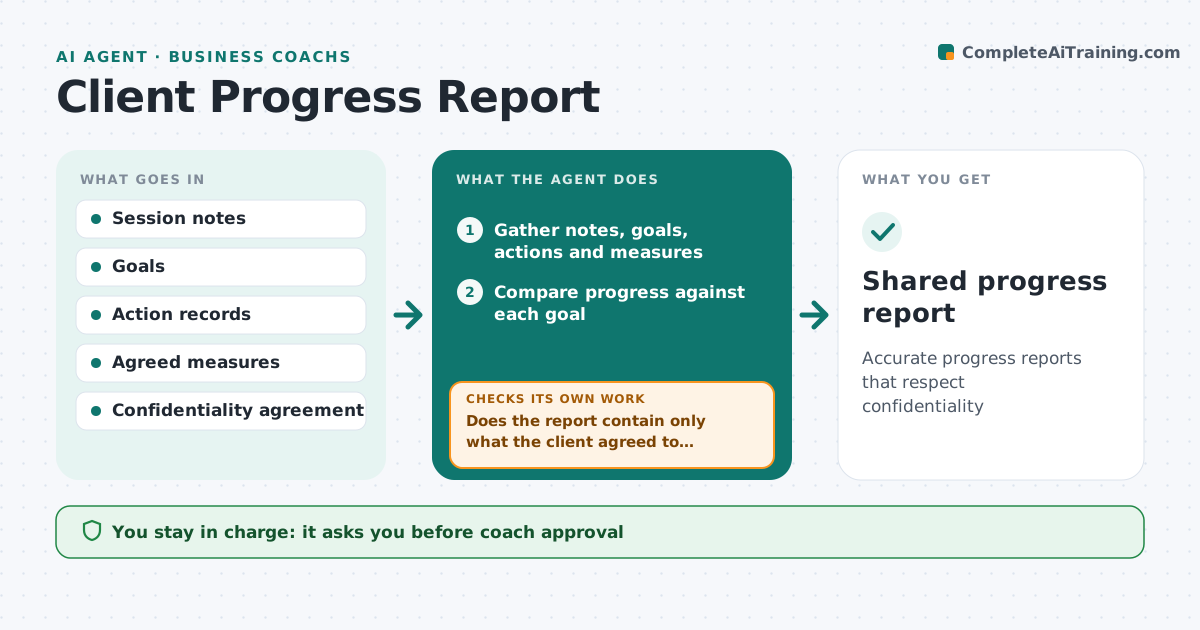
Accurate progress reports that respect confidentiality
What it does
Coaching engagements often need progress reports at set points for the client or the company paying, and they take hours to write from memory. This agent gathers session notes, goal ratings, action completion and measures agreed at the start, such as 360 scores or business results. It compares progress against each goal. A goal changed during the engagement is shown with the reason. It drafts the report, then checks it against what the client agreed can be shared with the sponsor. If anything falls outside that agreement, it removes it and checks again. The coach edits and approves, and the client sees it before the sponsor does.
How it works
Follow the arrows from top to bottom. The orange dashed arrow is the loop: when a check fails, the agent goes back and tries again.
Read the steps as a list
- Report due
- Gather notes, goals, actions and measures
- Compare progress against each goal
- Note any goal changes with reasons
- Draft report
- Does the report contain only what the client agreed to share?If not: remove the extra content and redraft. Back to step 5.
- Coach approves the reportThe agent waits here for your OK.
- Client reviews before the sponsor sees itThe agent waits here for your OK.
- Shared progress report
How it decides
It reports progress against each goal using agreed measures and includes only content the client agreed to share.
- Client sees the report before the sponsor
- Changed goals show the reason
- Agreed measures only
Make it yours
Every agent is a starting point. You choose these settings for your own situation.
- Report points
- Template
- Measures
- Sharing rules
What keeps you in control
It always asks you first
- Coach approval
- Client approval before sponsor
Hard limits
- Never sends to sponsors without client approval
It stops when
- Done: report shared
- Stop: client declines to share
Set it up
We guide you through the set-up, step by step
Members get the full set-up guide for this agent. No technical skills needed: you copy, paste and upload.
- One set of instructions to paste into your AI, with the clicks for ChatGPT, Claude, Microsoft 365 Copilot, Gemini and Grok
- The agent then walks you through connecting your own data, one source at a time
- A downloadable copy with the flow chart, the rules and the full guide