
Learning path
Learning AI as a Personal Trainer
This path helps personal trainers use AI for client assessments, workout plans, cueing, progress reviews, and admin. It includes setup, connecting your AI, job skills, this prompt course, and video courses with certifications.

Your path
Everything in the Personal Trainer AI kit, in the order that makes sense. Members tick off each step and see their progress.
Set up your AI
We guide you through each click.
Let skills do your everyday tasks
Connect your apps and pick your AI apps
Hand whole tasks to AI agents
Build your own tools
Keep growing
Everything for personal trainers
All the courses, certifications, AI tools, MCP servers and apps for personal trainers, most relevant first. Open any list to see more.
Take the prompt courses
A short framework course to learn how to ask, then 9 lessons with ready-to-use prompts for personal trainers.
Start with this framework: how to talk to AI
This framework helps you write ads and emails that fill your six-week strength program by guiding clients from problem to action.
Then your prompt course for personal trainers- 1Client Assessment And Goals3 prompts
- 2Workout Plan Drafting3 prompts
- 3Exercise Cueing And Demos2 prompts
- 4Form Correction From Descriptions3 prompts
- 5Progress Tracking And Adjustments3 prompts
- 6Motivation And Adherence2 prompts
- 7Nutrition Basics Education2 prompts
- 8Adapting Plans To Real Life3 prompts
- 9Client Admin And Communication3 prompts
Watch the video courses or add them to your Favorites for later
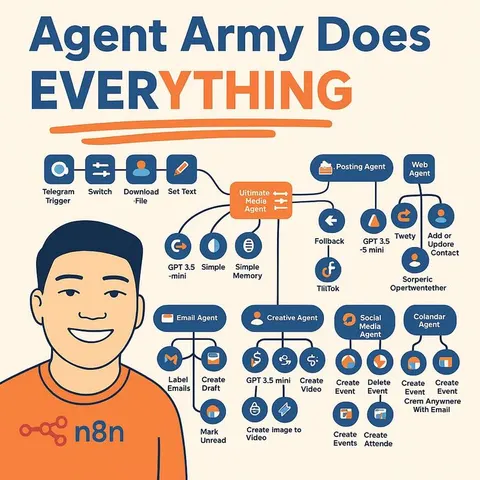
112 video courses our AI picked for personal trainers, most useful first. Save the ones you want to watch later with the heart.
Favorites are saved to your account: sign in or get your AI kit first.
Show all 112 video courses
Get certified, or add certifications to your Favorites
Every course ends in an exam and a certificate you can add to LinkedIn. Save the certifications you are aiming for with the heart.
Favorites are saved to your account: sign in or get your AI kit first.
More certifications for personal trainersShow all 24 certifications
Try the AI tools for personal trainers
8 AI tools our AI matched to the work of personal trainers, best fit first. Each review shows what it does, its alternatives and the jobs it suits.
Favorites are saved to your account: sign in or get your AI kit first.
Show all 8 AI tools
Connect your AI to the apps personal trainers use
MCP servers let ChatGPT, Claude or Copilot look things up and get work done in other apps, like your email, calendar or bookkeeping software. These 12 fit the work of personal trainers best, well-known apps first.

Nutrients MCP server
by ericblair1903Your AI can look up calories, macros, vitamins, minerals and allergens for any food, from a photo or a description.

macalc Calculator MCP server
by tresor4kLets your AI run everyday calculators: taxes, salary, mortgage, BMI, conversions and more.
Finance and cryptoNo install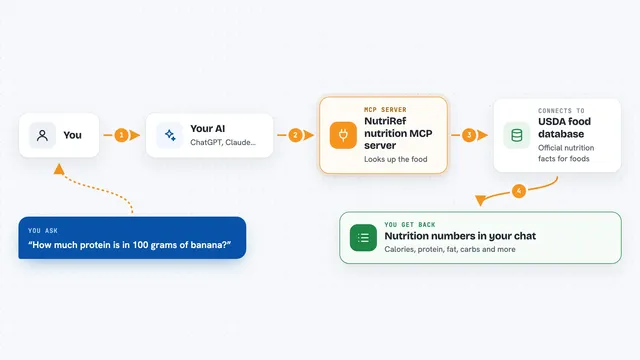
NutriRef nutrition MCP server
by YounghefLook up USDA nutrition facts, compare foods, and build recipes with your AI, paying a tiny amount per request.

Temporal Cortex MCP server
by temporal-cortexLet your AI check calendars, find free slots, and book meetings without double-booking.
ProductivityMeetingsNo install
Instagram MCP server
by drashrafsaiyed-cyberLets your AI post to Instagram, read your stats, manage comments and reply to DMs for you.
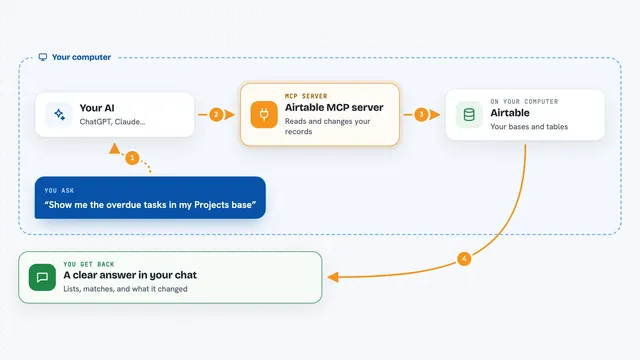
Airtable MCP server
by domdomeggLets your AI read, search, add, update and delete records in your Airtable bases for you.
Show all 12 MCP servers

Google Forms MCP server
by A1-x-TechLet your AI build Google Forms, add questions, publish them, and read the answers for you.

CallChatSyn MCP server
by oneappsworldLet your AI answer customer questions from your business FAQs and book appointments for you.
Customer communication Official
Meet.bot MCP server
by poolside-venturesLet your AI check your Meet.bot calendar availability and book meetings for you.
ProductivityMeetings Official
OpenNutrition MCP server
by deadletterqLets your AI look up foods, nutrition facts and barcodes from a local food database.

Hindsight MCP server
by vectorize-ioGive your AI a long-term memory so it remembers facts and past chats and answers with that context.
NotesNo install
Google Calendar MCP server
by takumi0706Lets your AI read, create, change, and delete events in your Google Calendar for you.































































































About this learning path
6 topicsA Practical AI Path For Personal Trainers
You do not need to be technical to use AI well in your training business. This path starts with simple setup questions, then shows you how to connect your AI and use it for the real tasks you handle each week.
Step by step, you will learn prompts for assessments, workout plans, cueing, progress reviews, motivation, and client messages. You will also find video courses chosen for personal trainers, with certifications that show you finished the work.
Why AI Matters For Trainers Now
Clients want clear plans, quick answers, and steady support. At the same time, trainers lose hours to notes, messages, and program changes. AI can help you draft that work faster while you keep the coaching judgment that only you can provide.
Used well, AI becomes a quiet assistant. It helps you start with a solid draft, then you shape it around the person in front of you.
What The Path Includes
The path begins with setup questions so your AI tools fit your work. You will connect your AI, learn skills for the job inside your AI, and take this prompt course for personal trainers.
You also get video courses picked for your role, along with the certifications of those courses. Everything is built around the tasks you already do: assessing clients, planning workouts, cueing exercises, tracking progress, and handling admin.
How It Saves You Time
You can turn intake notes into a clear assessment, draft a safe workout plan, and create progress reviews without starting from a blank page. Client check-ins, schedule changes, and policy reminders can be written in minutes, then reviewed by you.
The time you save goes back into coaching, rest, or your own life. You still approve every plan and message before a client sees it.
How It Protects Your Career
AI does not replace the trust you build with clients. It helps you stay organized, respond faster, and show up with better questions. Your eye for form, safety, and motivation remains the core of the job.
The path also points you to certifications that keep your skills current. That mix of human coaching and practical AI use makes you more valuable, not less.
How To Start This Week
Pick one task that takes too long, such as writing a workout plan or a progress review. Complete the setup questions, connect your AI, and run one prompt from the course. Then watch one short video lesson and try it with a real client.
Small steps build confidence. By the end of the week, you will have a repeatable way to use AI without adding more to your plate.
Frequently asked questions
Do I need to be good with technology?
No. The path starts with setup questions and plain steps. You learn by doing one task at a time, with prompts you can copy and adjust.Will AI write unsafe workouts?
AI can draft ideas, but you check injuries, form, and client limits. You stay responsible for safety and make the final call on every plan.How do the video courses fit in?
They show job skills in action and come with certifications. They sit beside the prompt course so you can watch, practice, and apply what you learn.Can this help with client admin?
Yes. You can draft scheduling notes, policy reminders, and check-ins. You still read and approve every message before it goes out.