AI agent for clinical data managers
Clinical Data Query Resolution Agent
Data queries resolved quickly and correctly so the database can lock on time
What it does
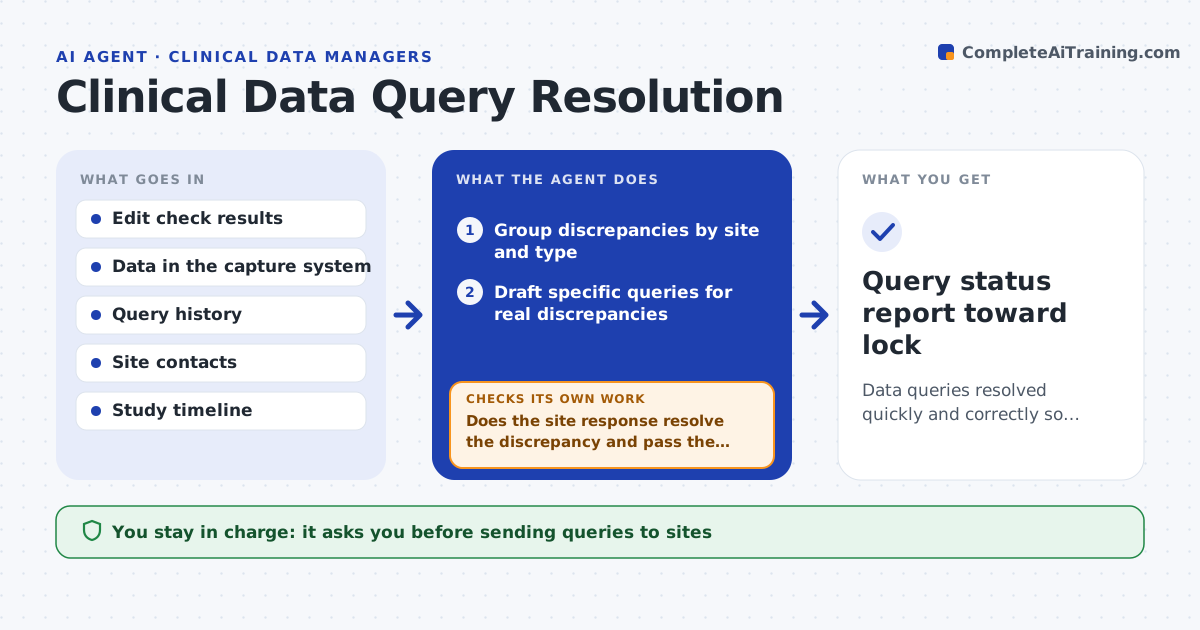
In clinical trials, data problems become queries to sites, and open queries delay database lock. This agent reviews new discrepancies from the edit checks, groups them by site and type, and drafts clear, specific queries so each site knows exactly what to fix. It first screens out values that are correct but unusual and routes those for a monitor note instead. It tracks each query's age and drafts reminders for overdue ones. When a site responds, it checks whether the data now passes the edit check. If not, it reopens the query and says what is still wrong. It reports query status against the lock date. You approve queries going to sites and closing them. Edge case: a protocol amendment that changes a valid range makes the agent recheck open queries against the new range.
How it works
Follow the arrows from top to bottom. The orange dashed arrow is the loop: when a check fails, the agent goes back and tries again.
Read the steps as a list
- Edit checks flag discrepancies
- Group discrepancies by site and type
- Draft specific queries for real discrepancies
- Data manager approves queries to sitesThe agent waits here for your OK.
- Send queries and track age, chasing overdue ones
- Does the site response resolve the discrepancy and pass the check?If not: reopen the query stating what is still wrong. Back to step 5.
- Data manager approves closing resolved queriesThe agent waits here for your OK.
- Query status report toward lock
How it decides
It opens a query only for a true discrepancy and closes one only when the response resolves it and the edit check passes.
- Open queries only for true discrepancies
- Route correct unusual values for a monitor note
- Close only when the edit check passes
Make it yours
Every agent is a starting point. You choose these settings for your own situation.
- Query templates by discrepancy type
- Overdue reminder schedule
- Edit checks in scope
- Lock date and milestones
What keeps you in control
It always asks you first
- Sending queries to sites
- Closing queries
Hard limits
- Never edits trial data itself
- No query sent or closed without approval
It stops when
- Done: queries resolved or clearly tracked
- Stop: edit check definitions are missing
Set it up
We guide you through the set-up, step by step
Members get the full set-up guide for this agent. No technical skills needed: you copy, paste and upload.
- One set of instructions to paste into your AI, with the clicks for ChatGPT, Claude, Microsoft 365 Copilot, Gemini and Grok
- The agent then walks you through connecting your own data, one source at a time
- A downloadable copy with the flow chart, the rules and the full guide