AI agent for clinical data managers
Clinical External Data Reconciliation Agent
Vendor and lab data reconciled with the study database on every transfer
What it does
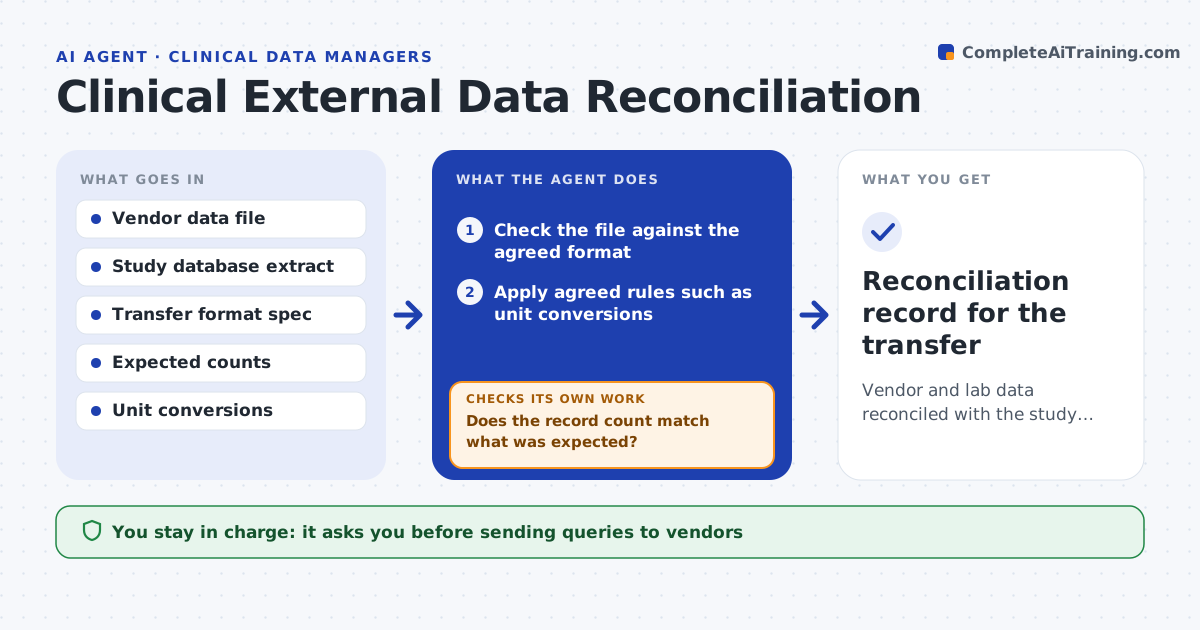
Trials receive data from central labs and imaging vendors that must agree with the study database, and mismatches found late can delay lock. On each transfer this agent first checks the vendor file against the agreed format and expected record counts. Then it compares key fields with the study data: subject, visit, test and result. It applies agreed rules, such as unit conversions, before calling anything a mismatch. Where records still do not match, it classifies the cause, such as a missing visit, a unit difference or a subject not yet entered, and drafts a query to the vendor or the study team. It will not mark a transfer reconciled until every mismatch is explained or resolved. You approve vendor queries and sign-off. Edge case: a correctly converted result in different units is matched, not flagged.
How it works
Follow the arrows from top to bottom. The orange dashed arrow is the loop: when a check fails, the agent goes back and tries again.
Read the steps as a list
- External data file received
- Check the file against the agreed format
- Does the record count match what was expected?If not: list missing or extra records by subject and visit. Back to step 2.
- Apply agreed rules such as unit conversions
- Compare key fields with the study database
- Does every record reconcile under the agreed rules?If not: classify each mismatch and draft a query to the vendor or study team. Back to step 5.
- Track the transfer status toward reconciliation
- Data manager approves queries and reconciliation sign-offThe agent waits here for your OK.
- Reconciliation record for the transfer
How it decides
Records match only when key fields agree after agreed conversions; a transfer is reconciled only when every mismatch is explained or resolved.
- Match only after agreed unit conversions
- Classify mismatches by cause
- Reconcile only when all mismatches are resolved
Make it yours
Every agent is a starting point. You choose these settings for your own situation.
- Key fields to match
- Unit conversions
- Expected counts per transfer
- Query templates
What keeps you in control
It always asks you first
- Sending queries to vendors
- Reconciliation sign-off
Hard limits
- Never edits study or vendor data
- No vendor query without approval
It stops when
- Done: transfer reconciled or mismatches tracked
- Stop: the transfer format spec is missing
Set it up
We guide you through the set-up, step by step
Members get the full set-up guide for this agent. No technical skills needed: you copy, paste and upload.
- One set of instructions to paste into your AI, with the clicks for ChatGPT, Claude, Microsoft 365 Copilot, Gemini and Grok
- The agent then walks you through connecting your own data, one source at a time
- A downloadable copy with the flow chart, the rules and the full guide