AI agent for accounts receivable specialists
Collections Dispute Evidence Agent
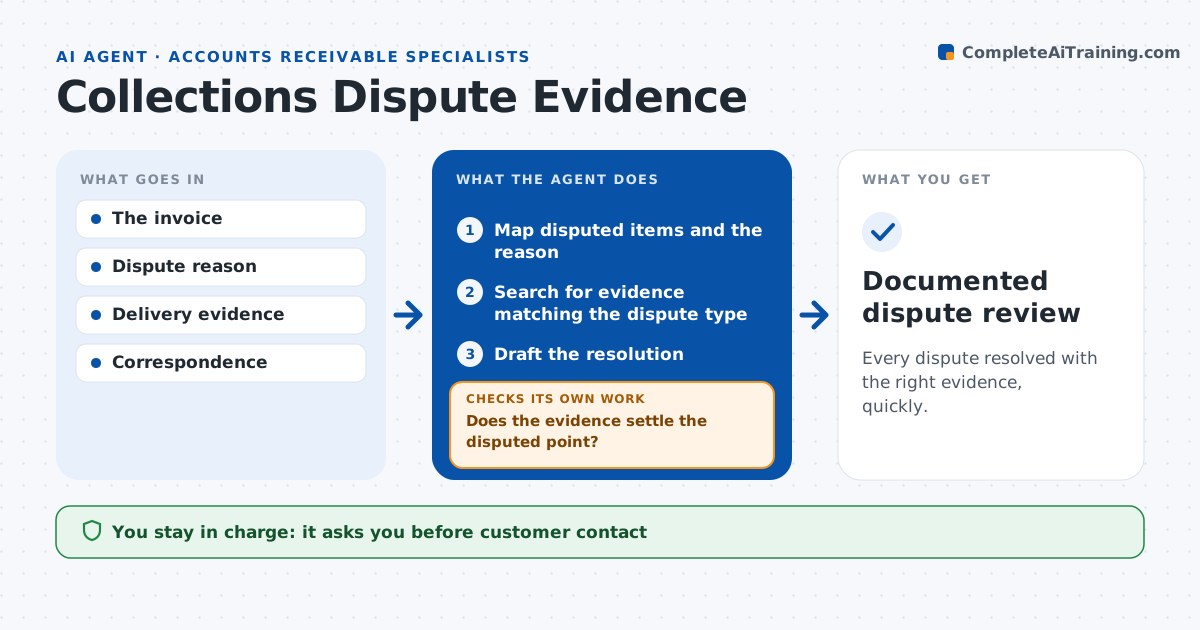
Every dispute resolved with the right evidence, quickly.
What it does
Invoice disputes stall while evidence sits in different systems. This agent maps exactly which items are disputed and why. It then collects the evidence that fits that kind of dispute: proof of delivery for quantity, the contract or price list for price, and the service log for quality. It checks whether the evidence settles the point; if not, it looks for other evidence or adjusts the claim. When the evidence shows the customer is right, it proposes a credit note instead of arguing. When the customer's stated reason changes, it re-plans the investigation. It drafts a resolution, and the AR lead approves any customer contact or settlement. Edge case: the delivery note is unsigned, so the agent treats quantity as unproven.
How it works
Follow the arrows from top to bottom. The orange dashed arrow is the loop: when a check fails, the agent goes back and tries again.
Read the steps as a list
- Dispute received
- Map disputed items and the reason
- Search for evidence matching the dispute type
- Does the evidence settle the disputed point?If not: look for other evidence or adjust the claim. Back to step 3.
- Draft the resolution
- AR lead approves contact or settlementThe agent waits here for your OK.
- Documented dispute review
How it decides
It matches evidence type to the dispute type and re-plans when the reason changes.
- Evidence type is chosen by the dispute reason.
- Adjust the claim when the evidence shows the customer is right.
- Unsigned delivery evidence does not prove quantity.
- A changed dispute reason restarts the evidence search.
Make it yours
Every agent is a starting point. You choose these settings for your own situation.
- Evidence sources per dispute type (delivery system, contract store, service log)
- Dispute amount that needs a manager's approval (default $5,000)
- Days before an unresolved dispute is escalated (default 14)
- Tone of the drafted resolution
- Who approves settlements
What keeps you in control
It always asks you first
- Customer contact
- Settlements
- Legal action
Hard limits
- No settlements without approval.
It stops when
- Done: resolution drafted.
Set it up
We guide you through the set-up, step by step
Members get the full set-up guide for this agent. No technical skills needed: you copy, paste and upload.
- One set of instructions to paste into your AI, with the clicks for ChatGPT, Claude, Microsoft 365 Copilot, Gemini and Grok
- The agent then walks you through connecting your own data, one source at a time
- A downloadable copy with the flow chart, the rules and the full guide