AI agent for internal communications managers
Communications Channel Adaptation Agent
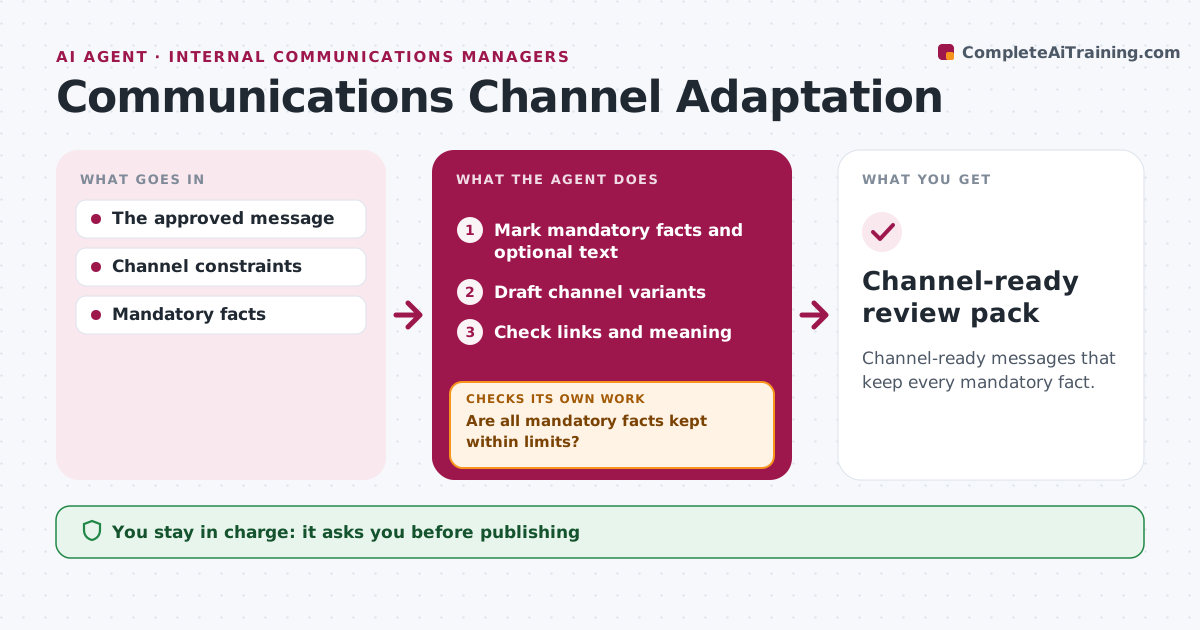
Channel-ready messages that keep every mandatory fact.
What it does
Channel character limits often cut important context, such as who qualifies or when something starts. When an approved message needs versions for social, SMS or app notices, this agent drafts each variant by cutting optional explanation first. It checks that every mandatory fact survives within the limit. If they do not fit, it cuts more optional text or proposes a link to the full version. It never drops a mandatory fact silently. It then checks links and meaning against the approved message. Communications operations approves publishing. Edge case: the first short draft drops the eligibility qualifier, so the agent cuts the opening line instead.
How it works
Follow the arrows from top to bottom. The orange dashed arrow is the loop: when a check fails, the agent goes back and tries again.
Read the steps as a list
- Approved message needs channel versions
- Mark mandatory facts and optional text
- Draft channel variants
- Are all mandatory facts kept within limits?If not: cut optional text or add a link to the full version. Back to step 3.
- Check links and meaning
- Does each variant match the approved meaning?If not: redraft that variant. Back to step 3.
- Communications ops approves publishingThe agent waits here for your OK.
- Channel-ready review pack
How it decides
It cuts optional text first and never drops mandatory facts silently.
- Cut optional text before anything mandatory.
- Never drop a mandatory fact silently.
- Add a link when mandatory facts do not fit.
Make it yours
Every agent is a starting point. You choose these settings for your own situation.
- Channels and character limits
- Mandatory facts per message
- Link format for full versions
- Who approves publishing
What keeps you in control
It always asks you first
- Publishing
- Statement changes
Hard limits
- No statement changes.
It stops when
- Done: variants valid.
Set it up
We guide you through the set-up, step by step
Members get the full set-up guide for this agent. No technical skills needed: you copy, paste and upload.
- One set of instructions to paste into your AI, with the clicks for ChatGPT, Claude, Microsoft 365 Copilot, Gemini and Grok
- The agent then walks you through connecting your own data, one source at a time
- A downloadable copy with the flow chart, the rules and the full guide