AI agent for internal communications managers
Internal Announcement Audience Agent
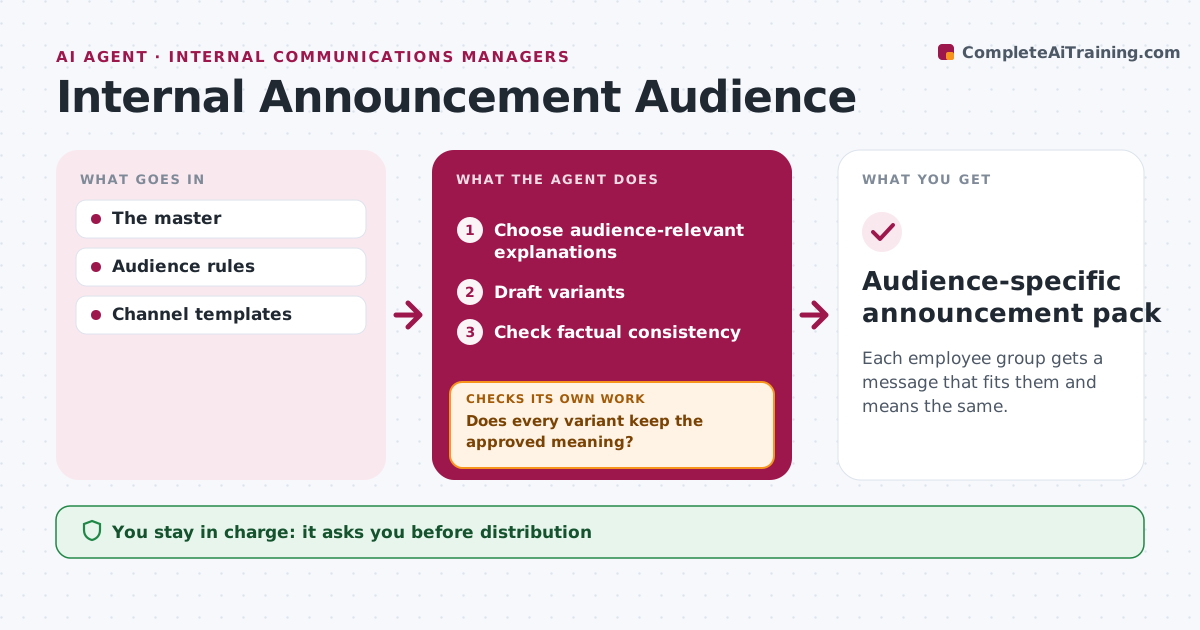
Each employee group gets a message that fits them and means the same.
What it does
Internal announcements often assume every employee group has the same background, so field staff, managers and new hires read them differently. When an announcement is approved, this agent picks the explanations each audience needs, such as what changes on shift for field staff or what to tell the team for managers. It drafts a version for each group, changing explanations but never facts. It then checks that every version keeps the approved dates, numbers and meaning. If a version drifts, it revises it and checks again. Internal communications approves distribution. Edge case: the field staff draft implies a different effective date, so the agent corrects it.
How it works
Follow the arrows from top to bottom. The orange dashed arrow is the loop: when a check fails, the agent goes back and tries again.
Read the steps as a list
- Announcement approved
- Choose audience-relevant explanations
- Draft variants
- Check factual consistency
- Does every variant keep the approved meaning?If not: revise the variant. Back to step 3.
- Internal comms approves distributionThe agent waits here for your OK.
- Audience-specific announcement pack
How it decides
It adapts explanations, not facts, and revises meaning drift.
- Adapt explanations, never facts.
- Every version must carry the approved dates and numbers.
- Revise and recheck any version that drifts in meaning.
Make it yours
Every agent is a starting point. You choose these settings for your own situation.
- Audience groups and what each needs
- Facts that must appear in every version
- Reading level per audience
- Who approves distribution
What keeps you in control
It always asks you first
- Distribution
- Position changes
Hard limits
- No new facts.
It stops when
- Done: variants consistent.
Set it up
We guide you through the set-up, step by step
Members get the full set-up guide for this agent. No technical skills needed: you copy, paste and upload.
- One set of instructions to paste into your AI, with the clicks for ChatGPT, Claude, Microsoft 365 Copilot, Gemini and Grok
- The agent then walks you through connecting your own data, one source at a time
- A downloadable copy with the flow chart, the rules and the full guide