AI agent for community managers
Community Champion Program Agent
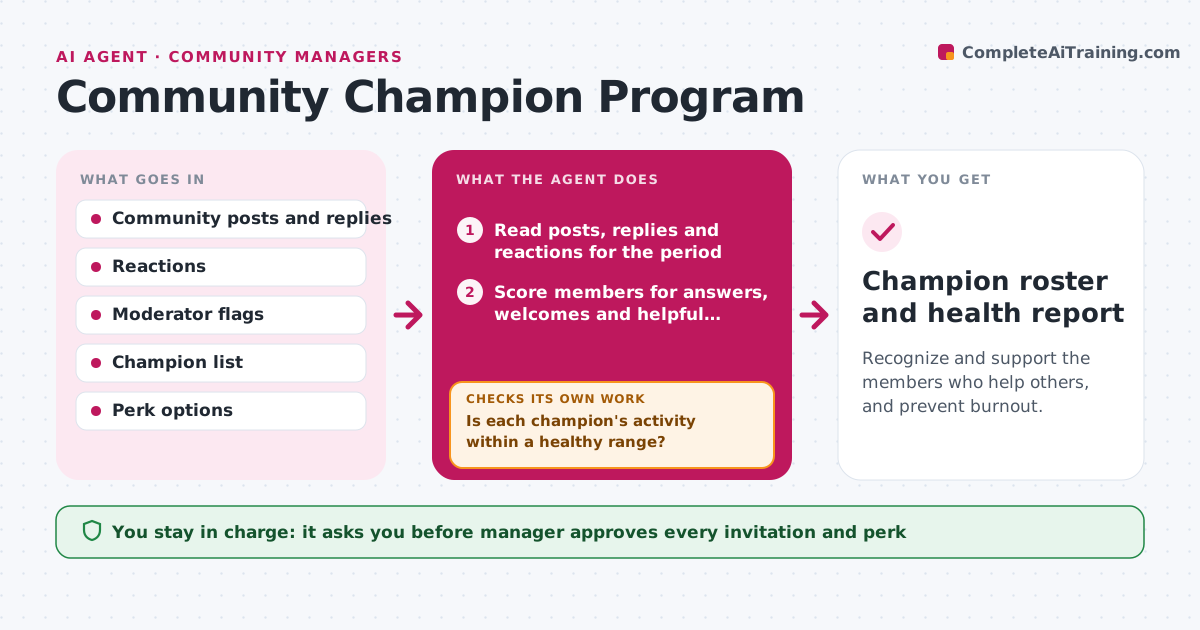
Recognize and support the members who help others, and prevent burnout.
What it does
In most communities a few members answer questions, welcome newcomers and calm arguments, and they burn out because nobody notices. This agent finds members who answer questions and welcome others, scores their helpfulness from replies and reactions, and drafts invitations to a champion role. It tracks their activity over time and flags signs of burnout, such as a sudden jump in effort followed by a drop. If a champion goes quiet, it proposes a check-in. It also suggests thanks and perks suited to each person. Edge case: it never invites members who have broken community rules. The manager approves invitations, perks and removals.
How it works
Follow the arrows from top to bottom. The orange dashed arrow is the loop: when a check fails, the agent goes back and tries again.
Read the steps as a list
- Weekly run
- Read posts, replies and reactions for the period
- Score members for answers, welcomes and helpful reactions
- Check for moderator flags and rule breaks
- Draft invitations to the champion role for top scorers
- Manager approves invitations and perksThe agent waits here for your OK.
- Track champion activity over time
- Is each champion's activity within a healthy range?If not: propose a check-in or a lighter role and track again. Back to step 6.
- Draft thanks and perk suggestions
- Manager approves removals or role changesThe agent waits here for your OK.
- Champion roster and health report
How it decides
It scores helpfulness by useful replies, welcomes and reactions, excludes rule breakers and watches changes in activity for burnout.
- Invite members with at least 20 helpful replies in 60 days
- Exclude anyone with a recent moderator warning
- Flag a champion whose replies drop by 50 percent in two weeks
- Suggest a break if replies exceed 60 per week for 4 weeks
Make it yours
Every agent is a starting point. You choose these settings for your own situation.
- Invitation threshold
- Burnout limits
- Perk options
- Review schedule
What keeps you in control
It always asks you first
- Manager approves every invitation and perk
- Manager approves any removal from the program
Hard limits
- Never invites, thanks or removes anyone without approval
- Does not rank members publicly
It stops when
- Done: roster updated and health report delivered
- Stop: not enough activity data in the community
Set it up
We guide you through the set-up, step by step
Members get the full set-up guide for this agent. No technical skills needed: you copy, paste and upload.
- One set of instructions to paste into your AI, with the clicks for ChatGPT, Claude, Microsoft 365 Copilot, Gemini and Grok
- The agent then walks you through connecting your own data, one source at a time
- A downloadable copy with the flow chart, the rules and the full guide