AI agent for online course creators
Student Question Triage Agent
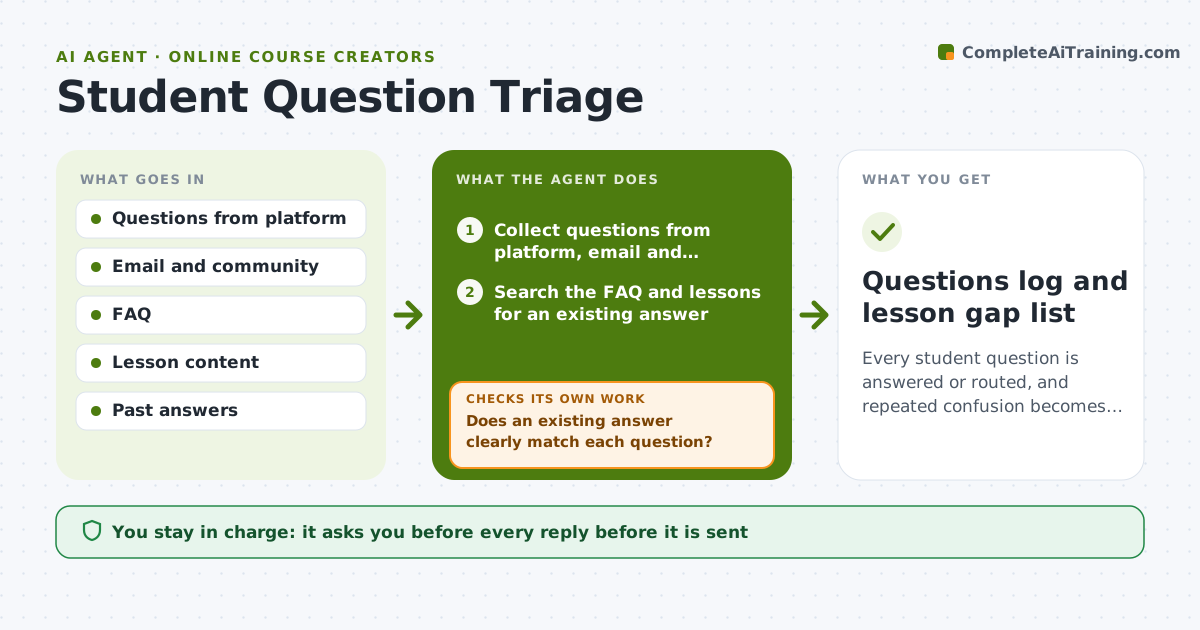
Every student question is answered or routed, and repeated confusion becomes a lesson fix.
What it does
Questions arrive from the platform comments, email and the community group, and the same one gets answered three times while another gets none. This agent collects questions from all three places and checks the FAQ and lessons for an existing answer. For common questions it drafts replies with a link to the lesson. For new ones it flags them for you. It also tags questions that reveal a gap in a lesson, since five confused students suggest the lesson needs a fix. Edge case: a question about a refund is not answered by the agent but passed to you immediately. The creator approves replies.
How it works
Follow the arrows from top to bottom. The orange dashed arrow is the loop: when a check fails, the agent goes back and tries again.
Read the steps as a list
- New day's questions arrive
- Collect questions from platform, email and community
- Search the FAQ and lessons for an existing answer
- Does an existing answer clearly match each question?If not: flag the question as new for the creator. Back to step 3.
- Draft replies with a link to the right lesson
- Tag questions that point to a lesson gap
- Creator approves repliesThe agent waits here for your OK.
- Send approved replies and log them
- Did the student confirm the answer worked?If not: reopen the question with a clearer answer. Back to step 3.
- Questions log and lesson gap list
How it decides
It drafts a reply only when an existing answer clearly matches, and routes anything new, sensitive or about money to the creator.
- Questions about refunds, billing or complaints go straight to the creator.
- Three questions on the same lesson create a gap tag.
- Link the exact lesson section in each reply.
- Replies stay in the creator's tone.
Make it yours
Every agent is a starting point. You choose these settings for your own situation.
- Channels covered
- Tone of replies
- Gap tag threshold (default 3)
- Topics sent directly to the creator
- Run frequency
What keeps you in control
It always asks you first
- Every reply before it is sent
- Any answer about refunds or money
Hard limits
- Do not send replies without approval.
- Do not answer refund or legal questions.
It stops when
- Done: all questions answered or routed
- Stop: a question looks like a complaint or legal issue, so the agent stops and alerts the creator
Set it up
We guide you through the set-up, step by step
Members get the full set-up guide for this agent. No technical skills needed: you copy, paste and upload.
- One set of instructions to paste into your AI, with the clicks for ChatGPT, Claude, Microsoft 365 Copilot, Gemini and Grok
- The agent then walks you through connecting your own data, one source at a time
- A downloadable copy with the flow chart, the rules and the full guide