AI agent for community managers
Community FAQ Gap Agent
Cut repeated questions by pinning accurate, easy-to-find answers.
What it does
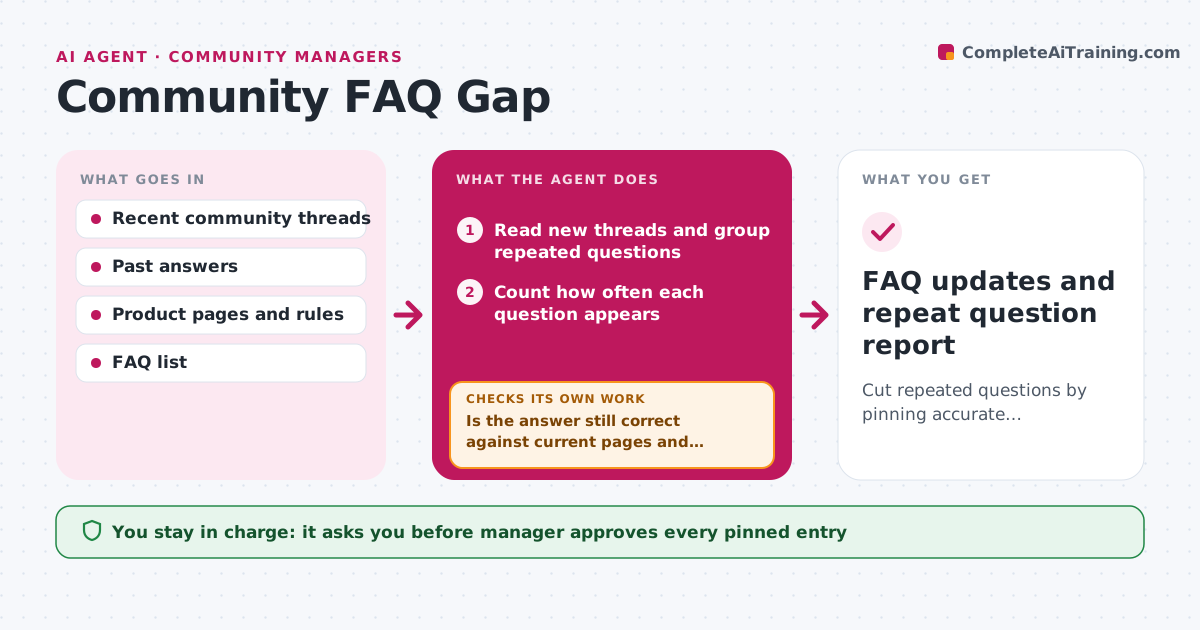
New members ask the same questions every week, and the answers are buried in old threads. This agent groups repeated questions from the last weeks and finds the best existing answer in past threads. It checks that the answer is still correct against current product pages and rules, and drafts a short pinned FAQ entry. If an answer looks outdated, it sends the thread to an expert for review rather than publishing it. It then watches whether the question comes up less often after the entry is pinned. If the questions keep coming, it rewrites the entry or moves it. The manager approves what gets pinned.
How it works
Follow the arrows from top to bottom. The orange dashed arrow is the loop: when a check fails, the agent goes back and tries again.
Read the steps as a list
- Weekly run
- Read new threads and group repeated questions
- Count how often each question appears
- Search past threads for the best answer
- Is the answer still correct against current pages and rules?If not: send to an expert for review and search for a newer answer. Back to step 4.
- Draft a short FAQ entry with a link to the source thread
- Manager approves what gets pinnedThe agent waits here for your OK.
- Pin the entry and track repeat questions
- Did repeats fall after 4 weeks?If not: rewrite the entry or move it to a more visible place. Back to step 6.
- FAQ updates and repeat question report
How it decides
It proposes an FAQ entry when a question appears at least 3 times, and publishes only answers confirmed as current.
- Propose an entry after 3 repeats in 30 days
- Treat an answer older than 12 months as needing a check
- Send answers about prices or rules to an owner for confirmation
- Keep each entry under 100 words
Make it yours
Every agent is a starting point. You choose these settings for your own situation.
- Repeat threshold (default 3)
- Answer age limit (default 12 months)
- Experts by topic
- Where entries are pinned
What keeps you in control
It always asks you first
- Manager approves every pinned entry
- Expert approves outdated or sensitive answers
Hard limits
- Never pins or edits posts itself
- Does not publish answers that have not been confirmed
It stops when
- Done: entries pinned and repeats tracked
- Stop: no confirmed answer exists for a frequent question
Set it up
We guide you through the set-up, step by step
Members get the full set-up guide for this agent. No technical skills needed: you copy, paste and upload.
- One set of instructions to paste into your AI, with the clicks for ChatGPT, Claude, Microsoft 365 Copilot, Gemini and Grok
- The agent then walks you through connecting your own data, one source at a time
- A downloadable copy with the flow chart, the rules and the full guide