AI agent for community managers
Community Health Metrics Agent
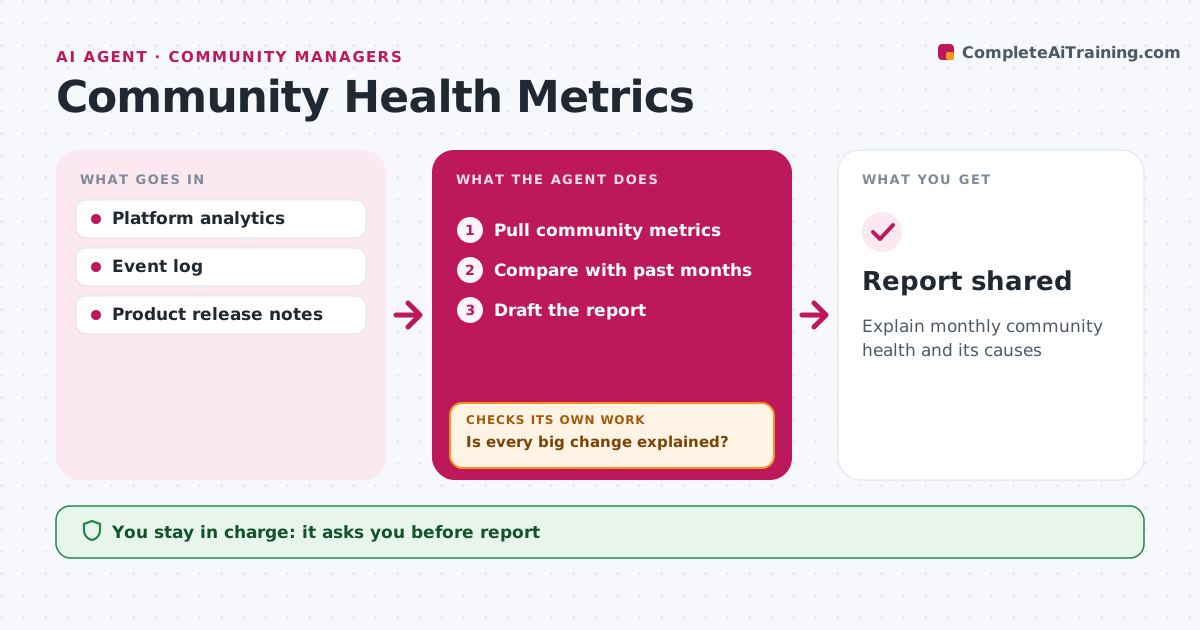
Explain monthly community health and its causes
What it does
Leaders ask how the community is doing, and a list of numbers does not answer that. When the month ends, this agent pulls active members, new posts, response times, retention and top contributors. It compares each metric with past months and finds changes above the set threshold, such as 15 percent. For each big change, it looks for a cause, such as an event, a product launch or a gap in moderator coverage. It checks that every big change has an explanation; if one does not, it digs further into the data or asks the community manager. It then drafts a report with the main changes and their causes. Top contributors are only named with their consent. The community manager approves the report before it is shared. Edge case: data from a platform outage is marked so it does not distort the trend lines.
How it works
Follow the arrows from top to bottom. The orange dashed arrow is the loop: when a check fails, the agent goes back and tries again.
Read the steps as a list
- Month ends
- Pull community metrics
- Compare with past months
- Is every big change explained?If not: search events and releases for causes. Back to step 3.
- Draft the report
- Community manager approvesThe agent waits here for your OK.
- Report shared
How it decides
Changes above 15% get a cause search.
- Changes above 15% need a cause
- Outage periods marked
- Top contributors listed with consent
Make it yours
Every agent is a starting point. You choose these settings for your own situation.
- Change threshold
- Metrics
- Report format
What keeps you in control
It always asks you first
- Report
Hard limits
- Never shares individual activity without consent
- Labels causes as likely
It stops when
- Done: report shared
- Stop: analytics unavailable
Set it up
We guide you through the set-up, step by step
Members get the full set-up guide for this agent. No technical skills needed: you copy, paste and upload.
- One set of instructions to paste into your AI, with the clicks for ChatGPT, Claude, Microsoft 365 Copilot, Gemini and Grok
- The agent then walks you through connecting your own data, one source at a time
- A downloadable copy with the flow chart, the rules and the full guide