AI agent for compensation analysts
Compensation Survey Submission Agent
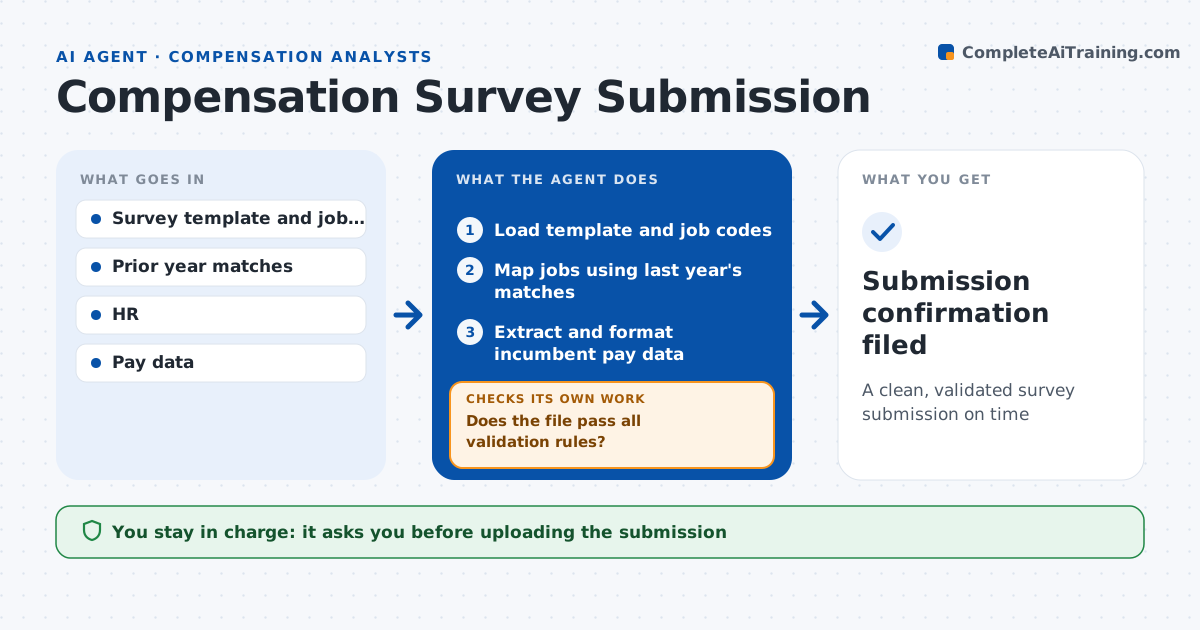
A clean, validated survey submission on time
What it does
Survey submissions are tedious and a rejected file can mean losing access to the results. Each survey cycle, this agent prepares the company's submission. It loads the survey template and job codes, maps internal jobs to survey codes using last year's matches as a start, and re-matches jobs whose duties changed. It extracts pay data for incumbents and formats it to the template. It runs the survey's validation rules and its own checks: pay outside expected ranges, missing bonus fields and stale matches. It fixes or flags each issue and re-validates until the file passes. The analyst approves the file before upload. Edge case: an employee is paid in another currency, so the agent converts using the survey's required rate.
How it works
Follow the arrows from top to bottom. The orange dashed arrow is the loop: when a check fails, the agent goes back and tries again.
Read the steps as a list
- Survey window opens
- Load template and job codes
- Map jobs using last year's matches
- Extract and format incumbent pay data
- Does the file pass all validation rules?If not: fix data or matches and re-validate. Back to step 3.
- Analyst approves uploadThe agent waits here for your OK.
- Submission confirmation filed
How it decides
It reuses last year's matches unless duties changed and runs every validation rule before upload.
- Duties changed since last year: re-match
- Pay outside 50% to 200% of range midpoint: check
- Foreign currency: convert at survey rate
Make it yours
Every agent is a starting point. You choose these settings for your own situation.
- Surveys in scope
- Fields to include
- Validation thresholds
- Deadline reminders
What keeps you in control
It always asks you first
- Uploading the submission
Hard limits
- Never includes names or personal identifiers
- Never uploads without approval
It stops when
- Done: upload confirmed
- Stop: deadline at risk, alert analyst
Set it up
We guide you through the set-up, step by step
Members get the full set-up guide for this agent. No technical skills needed: you copy, paste and upload.
- One set of instructions to paste into your AI, with the clicks for ChatGPT, Claude, Microsoft 365 Copilot, Gemini and Grok
- The agent then walks you through connecting your own data, one source at a time
- A downloadable copy with the flow chart, the rules and the full guide