AI agent for user experience designers
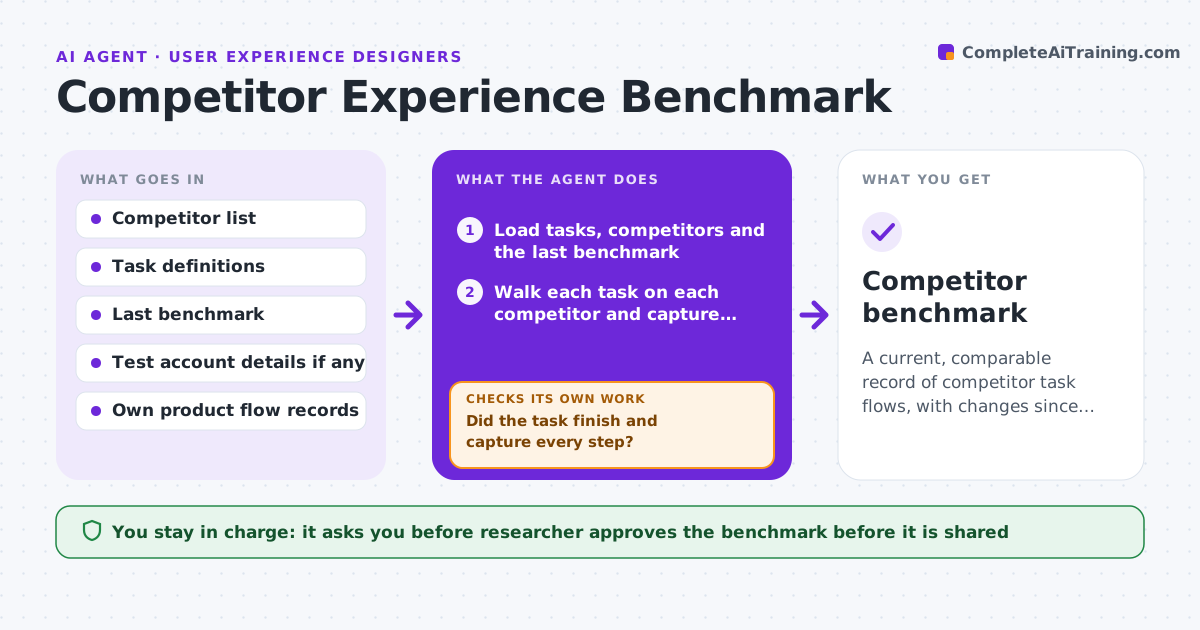
Competitor Experience Benchmark Agent
A current, comparable record of competitor task flows, with changes since the last run highlighted.
What it does
A competitor changes its signup flow, and your team keeps arguing from a screenshot taken a year ago. This agent keeps the benchmark current. Every quarter it walks defined tasks on competitor sites and apps, such as signing up, finding pricing or canceling, and records the steps, friction points and screenshots. It compares step counts and patterns with your own product and flags changes since the last run. If a task fails midway, for example a login wall or a changed button, it reruns with another route or notes why it could not complete. You approve the benchmark before it is shared. Edge case: a task needing a paid account is marked not tested, not guessed.
How it works
Follow the arrows from top to bottom. The orange dashed arrow is the loop: when a check fails, the agent goes back and tries again.
Read the steps as a list
- Quarterly run
- Load tasks, competitors and the last benchmark
- Walk each task on each competitor and capture steps
- Did the task finish and capture every step?If not: Retry by another route, or mark the task not tested with the reason. Back to step 3.
- Count steps, fields and friction points
- Compare with our flow and the last benchmark
- Flag changes and new patterns
- Are the screenshots and counts consistent for each task?If not: Redo the capture and recount. Back to step 4.
- Build the benchmark report
- Researcher approves the benchmark before sharingThe agent waits here for your OK.
- Competitor benchmark
How it decides
It compares step count, time to finish, number of fields and friction points for the same task, and flags a change when any differs from the last run.
- Use the same task script every quarter
- Mark tasks needing payment as not tested
- Flag a change when step count changes by 1 or more
- Include screenshots for every flagged change
Make it yours
Every agent is a starting point. You choose these settings for your own situation.
- Competitors and tasks
- Run schedule
- Change threshold
- Screenshot detail
What keeps you in control
It always asks you first
- Researcher approves the benchmark before it is shared
Hard limits
- Never create paid accounts or enter real personal data
- Never sign up under false identity
It stops when
- Done: benchmark approved
- Stop: site blocks automated access
Set it up
We guide you through the set-up, step by step
Members get the full set-up guide for this agent. No technical skills needed: you copy, paste and upload.
- One set of instructions to paste into your AI, with the clicks for ChatGPT, Claude, Microsoft 365 Copilot, Gemini and Grok
- The agent then walks you through connecting your own data, one source at a time
- A downloadable copy with the flow chart, the rules and the full guide