AI agent for user experience designers
Competitor Feature Tracking Agent
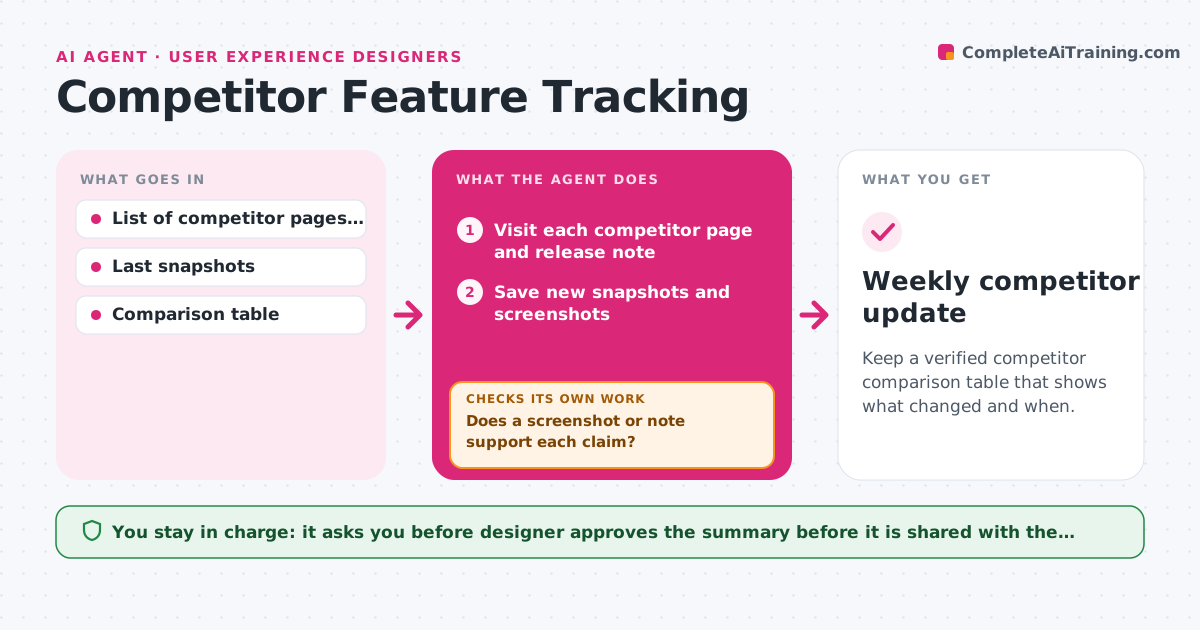
Keep a verified competitor comparison table that shows what changed and when.
What it does
A competitor changes its pricing page or adds a feature, and you hear about it from a client weeks later. This agent visits the competitor sites, release notes and help centers you choose on a schedule. It takes a snapshot of each and compares it with the previous one. It flags changes in features, user flows and pricing, and updates your comparison table with what changed and when. Before anything is saved as a finding, it checks the claim against a screenshot or the release note text, so a rumor or a mistaken reading does not enter the table. If the evidence is weak, it retries from another page or marks the item unconfirmed. The designer approves what goes into the shared summary. Edge case: a competitor tests a new layout for some visitors only, so the agent labels it as a possible test, not a launch.
How it works
Follow the arrows from top to bottom. The orange dashed arrow is the loop: when a check fails, the agent goes back and tries again.
Read the steps as a list
- Weekly schedule runs
- Visit each competitor page and release note
- Save new snapshots and screenshots
- Compare with the last snapshot and list differences
- Classify each change as feature, flow, pricing or copy
- Does a screenshot or note support each claim?If not: reload from another page or device and compare again, otherwise mark unconfirmed. Back to step 3.
- Update the comparison table
- Is the change cosmetic only?If not: keep it in the report with the evidence; if cosmetic, remove it from the findings list. Back to step 4.
- Designer approves what is shared with the teamThe agent waits here for your OK.
- Weekly competitor update
How it decides
A change is real if the new snapshot differs in text or layout and a screenshot or release note supports it. Otherwise it is marked unconfirmed.
- Treat a price change as confirmed only when the same price shows on two loads
- Ignore copy changes under three words unless they change a feature name
- Mark layout differences seen once as possible tests
- Highlight any feature that matches one on our roadmap
Make it yours
Every agent is a starting point. You choose these settings for your own situation.
- Competitor pages to watch
- Schedule (default weekly)
- Change types to ignore
- Who receives the summary
- Comparison table columns
What keeps you in control
It always asks you first
- Designer approves the summary before it is shared with the team or clients
Hard limits
- Never sign up with fake details or bypass a login
- Never state a change as fact without evidence
It stops when
- Done: the table is updated with evidence for each change
- Stop: a competitor page is behind a login the agent cannot use
Set it up
We guide you through the set-up, step by step
Members get the full set-up guide for this agent. No technical skills needed: you copy, paste and upload.
- One set of instructions to paste into your AI, with the clicks for ChatGPT, Claude, Microsoft 365 Copilot, Gemini and Grok
- The agent then walks you through connecting your own data, one source at a time
- A downloadable copy with the flow chart, the rules and the full guide