AI agent for competitive intelligence analysts
Competitor Partnership and Channel Tracker Agent
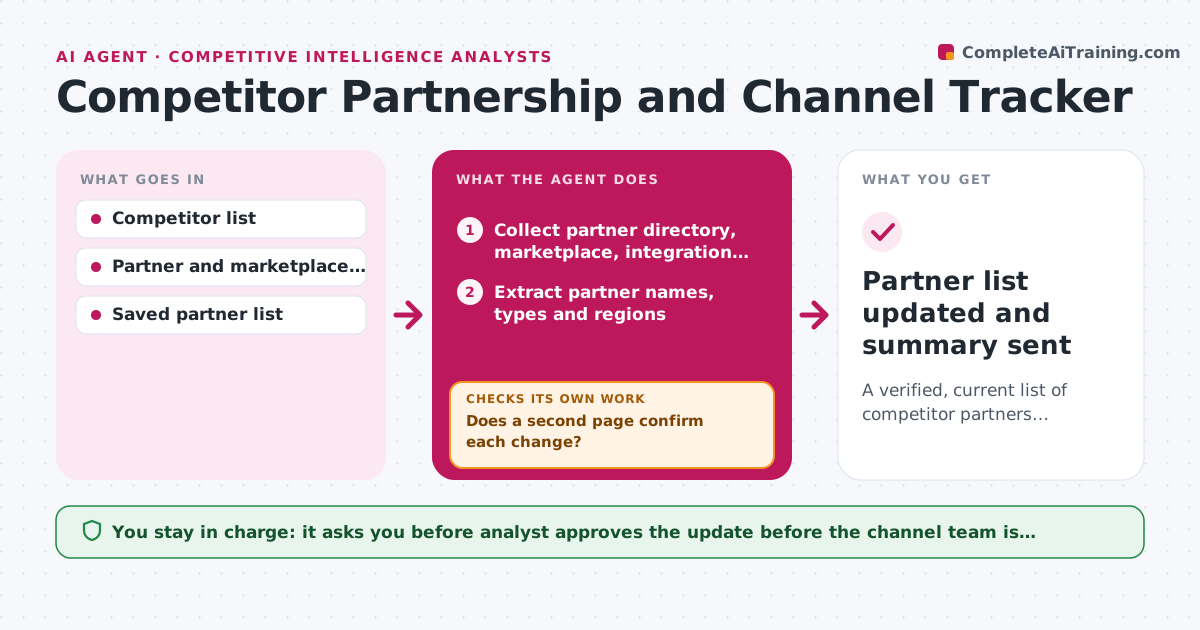
A verified, current list of competitor partners, resellers and integrations, with changes reported monthly.
What it does
When a competitor adds a reseller in a new region or an integration with a big platform, the first you hear of it is a prospect mentioning it. This agent scans partner directories, marketplaces, press releases and integration pages for each competitor every month. It compares what it finds with the saved partner list and notes additions and removals. Before logging a change it verifies it on a second page, because directories are often stale or wrong. It drafts a change summary with links. The analyst approves the update before the channel team is notified. Edge case: a partner vanishes from a directory but is still on the competitor's site, so it is held as unconfirmed.
How it works
Follow the arrows from top to bottom. The orange dashed arrow is the loop: when a check fails, the agent goes back and tries again.
Read the steps as a list
- Monthly scan starts
- Collect partner directory, marketplace, integration and press pages per competitor
- Extract partner names, types and regions
- Compare with the saved list to find additions and removals
- Does a second page confirm each change?If not: search press and the partner's own site; if still single-source, hold as unconfirmed. Back to step 2.
- Classify each change as reseller, integration or referral partner
- Do removals still hold after a repeat check a week later?If not: restore the partner and note the directory error. Back to step 3.
- Draft the change summary with links and deal impact
- Analyst approves the update before the channel team is notifiedThe agent waits here for your OK.
- Partner list updated and summary sent
How it decides
A change is logged only when two pages agree. A removal needs two checks 7 days apart.
- Log a change only when 2 pages agree.
- Treat a removal as real only after 2 checks 7 days apart.
- Mark a partner as high impact when it serves a region or segment where we sell.
- Hold single-source items for the next run.
Make it yours
Every agent is a starting point. You choose these settings for your own situation.
- Competitors and source pages
- Run day each month
- Verification rule (default 2 pages)
- Channel team recipients
What keeps you in control
It always asks you first
- Analyst approves the update before the channel team is notified
Hard limits
- Use only public pages
- Never contact competitor partners to verify
It stops when
- Done: list updated and approved.
- Stop: sources blocked or unavailable, so the analyst is told.
Set it up
We guide you through the set-up, step by step
Members get the full set-up guide for this agent. No technical skills needed: you copy, paste and upload.
- One set of instructions to paste into your AI, with the clicks for ChatGPT, Claude, Microsoft 365 Copilot, Gemini and Grok
- The agent then walks you through connecting your own data, one source at a time
- A downloadable copy with the flow chart, the rules and the full guide