AI agent for competitive intelligence analysts
Competitor Pricing Change Monitor Agent
Catch and explain competitor pricing changes within a week
What it does
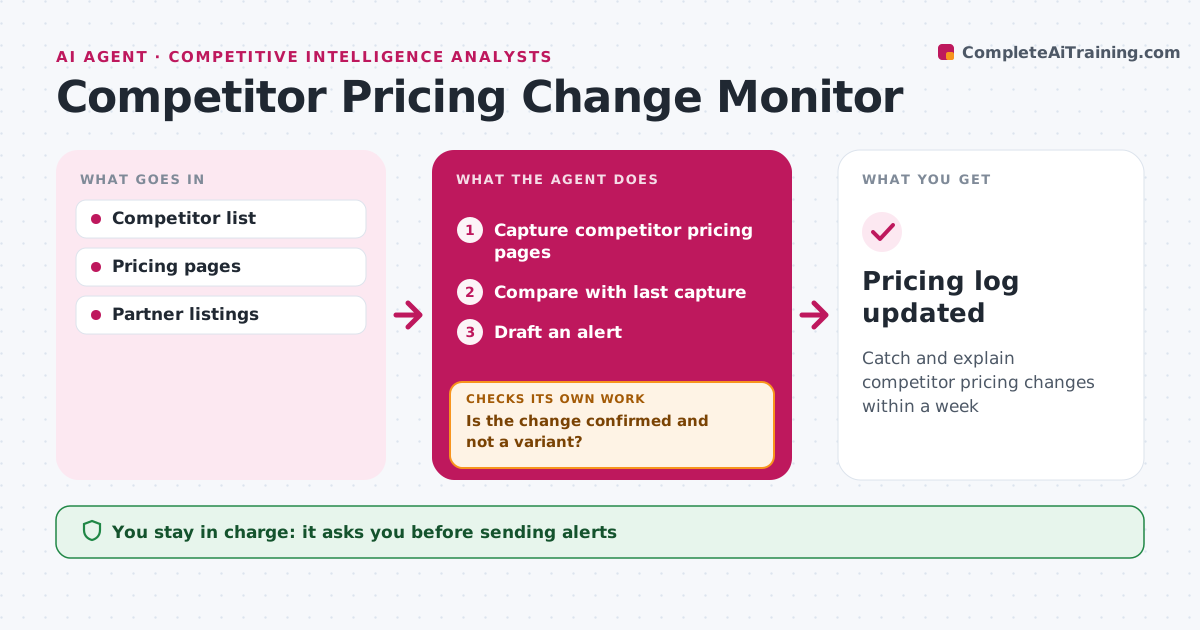
Competitors change prices and packages without notice, and sales teams often hear about it from customers first. Each week this agent captures competitor pricing pages, public price lists and partner listings and compares them with the last capture. It records every change with the date and a screenshot. Before alerting anyone, it checks whether the change is real or only a regional or promotional variant. Promotions are noted with their end date, and regional changes are logged separately. It then drafts a short alert explaining what changed and what it might mean for sales and pricing. The analyst approves each alert before it goes to sales and pricing teams. All changes go into the pricing log so trends are easy to see. Edge case: a page that blocks access is marked unknown, never unchanged, so a missed change is not hidden.
How it works
Follow the arrows from top to bottom. The orange dashed arrow is the loop: when a check fails, the agent goes back and tries again.
Read the steps as a list
- Weekly price check
- Capture competitor pricing pages
- Compare with last capture
- Is the change confirmed and not a variant?If not: check other regions and promotion terms. Back to step 2.
- Draft an alert
- Analyst approves the alertThe agent waits here for your OK.
- Pricing log updated
How it decides
Changes are confirmed by checking region and promotion variants.
- Blocked pages marked unknown
- Promotions noted with end date
- Regional changes noted separately
Make it yours
Every agent is a starting point. You choose these settings for your own situation.
- Competitors tracked
- Check frequency
- Alert recipients
What keeps you in control
It always asks you first
- Sending alerts
Hard limits
- Never accesses gated pages with false accounts
- Never shares alerts outside the company
It stops when
- Done: alerts sent
- Stop: no changes
Set it up
We guide you through the set-up, step by step
Members get the full set-up guide for this agent. No technical skills needed: you copy, paste and upload.
- One set of instructions to paste into your AI, with the clicks for ChatGPT, Claude, Microsoft 365 Copilot, Gemini and Grok
- The agent then walks you through connecting your own data, one source at a time
- A downloadable copy with the flow chart, the rules and the full guide