AI agent for quality control specialists
Complaint to Batch Investigation Agent
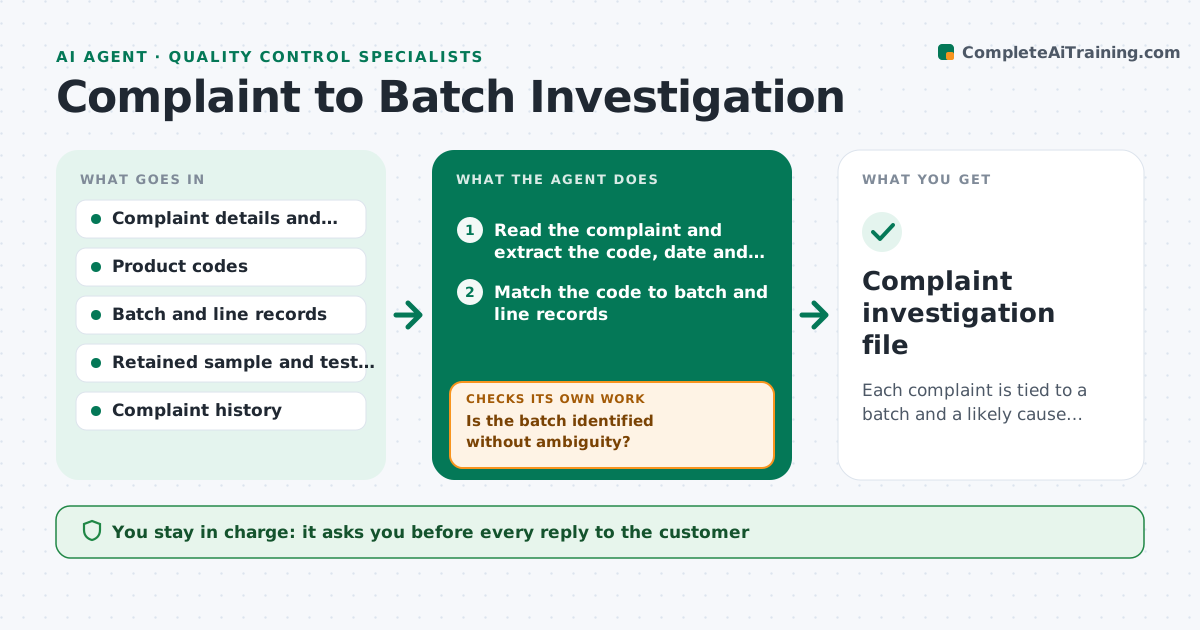
Each complaint is tied to a batch and a likely cause quickly, with a documented response.
What it does
A customer sends a photo of a product with an off smell and a partial code, and the team spends days finding the batch, the line and the records. This agent reads each complaint and links it to the batch and line records using the code, date and place. It checks production, ingredient and test data for causes, such as a deviation, a hold-and-release, a supplier lot issue or a retained sample result. It requests missing records from the owners. It drafts findings, a response plan and a check for other complaints on the same batch. The quality manager approves any reply to the customer. Edge case: a code that matches two possible batches is flagged, not guessed.
How it works
Follow the arrows from top to bottom. The orange dashed arrow is the loop: when a check fails, the agent goes back and tries again.
Read the steps as a list
- Complaint logged
- Read the complaint and extract the code, date and defect
- Match the code to batch and line records
- Is the batch identified without ambiguity?If not: ask the complainant or retailer for the full code or purchase details. Back to step 2.
- Pull production, ingredient and test data for the batch
- Compare the defect type with deviations, holds and results
- Check complaint history for the same batch or line
- Is there evidence supporting a probable cause?If not: request missing records or retained sample tests and reassess. Back to step 5.
- Draft the findings and the response plan
- Quality manager approves the reply to the customerThe agent waits here for your OK.
- Complaint investigation file
How it decides
It identifies the batch from the code and date. It then compares the complaint type to the records and ranks causes by supporting evidence.
- Code matches two batches: stop and ask for more details
- Defect type is a safety issue such as foreign material: escalate immediately
- Three complaints on one batch: recommend a hold review
- No records for the batch period: flag a traceability gap
Make it yours
Every agent is a starting point. You choose these settings for your own situation.
- Complaint categories and priorities
- Code format rules
- Complaint threshold for a hold review (default 3)
- Reply template
- Records to check
What keeps you in control
It always asks you first
- Every reply to the customer
- Any recall or hold recommendation
Hard limits
- Never send replies to customers
- Never state a cause as confirmed without test or record evidence
It stops when
- Done: file complete and reply approved
- Stop: customer cannot supply details, file logged
Set it up
We guide you through the set-up, step by step
Members get the full set-up guide for this agent. No technical skills needed: you copy, paste and upload.
- One set of instructions to paste into your AI, with the clicks for ChatGPT, Claude, Microsoft 365 Copilot, Gemini and Grok
- The agent then walks you through connecting your own data, one source at a time
- A downloadable copy with the flow chart, the rules and the full guide