AI agent for network engineers
Config Backup and Drift Agent
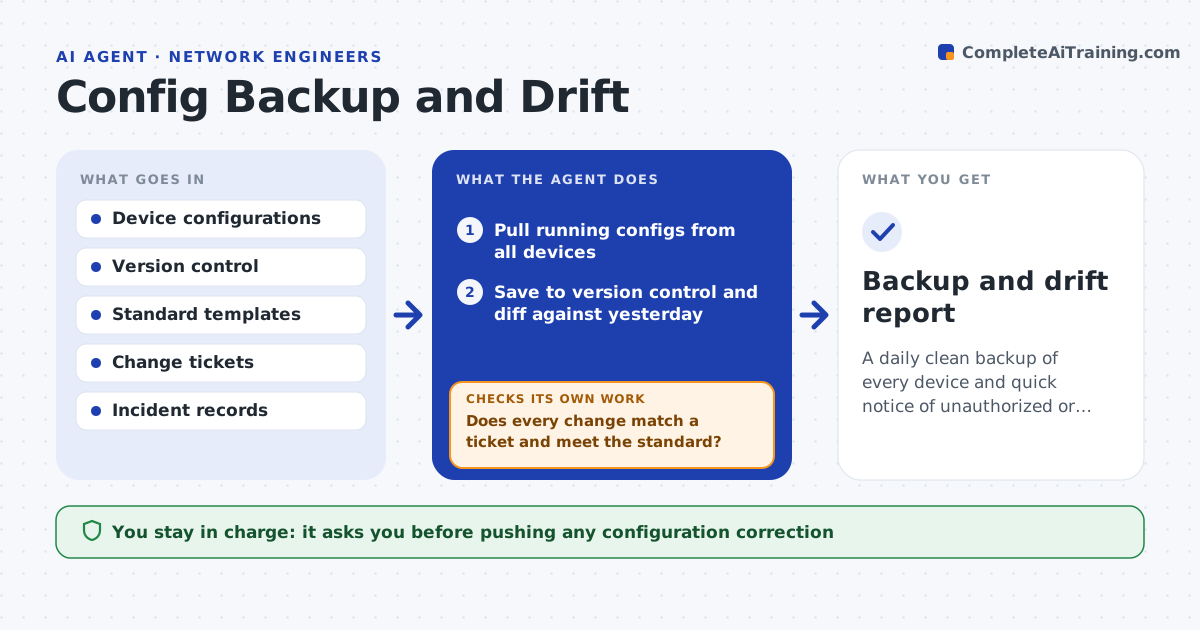
A daily clean backup of every device and quick notice of unauthorized or non-standard changes
What it does
Network devices get changed directly, and without tracking there is no reliable backup and no record of who changed what. Each day this agent pulls the running configuration from every device, saves it to version control and compares it with yesterday's and with your approved standard. It flags changes that have no matching change ticket and settings that drift from the standard, such as weak login settings or missing logging. Before flagging a change as unauthorized, it checks incident records for an approved emergency change. For safe standard settings it proposes a correction; risky items it only reports. It keeps a clean backup per device for recovery. You approve pushing any correction. Edge case: an unreachable device is retried and then reported, so a missing backup is never silent.
How it works
Follow the arrows from top to bottom. The orange dashed arrow is the loop: when a check fails, the agent goes back and tries again.
Read the steps as a list
- Daily config collection
- Pull running configs from all devices
- Save to version control and diff against yesterday
- Compare with the standard template
- Does every change match a ticket and meet the standard?If not: flag unauthorized changes and list drift items. Back to step 3.
- Propose corrections for safe standard settings
- Engineer approves any correction pushedThe agent waits here for your OK.
- Backup and drift report
How it decides
A change is flagged as unauthorized when it has no matching ticket, and as drift when it differs from the standard template.
- Flag changes with no matching ticket
- Report, do not auto-fix, risky settings
- Match emergency changes to incident records
Make it yours
Every agent is a starting point. You choose these settings for your own situation.
- Standard templates
- Settings to check for drift
- Devices in scope
- What counts as an authorized change
What keeps you in control
It always asks you first
- Pushing any configuration correction
Hard limits
- Never pushes config changes without approval
- Keeps backups read-only in version control
It stops when
- Done: all devices backed up and drift reported
- Stop: devices unreachable for backup
Set it up
We guide you through the set-up, step by step
Members get the full set-up guide for this agent. No technical skills needed: you copy, paste and upload.
- One set of instructions to paste into your AI, with the clicks for ChatGPT, Claude, Microsoft 365 Copilot, Gemini and Grok
- The agent then walks you through connecting your own data, one source at a time
- A downloadable copy with the flow chart, the rules and the full guide