AI agent for ux writers
Content Design Review Request Agent
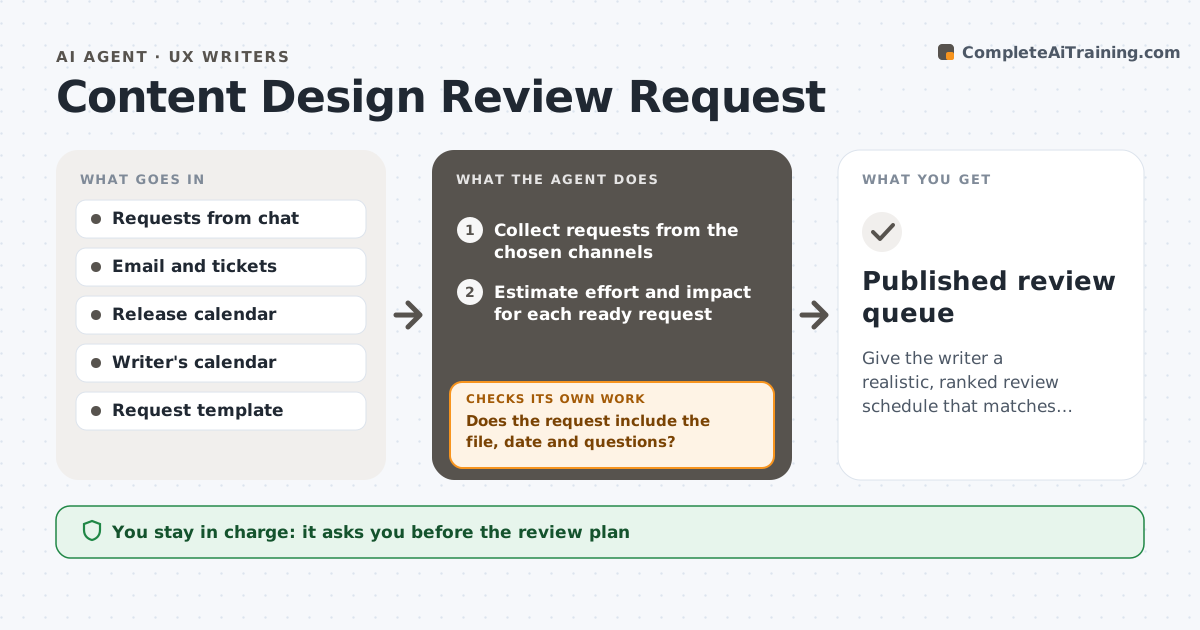
Give the writer a realistic, ranked review schedule that matches release dates.
What it does
Designers and product managers send copy review requests by chat, email and tickets, and the writer ends up working on whoever shouted last. This agent collects the requests from the channels the writer names and puts them in one queue. It checks each one for what it needs: the screen or file, the release date, the status of design and the questions to answer. It asks for what is missing, then ranks the requests by release date, user impact and size. It schedules review slots around the writer's calendar and deadlines, and reranks as release dates move or new requests arrive. It never sends the plan or accepts work. The writer approves the plan. Edge case: a request with no release date is queued as unscheduled and flagged.
How it works
Follow the arrows from top to bottom. The orange dashed arrow is the loop: when a check fails, the agent goes back and tries again.
Read the steps as a list
- New request or daily run
- Collect requests from the chosen channels
- Does the request include the file, date and questions?If not: draft a request for the missing details and hold the item out of the schedule. Back to step 2.
- Estimate effort and impact for each ready request
- Rank by release date, impact and effort
- Check the writer's calendar and release dates
- Build the review schedule
- Does every ready request fit before its release date?If not: reorder, split reviews or flag the conflict for the writer's decision. Back to step 5.
- Writer approves the plan and repliesThe agent waits here for your OK.
- Published review queue
How it decides
It ranks by release date first, then user impact, then effort. A request not ready for review goes back to its sender and does not take a slot.
- Rank by release date first
- Hold requests with missing files out of the queue
- Flag any request that cannot fit before its release
- Rerank when a release date changes by more than 2 days
Make it yours
Every agent is a starting point. You choose these settings for your own situation.
- Channels to collect from
- Effort estimates by type
- Reorder trigger (default 2 days)
- Review slot length
- Request template
What keeps you in control
It always asks you first
- The review plan
- Replies sent to requesters
Hard limits
- Never accept or decline work
- Never send replies without approval
It stops when
- Done: queue current and approved
- Stop: writer is out and the queue is handed over
Set it up
We guide you through the set-up, step by step
Members get the full set-up guide for this agent. No technical skills needed: you copy, paste and upload.
- One set of instructions to paste into your AI, with the clicks for ChatGPT, Claude, Microsoft 365 Copilot, Gemini and Grok
- The agent then walks you through connecting your own data, one source at a time
- A downloadable copy with the flow chart, the rules and the full guide