AI agent for contract administrators
Contract Schedule Alignment Agent
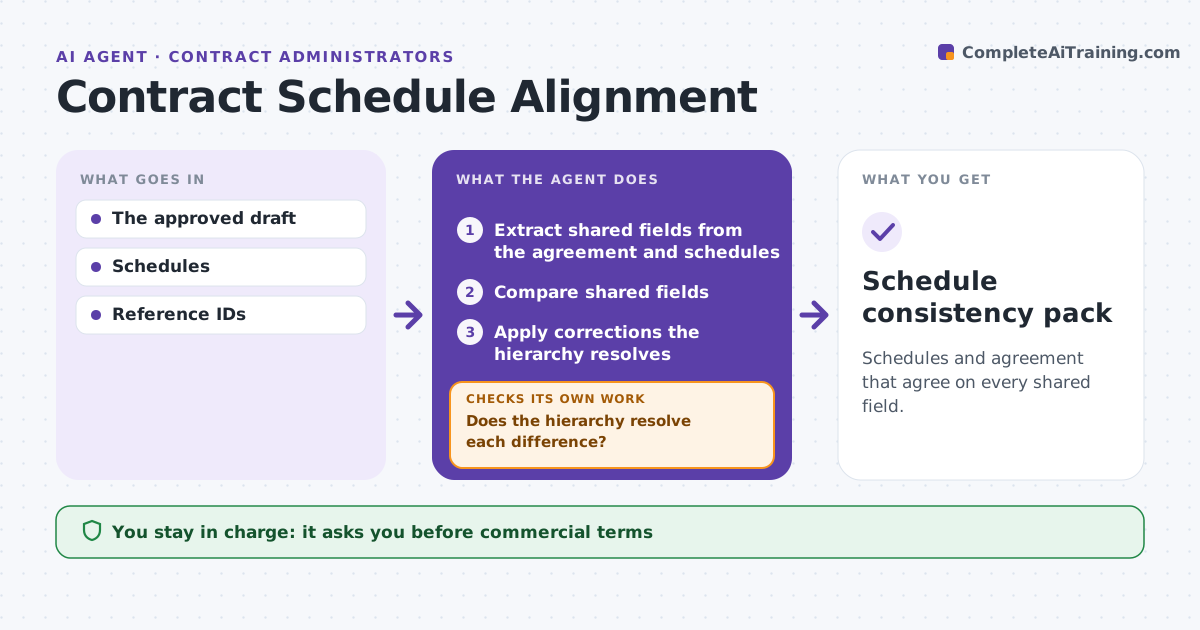
Schedules and agreement that agree on every shared field.
What it does
Contract schedules often disagree with the main agreement on prices, product IDs or dates. When a draft with schedules is prepared, this agent compares every field shared between the agreement and its schedules. For each difference it checks the approved source hierarchy, for example whether the price schedule overrides the body. It corrects a value only when the hierarchy clearly resolves the conflict. Otherwise it asks the lawyer and keeps both versions visible. It then prepares aligned review copies. The administrator approves the draft for signature. Commercial terms are never changed on the agent's own judgment. Edge case: the agreement and the schedule both claim priority in different clauses, so the agent asks the lawyer.
How it works
Follow the arrows from top to bottom. The orange dashed arrow is the loop: when a check fails, the agent goes back and tries again.
Read the steps as a list
- Draft with schedules prepared
- Extract shared fields from the agreement and schedules
- Compare shared fields
- Does the hierarchy resolve each difference?If not: ask the lawyer and preserve both versions. Back to step 3.
- Apply corrections the hierarchy resolves
- Prepare aligned review copies
- Administrator approves for signatureThe agent waits here for your OK.
- Schedule consistency pack
How it decides
It applies the source hierarchy and asks when none resolves it.
- The approved hierarchy decides; otherwise the lawyer.
- Both versions stay visible until resolved.
- Conflicting priority clauses always go to the lawyer.
Make it yours
Every agent is a starting point. You choose these settings for your own situation.
- Approved source hierarchy
- Fields compared (default prices, IDs, dates, quantities)
- Format of the review copies
- Who approves for signature
What keeps you in control
It always asks you first
- Commercial terms
- Signature
Hard limits
- No commercial decisions.
It stops when
- Done: consistent or escalated.
Set it up
We guide you through the set-up, step by step
Members get the full set-up guide for this agent. No technical skills needed: you copy, paste and upload.
- One set of instructions to paste into your AI, with the clicks for ChatGPT, Claude, Microsoft 365 Copilot, Gemini and Grok
- The agent then walks you through connecting your own data, one source at a time
- A downloadable copy with the flow chart, the rules and the full guide