AI agent for legal operations managers
Contract Signature Packet Agent
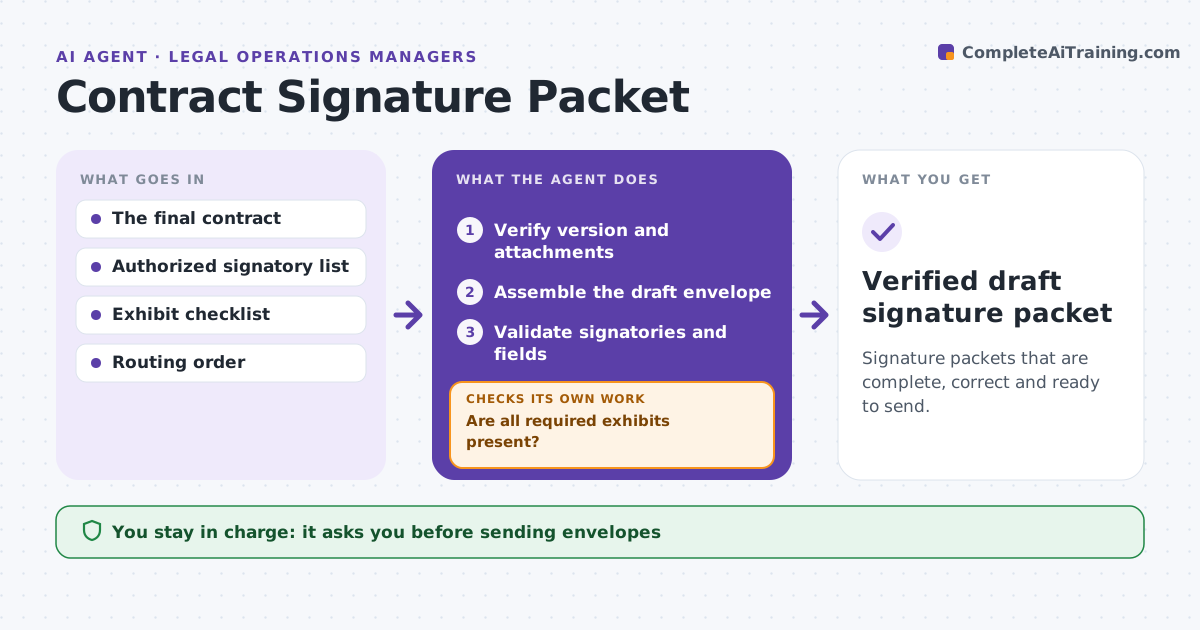
Signature packets that are complete, correct and ready to send.
What it does
Signature packets sometimes go out with the wrong version, missing exhibits or wrong signatories. When a contract is approved for signature, this agent verifies the final approved version and the required attachments. A missing exhibit stops the process and goes to the lawyer. It then assembles a draft envelope with signature and date fields, and validates signatory names, emails and titles against the approved list. Mechanical field placement problems are fixed and rechecked. Questions about signing authority go to the lawyer. The contract administrator sends the envelope. Edge case: the counterparty's signatory changed jobs last week, so the agent flags the authority question instead of sending.
How it works
Follow the arrows from top to bottom. The orange dashed arrow is the loop: when a check fails, the agent goes back and tries again.
Read the steps as a list
- Contract approved for signature
- Verify version and attachments
- Are all required exhibits present?If not: stop and ask the lawyer. Back to step 2.
- Assemble the draft envelope
- Validate signatories and fields
- Are field placements and signatories correct?If not: fix mechanical placements. Back to step 4.
- Contract administrator sends the envelopeThe agent waits here for your OK.
- Verified draft signature packet
How it decides
It assembles in routing order and stops on substantive gaps.
- Fix mechanical issues; send substantive ones to the lawyer.
- Authority questions go to the lawyer.
- A missing exhibit stops the packet.
Make it yours
Every agent is a starting point. You choose these settings for your own situation.
- Signature tool and envelope template
- Required attachments per contract type
- Signatory authority list source
- Who sends envelopes
What keeps you in control
It always asks you first
- Sending envelopes
- Changing legal text
- Signatory authority
Hard limits
- Never sends.
It stops when
- Done: packet ready.
Set it up
We guide you through the set-up, step by step
Members get the full set-up guide for this agent. No technical skills needed: you copy, paste and upload.
- One set of instructions to paste into your AI, with the clicks for ChatGPT, Claude, Microsoft 365 Copilot, Gemini and Grok
- The agent then walks you through connecting your own data, one source at a time
- A downloadable copy with the flow chart, the rules and the full guide