AI agent for legal operations managers
Contract Template Deviation Tracker Agent
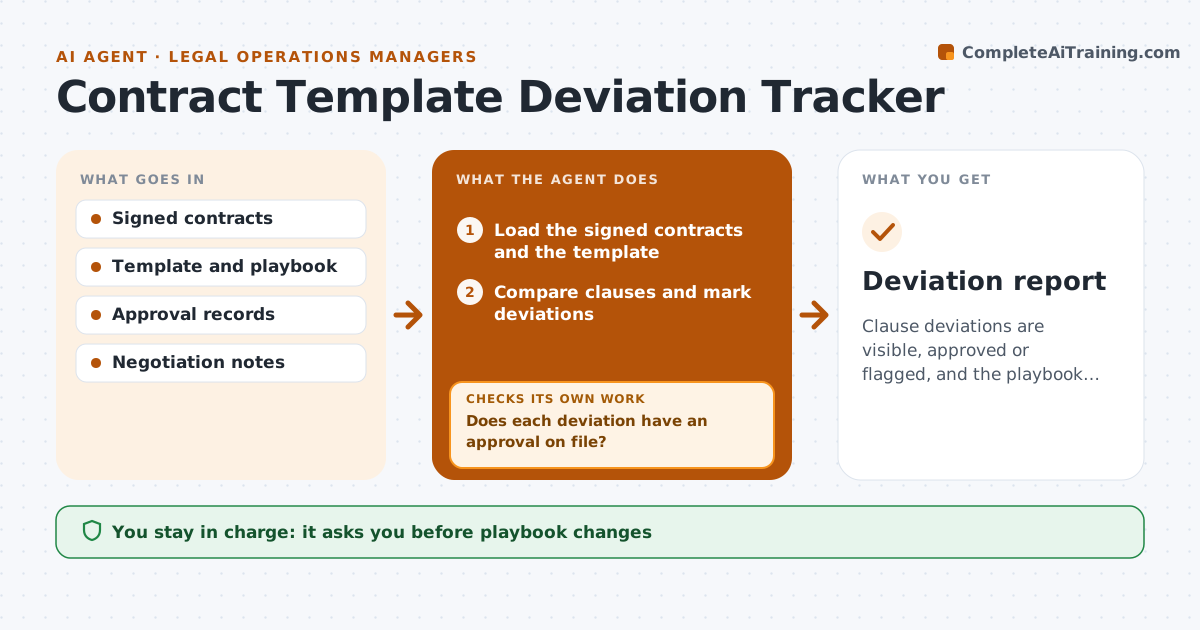
Clause deviations are visible, approved or flagged, and the playbook reflects what the business actually accepts
What it does
Negotiated contract clauses drift from the template, and the pattern is not noticed until it is a problem. This agent compares signed contracts with the standard template and groups the deviations by clause. For each deviation, it checks whether an approval is on file. Unapproved changes are flagged with the contract and the person responsible. It looks for clauses that are changed again and again and proposes playbook changes, such as a new fallback. After the manager accepts a change, it checks later contracts to see whether the deviation rate fell. The manager approves all changes. Edge case: the counterparty's paper was used, so the agent compares by clause meaning and not text.
How it works
Follow the arrows from top to bottom. The orange dashed arrow is the loop: when a check fails, the agent goes back and tries again.
Read the steps as a list
- Monthly contract review begins
- Load the signed contracts and the template
- Compare clauses and mark deviations
- Search the approval records for each deviation
- Does each deviation have an approval on file?If not: flag it with the contract and signer and request the missing approval. Back to step 4.
- Group deviations by clause and count them
- Propose playbook changes for frequent deviations
- Manager approves the playbook changesThe agent waits here for your OK.
- Compare the following month's contracts
- Did the deviation rate on that clause fall?If not: revise the proposal and retest next month. Back to step 6.
- Deviation report
How it decides
A clause is a deviation when the wording or terms differ from the template or fallback. It is approved only with a matching record. A clause changed in many contracts is a candidate for a playbook update.
- Propose a playbook change when a clause deviates in 20 percent of contracts
- Flag all unapproved deviations in liability and payment terms first
- Compare meaning for counterparty paper
- Ignore formatting changes
Make it yours
Every agent is a starting point. You choose these settings for your own situation.
- Clauses tracked
- Playbook trigger (default 20 percent)
- Contract types included
- Report schedule
What keeps you in control
It always asks you first
- Playbook changes
Hard limits
- Never edit signed contracts
- Never approve a deviation
It stops when
- Done: deviations reviewed and playbook updated
- Stop: template is not defined
Set it up
We guide you through the set-up, step by step
Members get the full set-up guide for this agent. No technical skills needed: you copy, paste and upload.
- One set of instructions to paste into your AI, with the clicks for ChatGPT, Claude, Microsoft 365 Copilot, Gemini and Grok
- The agent then walks you through connecting your own data, one source at a time
- A downloadable copy with the flow chart, the rules and the full guide