AI agent for ux writers
Copy Experiment Readout Agent
Copy decisions based on reliable test results
What it does
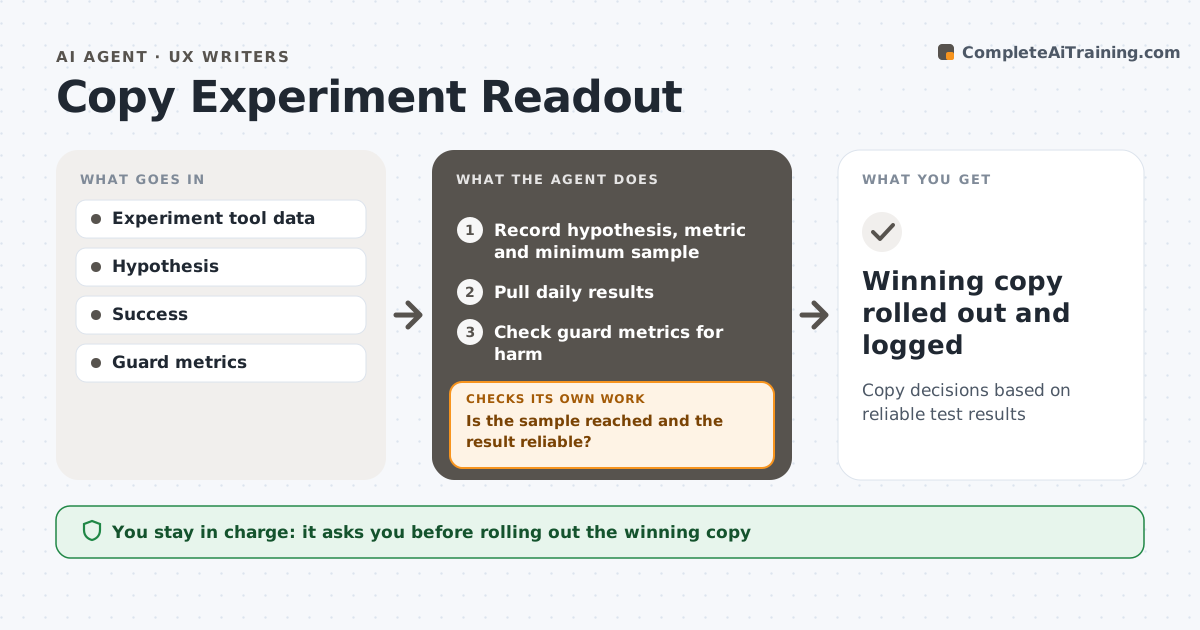
Testing two versions of a headline or button label is easy to start and easy to misread. When a copy test starts, this agent records the hypothesis, the success metric and the minimum sample. It pulls results every day. Before calling a result, it checks that the sample is reached and that the difference is statistically reliable. If not, it keeps the test running and checks again the next day. It then checks guard metrics, such as support contacts or cancellations, so a 'winner' does not hurt something else. If a test cannot reach its sample in the maximum time, it says so instead of declaring a winner. It writes a readout with a clear recommendation. The UX writer approves any rollout. Edge case: on low-traffic pages, it stops a test that cannot reach a result in time.
How it works
Follow the arrows from top to bottom. The orange dashed arrow is the loop: when a check fails, the agent goes back and tries again.
Read the steps as a list
- Copy test starts
- Record hypothesis, metric and minimum sample
- Pull daily results
- Is the sample reached and the result reliable?If not: keep the test running and check again tomorrow. Back to step 3.
- Check guard metrics for harm
- Write readout and recommendation
- UX writer approves rolloutThe agent waits here for your OK.
- Winning copy rolled out and logged
How it decides
It calls a winner only after the minimum sample is reached and the difference is reliable at the set confidence, with no guard metric harmed.
- Do not call results before the minimum sample
- Reject a winner that harms a guard metric
- Stop a test that cannot reach the sample in the max time
Make it yours
Every agent is a starting point. You choose these settings for your own situation.
- Confidence level (default 95%)
- Max test length (default 21 days)
- Guard metrics
- Readout format
What keeps you in control
It always asks you first
- Rolling out the winning copy
- Stopping a test early
Hard limits
- Never changes live copy without approval
- Reports inconclusive results honestly
It stops when
- Done: readout approved
- Stop: test hits max duration without result; report as inconclusive
Set it up
We guide you through the set-up, step by step
Members get the full set-up guide for this agent. No technical skills needed: you copy, paste and upload.
- One set of instructions to paste into your AI, with the clicks for ChatGPT, Claude, Microsoft 365 Copilot, Gemini and Grok
- The agent then walks you through connecting your own data, one source at a time
- A downloadable copy with the flow chart, the rules and the full guide