AI agent for school counselors
Course Scheduling Conflict Resolver Agent
Conflict-free schedules that still meet graduation requirements.
What it does
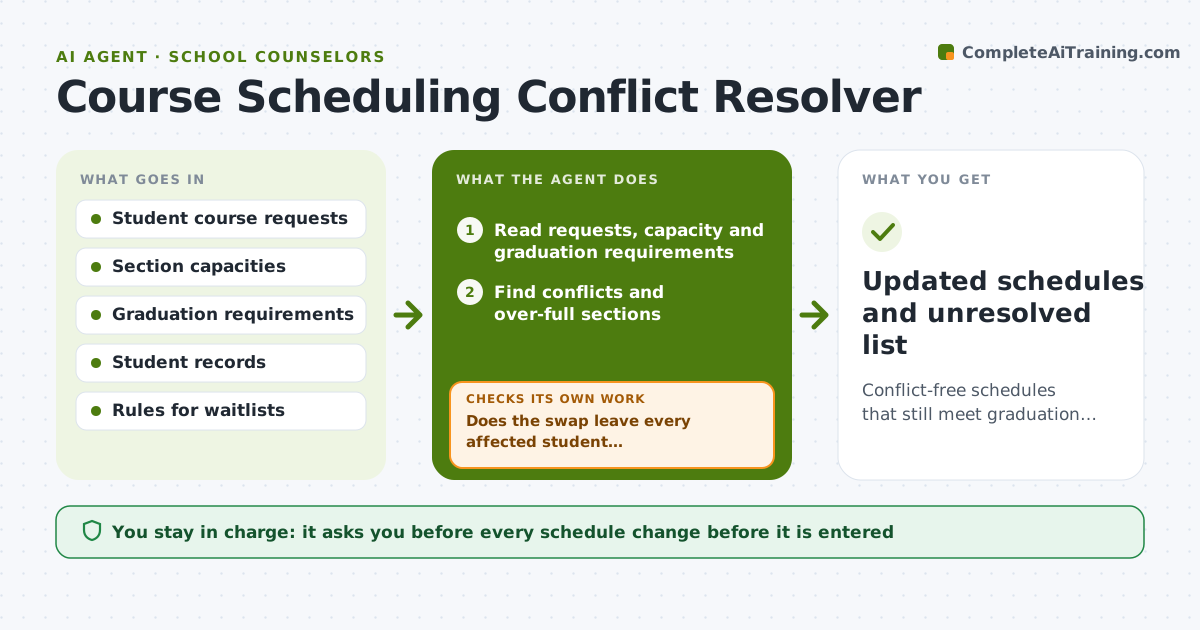
Registration week brings hundreds of schedule conflicts, and a counselor fixes them one student at a time, sometimes breaking graduation requirements in the process. This agent reads course requests, section capacity and graduation requirements and finds conflicts. It proposes swaps that keep requirements intact. After each swap it rechecks every affected student's schedule and loops back if a swap breaks another one. It works through the most constrained students first, because their options are fewest. Edge case: a required class is full, so the agent suggests a different section or period and checks the other courses. The counselor approves changes before they reach the student record.
How it works
Follow the arrows from top to bottom. The orange dashed arrow is the loop: when a check fails, the agent goes back and tries again.
Read the steps as a list
- Registration requests are submitted
- Read requests, capacity and graduation requirements
- Find conflicts and over-full sections
- Propose swaps that keep requirements
- Check every affected student's schedule after each swap
- Does the swap leave every affected student conflict-free?If not: undo the swap and try another option. Back to step 3.
- Do all graduation requirements still hold?If not: choose a different section or flag the student. Back to step 4.
- Compile a change list by student
- Counselor approves the changesThe agent waits here for your OK.
- Updated schedules and unresolved list
How it decides
It prefers swaps that keep a student's required courses and first-choice electives, and rejects any swap that creates another conflict.
- Required courses outrank electives.
- Never remove a graduation requirement to resolve a conflict.
- Prefer swaps affecting the fewest students.
- Students with unresolved conflicts go to the counselor.
Make it yours
Every agent is a starting point. You choose these settings for your own situation.
- Course priorities
- Capacity rules
- Waitlist policy
- Swap limit per student
- Output format
What keeps you in control
It always asks you first
- Every schedule change before it is entered
- Any conflict that needs a student conversation
Hard limits
- Do not edit student records.
- Do not remove required courses.
It stops when
- Done: conflicts resolved and approved
- Stop: capacity cannot satisfy requests, so the agent lists the unresolved students
Set it up
We guide you through the set-up, step by step
Members get the full set-up guide for this agent. No technical skills needed: you copy, paste and upload.
- One set of instructions to paste into your AI, with the clicks for ChatGPT, Claude, Microsoft 365 Copilot, Gemini and Grok
- The agent then walks you through connecting your own data, one source at a time
- A downloadable copy with the flow chart, the rules and the full guide