AI agent for legal secretaries
Court Deadline Docketing Agent
Every court deadline calculated correctly and calendared
What it does
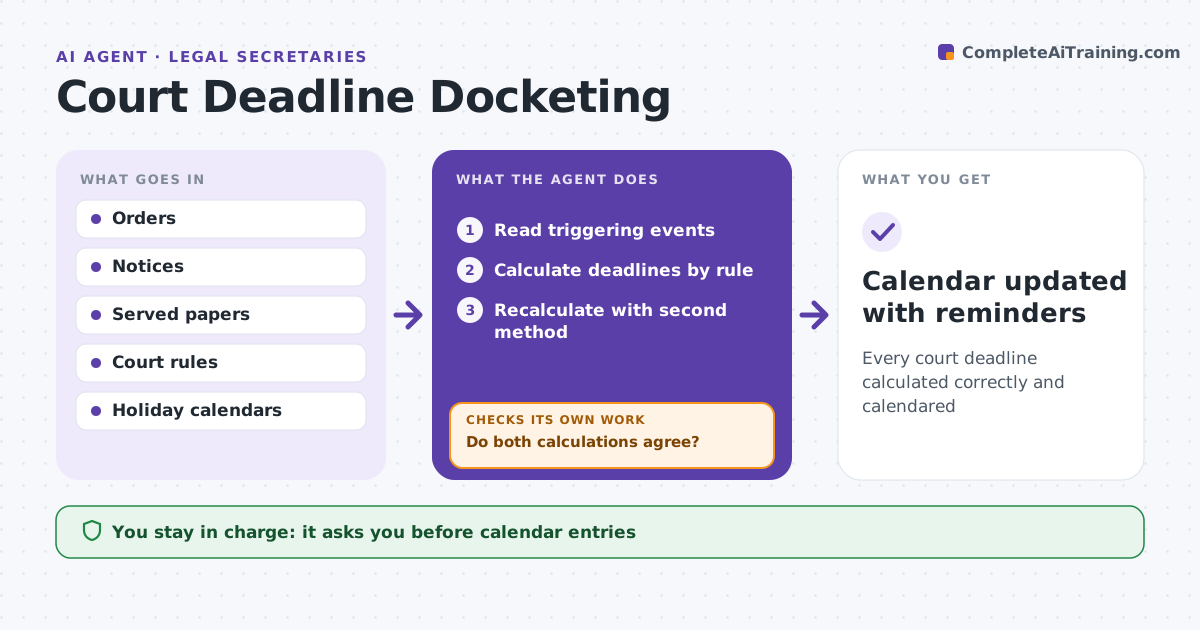
A missed court deadline can lose a case, and deadline rules vary by court, service method and holidays. When a court order, notice or served document arrives, this agent reads it and identifies triggering events. It calculates each deadline using the court's rules, including extra days for service method, weekends and court holidays. A date set in a judge's order overrides the rule. It then recalculates every deadline with a second method and the local rules. If the two calculations differ, it flags the deadline for review instead of choosing one. It drafts calendar entries with reminders for the attorney and team. The attorney or docketing supervisor approves entries before they go on the calendar. Edge case: a judge's order sets a different date than the rule would, so the order controls.
How it works
Follow the arrows from top to bottom. The orange dashed arrow is the loop: when a check fails, the agent goes back and tries again.
Read the steps as a list
- Court paper received
- Read triggering events
- Calculate deadlines by rule
- Recalculate with second method
- Do both calculations agree?If not: flag for docketing supervisor review. Back to step 3.
- Supervisor approves entriesThe agent waits here for your OK.
- Calendar updated with reminders
How it decides
It applies rules and orders and confirms with a second calculation.
- Order date overrides rule
- Mail service: add days per rule
- Holiday deadline: next court day
Make it yours
Every agent is a starting point. You choose these settings for your own situation.
- Courts and rules
- Reminder schedule
- Who approves
- Calendar format
What keeps you in control
It always asks you first
- Calendar entries
Hard limits
- Never removes deadlines
- Never decides rule disputes
It stops when
- Done: entries added
- Stop: rule unclear
Set it up
We guide you through the set-up, step by step
Members get the full set-up guide for this agent. No technical skills needed: you copy, paste and upload.
- One set of instructions to paste into your AI, with the clicks for ChatGPT, Claude, Microsoft 365 Copilot, Gemini and Grok
- The agent then walks you through connecting your own data, one source at a time
- A downloadable copy with the flow chart, the rules and the full guide