AI agent for police officers
Court Overtime Claim Agent
Each court appearance produces a correct claim filed inside the contract deadline
What it does
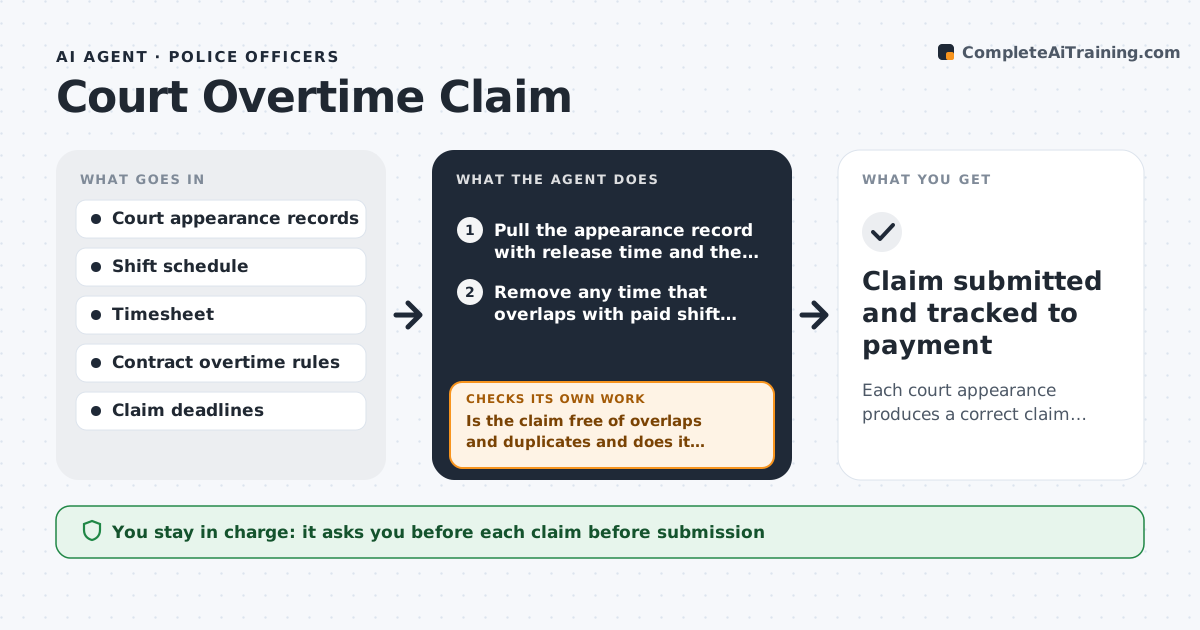
When an officer appears in court off duty, the contract usually guarantees minimum pay and sets deadlines for claiming it. Officers fill out the forms from memory, make arithmetic mistakes and miss the window. This agent reads the court appearance record: arrival and release time, travel and whether the appearance was on a day off. It matches this with shift times and computes overtime owed under the contract rules, such as minimum hours, travel time and rates. It drafts the claim and checks it against the timesheet and earlier claims for double entries. If the amounts do not match, it finds the cause, such as a shift overlap or a missing release time, corrects the calculation and rechecks. The supervisor approves each claim. Edge case: an appearance that runs into the start of the shift counts only the hours before the shift.
How it works
Follow the arrows from top to bottom. The orange dashed arrow is the loop: when a check fails, the agent goes back and tries again.
Read the steps as a list
- An officer appears in court or the weekly scan runs
- Pull the appearance record with release time and the shift times
- Remove any time that overlaps with paid shift hours
- Apply the minimum hours, travel time and rate rules
- Compute the overtime owed and draft the claim
- Compare with the timesheet and earlier claims
- Is the claim free of overlaps and duplicates and does it match the timesheet?If not: find the mismatch, correct the times or amount and recompute. Back to step 3.
- Is the claim inside the contract deadline?If not: flag it as late and draft a request for an exception. Back to step 5.
- Supervisor approves each claimThe agent waits here for your OK.
- Claim submitted and tracked to payment
How it decides
It applies the contract's minimum hours, rate and overlap rules to the times recorded and accepts a claim only when it agrees with the timesheet and has no duplicate.
- Apply a 3 hour minimum for each appearance if the contract says so
- Count travel time only when the contract allows it
- Subtract time that overlaps a paid shift
- Flag claims older than 30 days
Make it yours
Every agent is a starting point. You choose these settings for your own situation.
- Contract rules for minimums and rates
- Deadline (default 30 days)
- Travel time rule
- Claim form format
What keeps you in control
It always asks you first
- Each claim before submission
Hard limits
- Never submits a claim without approval
- Does not claim time that was not worked
- Shows the contract rule used
It stops when
- Done: claim is approved and submitted
- Stop: the release time or court record is missing
Set it up
We guide you through the set-up, step by step
Members get the full set-up guide for this agent. No technical skills needed: you copy, paste and upload.
- One set of instructions to paste into your AI, with the clicks for ChatGPT, Claude, Microsoft 365 Copilot, Gemini and Grok
- The agent then walks you through connecting your own data, one source at a time
- A downloadable copy with the flow chart, the rules and the full guide