
AI agent for social workers
Court Report Preparation Agent
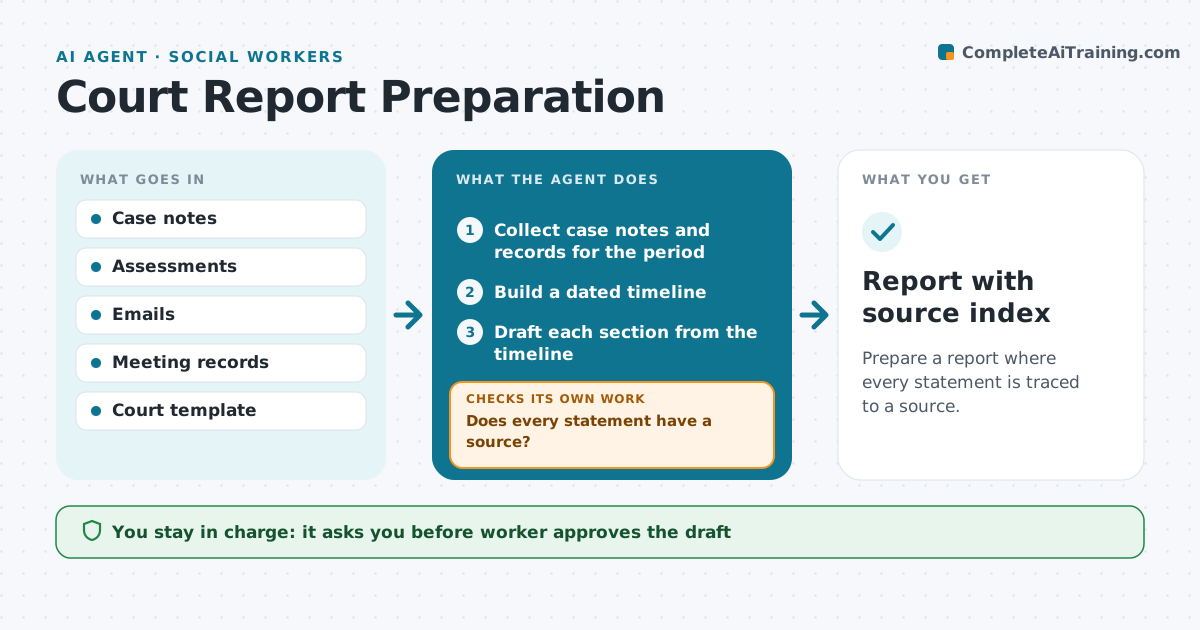
Prepare a report where every statement is traced to a source.
What it does
A court report depends on facts spread across case notes, assessments, emails and meeting records, and every statement may be challenged. This agent collects the notes for the case, builds a dated timeline, and drafts the report sections. It checks that every statement has a source, tags each source in the draft and flags statements that rely on one witness or have no record. It lists gaps for the worker, such as a missing visit note or a contradiction between two records. After the worker fills the gaps, the agent rechecks the draft. The worker and supervisor approve. Edge case: two notes give different dates for the same event, so the agent lists both and lets the worker resolve it.
How it works
Follow the arrows from top to bottom. The orange dashed arrow is the loop: when a check fails, the agent goes back and tries again.
Read the steps as a list
- Court deadline is set
- Collect case notes and records for the period
- Build a dated timeline
- Draft each section from the timeline
- Does every statement have a source?If not: mark unsupported statements and list them for the worker. Back to step 4.
- Do the sources agree on dates and facts?If not: list conflicts for the worker to resolve. Back to step 4.
- Update the draft after the worker's answers
- Worker reviews and approves the draftThe agent waits here for your OK.
- Supervisor approves the final reportThe agent waits here for your OK.
- Report with source index
How it decides
A statement stays in the draft only if it has a source. Conflicts and gaps go to the worker.
- Remove unsupported statements unless the worker adds a source
- Flag opinions to be labeled as opinion
- Flag any conflict between records
- Start the check 10 days before the deadline
Make it yours
Every agent is a starting point. You choose these settings for your own situation.
- Court template
- Days before deadline (default 10)
- Source tags
- Who reviews
What keeps you in control
It always asks you first
- Worker approves the draft
- Supervisor approves the final report
Hard limits
- Never state a fact without a source
- Never submit to court
It stops when
- Done: report approved and filed
- Stop: deadline passes, tell the supervisor
Set it up
We guide you through the set-up, step by step
Members get the full set-up guide for this agent. No technical skills needed: you copy, paste and upload.
- One set of instructions to paste into your AI, with the clicks for ChatGPT, Claude, Microsoft 365 Copilot, Gemini and Grok
- The agent then walks you through connecting your own data, one source at a time
- A downloadable copy with the flow chart, the rules and the full guide



