AI agent for art directors
Creative Asset Rights Expiry Agent
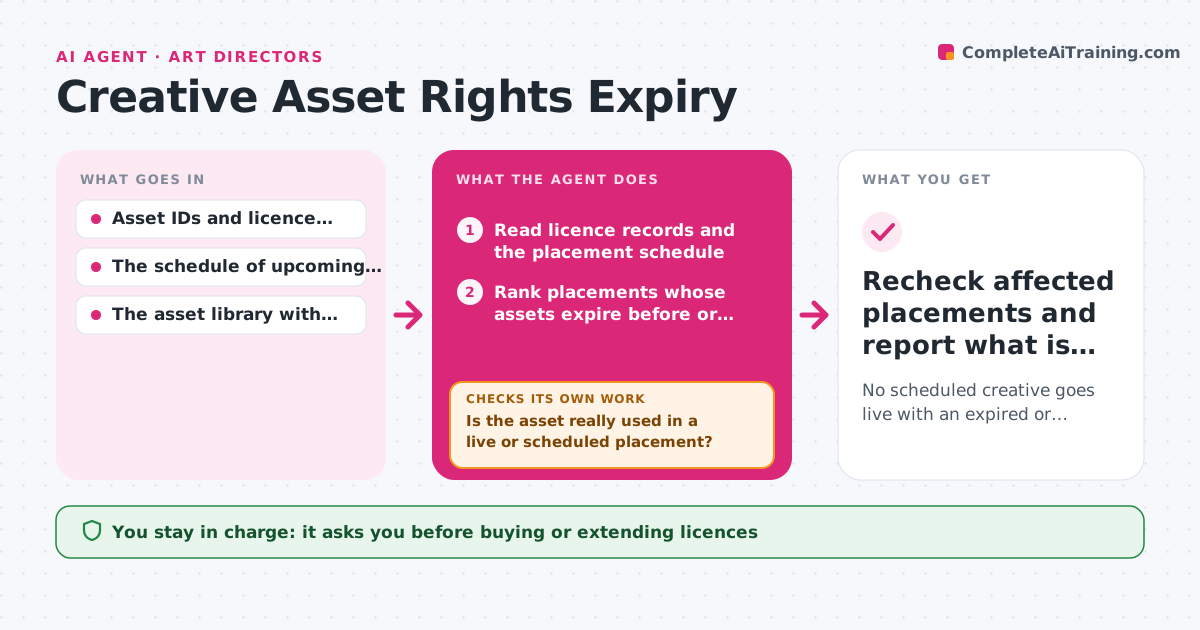
No scheduled creative goes live with an expired or out-of-territory licence.
What it does
Stock photos, music tracks and fonts come with licences that expire or only cover certain countries and media. Studios often discover too late that an asset in a scheduled campaign is no longer covered. This agent reads the rights register and the placement schedule, ranks placements by how soon their licence runs out, and traces each risky asset into the compositions that really use it. For each confirmed risk it searches the library for replacements and tests every candidate against date, territory and media rules. A candidate that fails is discarded and the next one is tested. It renders previews with the passing replacements and builds a review pack. The asset owner picks a replacement or decides to renew. Edge case: an asset listed in the register but no longer used in any composition is dropped, not replaced.
How it works
Follow the arrows from top to bottom. The orange dashed arrow is the loop: when a check fails, the agent goes back and tries again.
Read the steps as a list
- Scheduled rights check or pre-launch run
- Read licence records and the placement schedule
- Rank placements whose assets expire before or during their run
- Trace each risky asset into the compositions that use it
- Is the asset really used in a live or scheduled placement?If not: drop it and take the next risky asset. Back to step 3.
- Search the library for permitted replacement candidates
- Does the candidate pass date, territory and media rules?If not: discard it and test the next candidate. Back to step 6.
- Render previews of the composition with the replacement
- Create replacement tasks and an unresolved-rights queue
- Asset owner selects replacements or decides on new licencesThe agent waits here for your OK.
- Recheck affected placements and report what is cleared
How it decides
It ranks placements by risk (days until go-live versus licence end date) and investigates the most urgent first. For each, it follows asset references into compositions to confirm the asset is really used. It then tests replacement candidates against date, territory and media rules and only proposes those that pass; a failing candidate is dropped and the next one tested.
- Which placement to investigate first: shortest time between go-live and licence expiry.
- Whether an asset is truly at risk: only when it is found inside a scheduled composition.
- Which replacement to propose: the first candidates that pass every rule, ranked by visual similarity.
- When to stop searching: after five failed candidates, queue the placement for a human rights decision.
Make it yours
Every agent is a starting point. You choose these settings for your own situation.
- Look-ahead window for expiring licences (default 30 days before go-live)
- Maximum candidates tested before the placement goes to a human rights decision (default 5)
- Asset libraries the agent may search for replacements (default the studio's licensed stock and in-house shoots)
- Schedule for the check (default weekly plus before each launch)
- Who approves replacements and licence renewals (default the asset owner)
What keeps you in control
It always asks you first
- Buying or extending licences
- Legal interpretation of licence terms
- Publishing any replacement into a live placement
Hard limits
- Read-only access to the rights register.
- Never publishes or swaps assets in live placements.
- Never interprets ambiguous licence clauses; those go to a person.
It stops when
- Done: every at-risk placement has an approved replacement or a logged rights decision.
- Blocked: licence records are missing or contradictory.
- Nothing to do: no scheduled asset expires within the look-ahead window.
Set it up
We guide you through the set-up, step by step
Members get the full set-up guide for this agent. No technical skills needed: you copy, paste and upload.
- One set of instructions to paste into your AI, with the clicks for ChatGPT, Claude, Microsoft 365 Copilot, Gemini and Grok
- The agent then walks you through connecting your own data, one source at a time
- A downloadable copy with the flow chart, the rules and the full guide