AI agent for influencer marketing managers
Creator Outreach Follow-up Agent
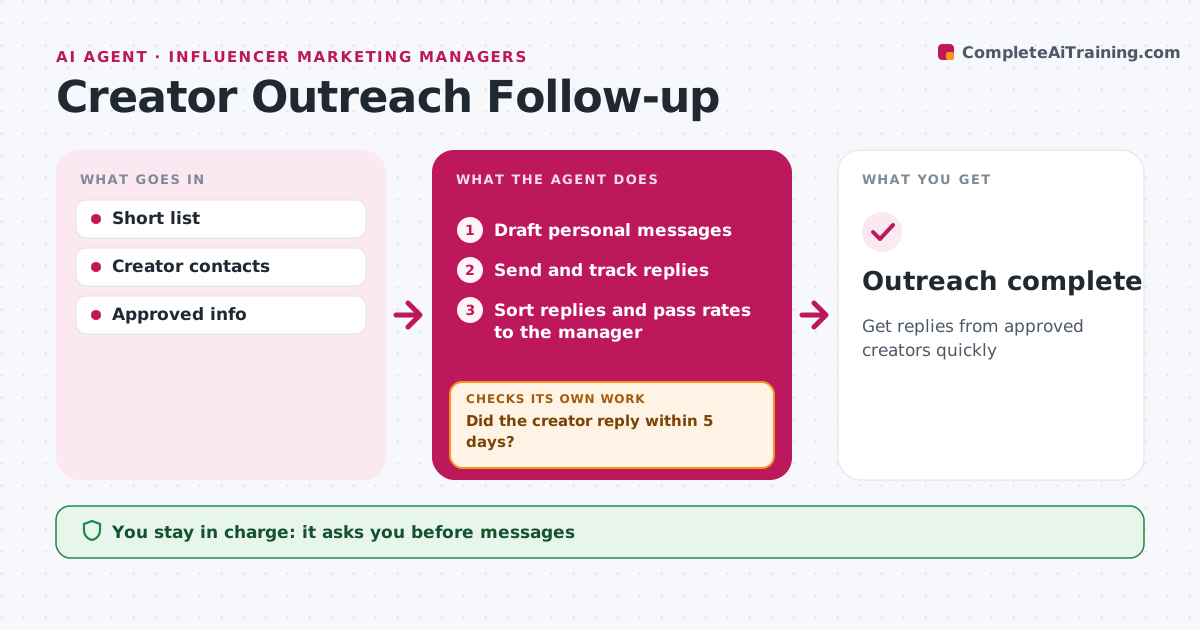
Get replies from approved creators quickly
What it does
Outreach to creators takes many messages, and replies get lost across inboxes. Once the short list is approved, this agent drafts a personal first message for each creator based on their recent content. The manager approves every message before it is sent. The agent then tracks replies. If a creator has not replied within five days, it sends one follow-up through another channel, and stops after that. It reads each reply and sorts it: interested, rates sent, declined or has questions. Common questions get answers from approved information. Rates and any negotiation go to the manager, who handles them personally. Outreach is complete when every creator has replied or had their follow-up. Edge case: creators who list an agent or manager are contacted through that agent, never directly.
How it works
Follow the arrows from top to bottom. The orange dashed arrow is the loop: when a check fails, the agent goes back and tries again.
Read the steps as a list
- Short list approved
- Draft personal messages
- Manager approves messagesThe agent waits here for your OK.
- Send and track replies
- Did the creator reply within 5 days?If not: send one follow-up through another channel. Back to step 4.
- Sort replies and pass rates to the manager
- Outreach complete
How it decides
Replies are sorted by intent. No reply after 5 days triggers a follow-up.
- Agents contacted when listed
- One follow-up only
- Rates passed to manager
Make it yours
Every agent is a starting point. You choose these settings for your own situation.
- Follow-up timing
- Channels
- Message tone
What keeps you in control
It always asks you first
- Messages
Hard limits
- Never negotiates rates
- Never promises deals
It stops when
- Done: all replied or followed up
- Stop: campaign cancelled
Set it up
We guide you through the set-up, step by step
Members get the full set-up guide for this agent. No technical skills needed: you copy, paste and upload.
- One set of instructions to paste into your AI, with the clicks for ChatGPT, Claude, Microsoft 365 Copilot, Gemini and Grok
- The agent then walks you through connecting your own data, one source at a time
- A downloadable copy with the flow chart, the rules and the full guide