AI agent for content marketing managers
Freelance Content Delivery Chase Agent
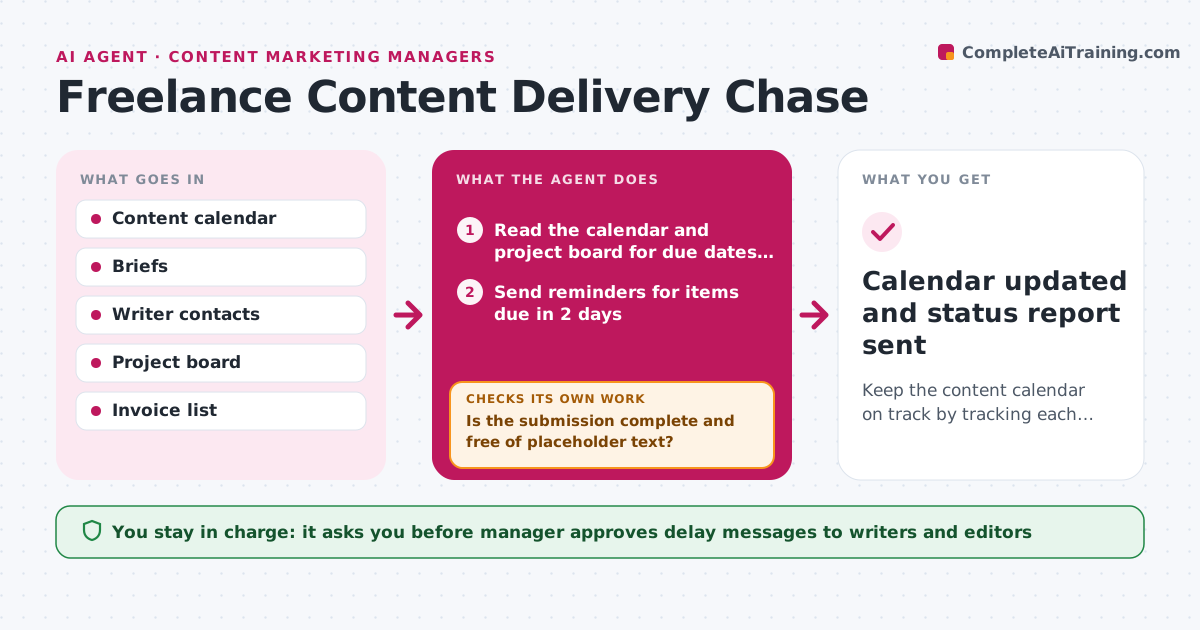
Keep the content calendar on track by tracking each delivery and re-planning when one slips.
What it does
With a dozen freelancers, someone is always late, and the calendar slips quietly. The agent keeps the due date for every draft and revision. It sends friendly reminders before each deadline, then checks the project board for a submission. When a draft arrives, it checks completeness against the brief: word count, required sections, sources and images. If parts are missing it asks the writer for exactly those parts. If a draft is still late after a second reminder, it proposes a new calendar plan that moves the dependent posts, and drafts a note to the manager about the delay. Edge case: a writer submits a draft that is the right length but contains placeholder text. The agent catches it. The manager approves every message about delays and any invoice approval.
How it works
Follow the arrows from top to bottom. The orange dashed arrow is the loop: when a check fails, the agent goes back and tries again.
Read the steps as a list
- Daily check starts
- Read the calendar and project board for due dates and submissions
- Send reminders for items due in 2 days
- Open each new submission and compare it with the brief checklist
- Is the submission complete and free of placeholder text?If not: ask the writer for the missing parts and set a new due time. Back to step 4.
- Mark overdue items and send a second reminder
- Is any draft still late after the second reminder?If not: wait for the next daily check. Back to step 6.
- Re-plan dependent posts on the calendar
- Manager approves any message about delaysThe agent waits here for your OK.
- Manager approves invoices for accepted workThe agent waits here for your OK.
- Calendar updated and status report sent
How it decides
A draft is on time or late by its due date. A submission is complete only when it meets the brief's checklist. Slips of more than two days trigger a re-plan.
- Send the first reminder 2 days before the due date
- Send the second reminder 1 day after the due date
- Re-plan when a draft is more than 2 days late
- Hold invoice approval until the draft passes the checklist
Make it yours
Every agent is a starting point. You choose these settings for your own situation.
- Reminder timing (default 2 days before and 1 day after)
- Completeness checklist
- Slip length that triggers a re-plan (default 2 days)
- Channel for reminders
- Invoice approval rules
What keeps you in control
It always asks you first
- Manager approves delay messages to writers and editors
- Manager approves invoices
- Manager approves reassigning a late piece
Hard limits
- Never send a message about a delay without approval
- Do not change a writer's fee
It stops when
- Done: all items for the week delivered or re-planned
- Stop: a writer is unreachable for 3 days, hand off to the manager
Set it up
We guide you through the set-up, step by step
Members get the full set-up guide for this agent. No technical skills needed: you copy, paste and upload.
- One set of instructions to paste into your AI, with the clicks for ChatGPT, Claude, Microsoft 365 Copilot, Gemini and Grok
- The agent then walks you through connecting your own data, one source at a time
- A downloadable copy with the flow chart, the rules and the full guide