AI agent for influencer marketing managers
Creator Promo Code Attribution Agent
Creator sales and commissions are based on one reconciled number that both sides can check.
What it does
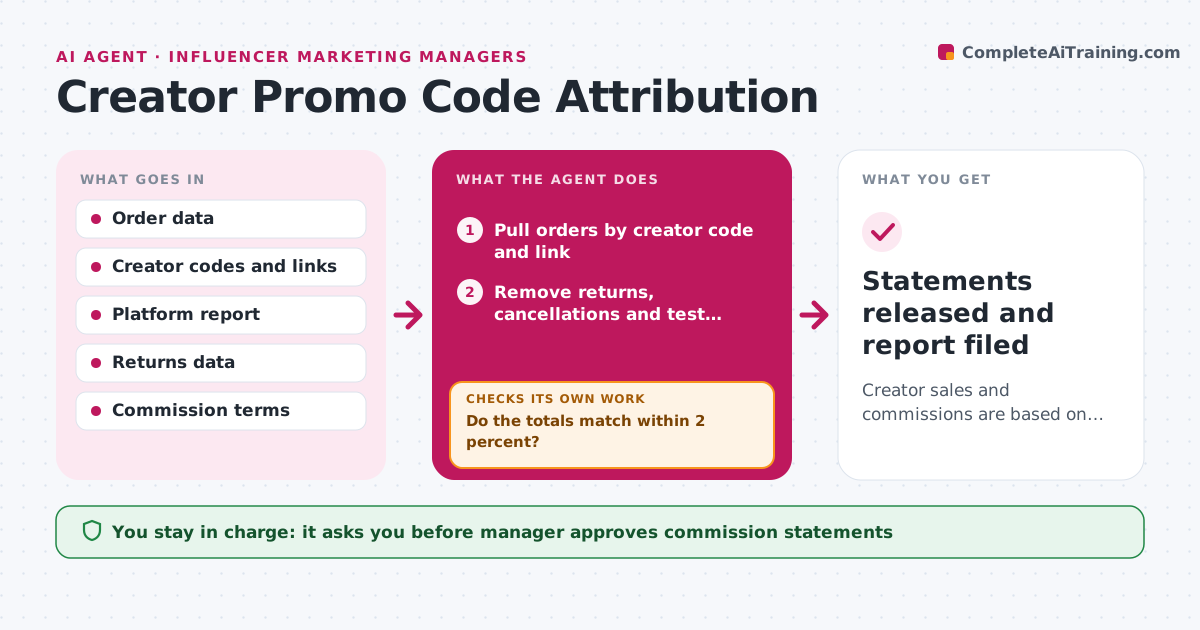
A creator says their code drove 400 sales, the store report says 310, and the tracking platform says 350. This agent pulls the orders that used each creator's code or link every week. It checks whether codes have leaked to coupon sites, which inflates the count, and whether returns and cancellations should be removed. It reconciles the totals with the platform report and lists mismatches. For each gap it investigates the cause and reruns the numbers. Once totals agree within tolerance, it drafts commission statements. The manager approves them before creators see them. Edge case: a code appears on a coupon site, so sales after that date are marked as leaked.
How it works
Follow the arrows from top to bottom. The orange dashed arrow is the loop: when a check fails, the agent goes back and tries again.
Read the steps as a list
- Weekly attribution run
- Pull orders by creator code and link
- Remove returns, cancellations and test orders
- Search coupon and deal sites for leaked codes
- Reconcile store totals with the platform report
- Do the totals match within 2 percent?If not: investigate duplicates, date gaps and refunds, then rerun the reconciliation. Back to step 4.
- Apply the contract's attribution rule and commission rate
- Are leaked-code orders handled as the contract says?If not: split the orders by date of leak and recompute. Back to step 6.
- Draft commission statements with the order list
- Manager approves commission statementsThe agent waits here for your OK.
- Statements released and report filed
How it decides
It reconciles until totals match within 2 percent, and counts only completed, unreturned orders under the contract's attribution rule.
- Match totals within 2 percent before drafting statements.
- Count only completed, unreturned orders.
- Flag a code as leaked once found on a public coupon site.
- Hold commissions with unresolved gaps above 5 percent.
Make it yours
Every agent is a starting point. You choose these settings for your own situation.
- Match tolerance (default 2 percent)
- Attribution rule
- Coupon sites searched
- Statement format
What keeps you in control
It always asks you first
- Manager approves commission statements
Hard limits
- Show the order list behind every number
- Never pay a commission itself
It stops when
- Done: totals match and statements approved.
- Stop: gap above 5 percent after 2 reruns, so the manager reviews.
Set it up
We guide you through the set-up, step by step
Members get the full set-up guide for this agent. No technical skills needed: you copy, paste and upload.
- One set of instructions to paste into your AI, with the clicks for ChatGPT, Claude, Microsoft 365 Copilot, Gemini and Grok
- The agent then walks you through connecting your own data, one source at a time
- A downloadable copy with the flow chart, the rules and the full guide