AI agent for police officers
Crime Pattern Review for Patrol Planning Agent
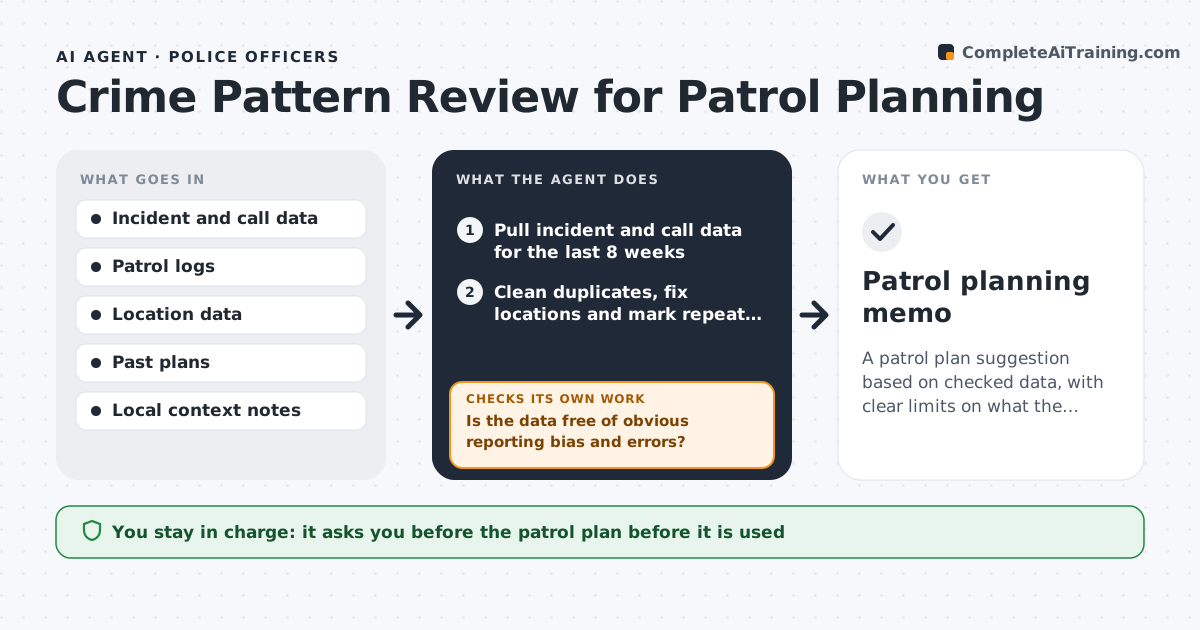
A patrol plan suggestion based on checked data, with clear limits on what the data can say
What it does
Patrol routes often follow last year's habits, while crime and calls shift week to week. This agent analyzes recent incident and call data by place and time of day. Before it finds patterns, it checks the data for reporting bias and errors, such as places with more reports only because there is more patrol, duplicate entries and wrong coordinates. It identifies where and when certain incident types cluster, and compares them to the usual baseline. It proposes a patrol focus, such as a block-level hot spot during specific hours, with a note on what it is based on and how sure it is. When new data arrives, it reruns the analysis and checks whether the pattern holds. The supervisor approves. Edge case: a cluster driven by one repeat caller is reported as a single issue, not a pattern.
How it works
Follow the arrows from top to bottom. The orange dashed arrow is the loop: when a check fails, the agent goes back and tries again.
Read the steps as a list
- Weekly review or spike reported
- Pull incident and call data for the last 8 weeks
- Clean duplicates, fix locations and mark repeat callers
- Is the data free of obvious reporting bias and errors?If not: adjust for patrol exposure, remove errors and clean again. Back to step 3.
- Find clusters by place and time and compare to the baseline
- Test whether each cluster holds across weeks
- Does the pattern persist for at least 3 weeks?If not: mark it as a short spike and exclude it from the plan. Back to step 4.
- Propose patrol focus areas and hours with confidence notes
- Supervisor approves the planThe agent waits here for your OK.
- Patrol planning memo
How it decides
A pattern is reported when incidents cluster above the baseline across several weeks after cleaning the data. Patterns driven by one person or location are labeled as such.
- Report a pattern only if it persists for 3 or more weeks
- Treat one repeat caller as one issue
- Adjust counts for patrol exposure before comparing places
- State the data limits in every memo
Make it yours
Every agent is a starting point. You choose these settings for your own situation.
- Time window (default 8 weeks)
- Persistence rule (default 3 weeks)
- Incident types to analyze
- Plan format
What keeps you in control
It always asks you first
- The patrol plan before it is used
Hard limits
- Never targets individuals
- Never presents a pattern as a prediction of who will offend
It stops when
- Done: the memo is approved
- Stop: location data quality is too poor to analyze
Set it up
We guide you through the set-up, step by step
Members get the full set-up guide for this agent. No technical skills needed: you copy, paste and upload.
- One set of instructions to paste into your AI, with the clicks for ChatGPT, Claude, Microsoft 365 Copilot, Gemini and Grok
- The agent then walks you through connecting your own data, one source at a time
- A downloadable copy with the flow chart, the rules and the full guide