AI agent for crisis communications managers
Crisis Contact Tree Verification Agent
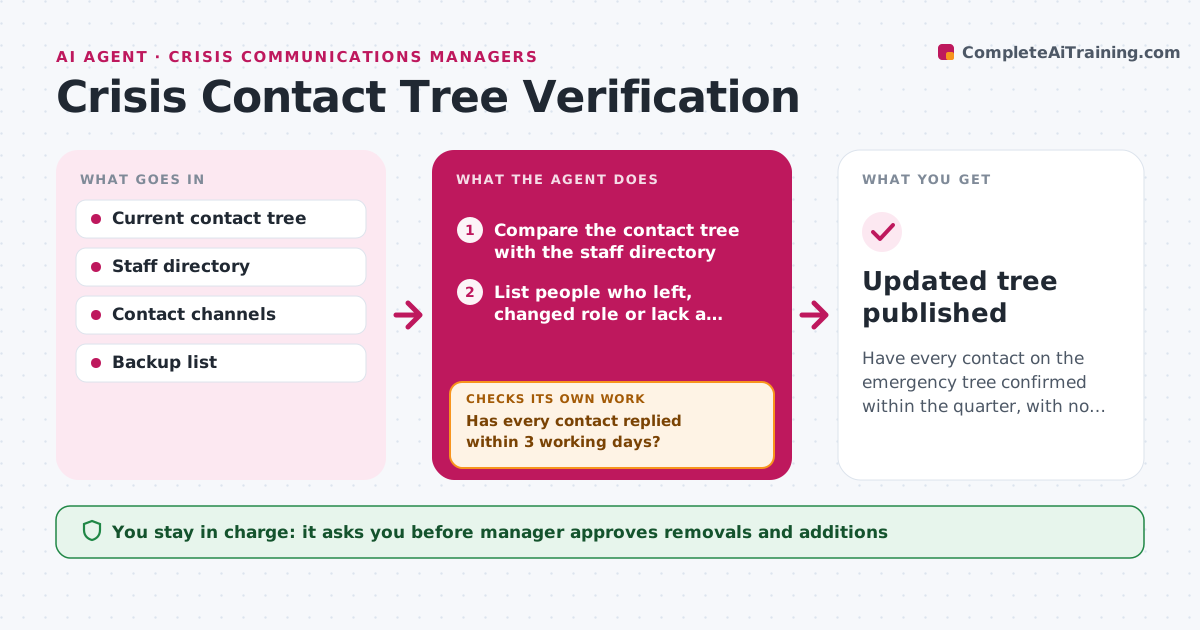
Have every contact on the emergency tree confirmed within the quarter, with no outdated entries.
What it does
The emergency contact tree is only as good as its last check, and most are last checked during a drill nobody remembers. Every quarter the agent sends each person on the list a confirmation request asking them to verify phone, email, backup contact and availability. It tracks who replies and when. For people who do not reply, it retries through another channel, such as text after email, then reminds their backup, and finally reports the unreachable ones. It also checks the list against the staff directory, to catch people who left or changed roles. It then updates the tree with confirmed details and lists proposed removals and additions. Edge case: a contact who is on long leave and needs a deputy named. The manager approves final changes and removals.
How it works
Follow the arrows from top to bottom. The orange dashed arrow is the loop: when a check fails, the agent goes back and tries again.
Read the steps as a list
- Quarterly verification begins
- Compare the contact tree with the staff directory
- List people who left, changed role or lack a backup
- Send each contact a confirmation request by email
- Track replies and record the confirmed details
- Has every contact replied within 3 working days?If not: retry by text or phone, then ask the backup contact. Back to step 4.
- Mark contacts still silent after three tries as unreachable
- Draft the updated tree with proposed removals and additions
- Does every role in the tree have a confirmed primary and backup?If not: request a new backup from the role owner. Back to step 4.
- Manager approves final changes and removalsThe agent waits here for your OK.
- Updated tree published
How it decides
A contact is verified only after a reply confirms details. Entries with no reply after three tries through two channels are flagged unreachable.
- Retry through a second channel after 3 working days
- Mark unreachable after 3 tries over 2 channels
- Every role needs a confirmed primary and a backup
- Remove a person only after the manager approves
Make it yours
Every agent is a starting point. You choose these settings for your own situation.
- Contact channels and order
- Retry timing (default 3 working days)
- Roles that need backups
- Run schedule
- Where the tree is stored
What keeps you in control
It always asks you first
- Manager approves removals and additions
- Manager approves sending reminders to senior leaders
Hard limits
- Use contact details only for this purpose
- Do not remove anyone without approval
It stops when
- Done: tree confirmed and published
- Stop: the directory is unavailable, report and keep the old tree marked unverified
Set it up
We guide you through the set-up, step by step
Members get the full set-up guide for this agent. No technical skills needed: you copy, paste and upload.
- One set of instructions to paste into your AI, with the clicks for ChatGPT, Claude, Microsoft 365 Copilot, Gemini and Grok
- The agent then walks you through connecting your own data, one source at a time
- A downloadable copy with the flow chart, the rules and the full guide