AI agent for customer experience managers
Customer Journey Drop-off Agent
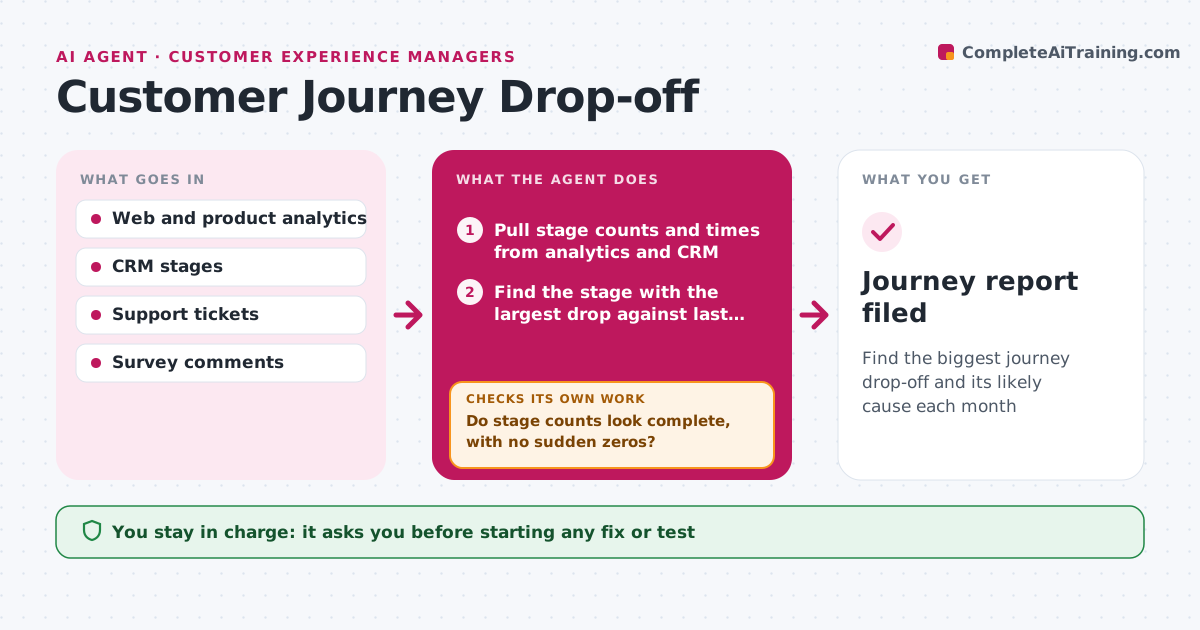
Find the biggest journey drop-off and its likely cause each month
What it does
Customers leak out of the journey at some stage every month, but finding where and why takes hours of digging. This agent pulls stage counts and times from analytics and the CRM: first visit, signup, first use, purchase, onboarding and renewal. It first checks the counts look complete, with no sudden zeros, since a tracking change can break a stage. Then it finds the stage with the biggest drop against last quarter and splits it by channel, device and segment, reading related feedback. It only names a cause when two sources agree. If they do not, it adds support tickets or session data and looks again. It drafts a short finding with the likely cause and one fix to test. The manager decides what to act on. Edge case: a stage reading zero triggers a tracking check before any analysis.
How it works
Follow the arrows from top to bottom. The orange dashed arrow is the loop: when a check fails, the agent goes back and tries again.
Read the steps as a list
- Monthly journey review
- Pull stage counts and times from analytics and CRM
- Do stage counts look complete, with no sudden zeros?If not: check for tracking changes and pull from the backup source. Back to step 2.
- Find the stage with the largest drop against last quarter
- Split by channel, device and segment and read related feedback
- Do two sources point to the same cause?If not: add support tickets or session data and look again. Back to step 5.
- Draft finding and suggested fix
- Manager decides what to act onThe agent waits here for your OK.
- Journey report filed
How it decides
It focuses on the stage with the largest drop compared with last quarter and needs data from two sources before naming a cause.
- Focus on one stage per month
- Need two sources agreeing before naming a cause
- Flag tracking problems before analysis
Make it yours
Every agent is a starting point. You choose these settings for your own situation.
- Journey stages
- Comparison period
- Segments to split by
- Sources used
What keeps you in control
It always asks you first
- Starting any fix or test
Hard limits
- Read-only data access
- Does not contact customers
It stops when
- Done: report filed
- Stop: tracking broken, report to analytics owner
Set it up
We guide you through the set-up, step by step
Members get the full set-up guide for this agent. No technical skills needed: you copy, paste and upload.
- One set of instructions to paste into your AI, with the clicks for ChatGPT, Claude, Microsoft 365 Copilot, Gemini and Grok
- The agent then walks you through connecting your own data, one source at a time
- A downloadable copy with the flow chart, the rules and the full guide