AI agent for franchise owners
Customer Review and Reputation Response Agent
Draft accurate, personal replies to every new review within two days, with risky ones flagged for a person.
What it does
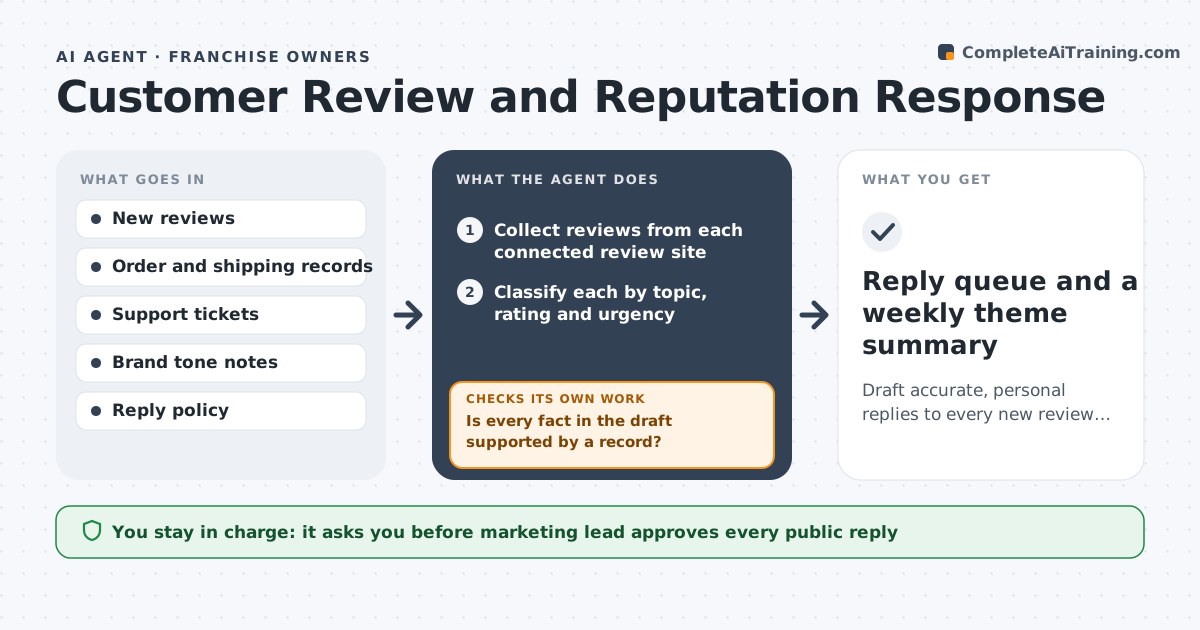
Negative reviews sit for weeks, and the replies that do go out are copy and paste. This agent collects new reviews from your review sites each day and sorts them by topic and mood. For each complaint it looks up the order, shipment and support ticket behind it, so the reply states what really happened. It drafts a reply in your tone and checks every fact in it against the records. If the draft claims a refund that the records do not show, it rewrites the reply. Reviews that mention injury, illegal acts, a named employee or a lawsuit are flagged and never drafted without a note. A person approves every public reply before it posts.
How it works
Follow the arrows from top to bottom. The orange dashed arrow is the loop: when a check fails, the agent goes back and tries again.
Read the steps as a list
- New reviews arrive
- Collect reviews from each connected review site
- Classify each by topic, rating and urgency
- Match each complaint to the order and support ticket
- Flag mentions of injury, legal threats, staff names or fraud
- Draft a reply using only confirmed facts
- Is every fact in the draft supported by a record?If not: remove or fix the unsupported claim and redraft. Back to step 6.
- Add a suggested fix or offer within policy
- Marketing lead approves each public replyThe agent waits here for your OK.
- Reply queue and a weekly theme summary
How it decides
It matches the review to a customer record, then drafts a reply only from facts it can confirm, and flags any legal or safety words for escalation.
- Flag any review that mentions injury, lawsuit, allergy or fraud
- Reply to 1 and 2 star reviews first
- If no matching order is found, draft a request for details, not an apology for a fact
- Offer a refund or credit only if the policy allows it for that case
Make it yours
Every agent is a starting point. You choose these settings for your own situation.
- Review sites to watch
- Star rating that counts as negative (default 3 or below)
- Reply tone and sign-off
- Words that trigger escalation
- Maximum days before an unanswered review is flagged (default 2)
What keeps you in control
It always asks you first
- Marketing lead approves every public reply
- Legal or founder approves replies to flagged reviews
Hard limits
- Never posts a reply on its own
- Never discloses customer details in a public reply
It stops when
- Done: every new review has an approved reply or a reason it was skipped
- Stop: review cannot be matched and mentions a legal issue, so it goes to a person
Set it up
We guide you through the set-up, step by step
Members get the full set-up guide for this agent. No technical skills needed: you copy, paste and upload.
- One set of instructions to paste into your AI, with the clicks for ChatGPT, Claude, Microsoft 365 Copilot, Gemini and Grok
- The agent then walks you through connecting your own data, one source at a time
- A downloadable copy with the flow chart, the rules and the full guide