AI agent for insurance data analysts
Customer Segmentation Refresh Agent
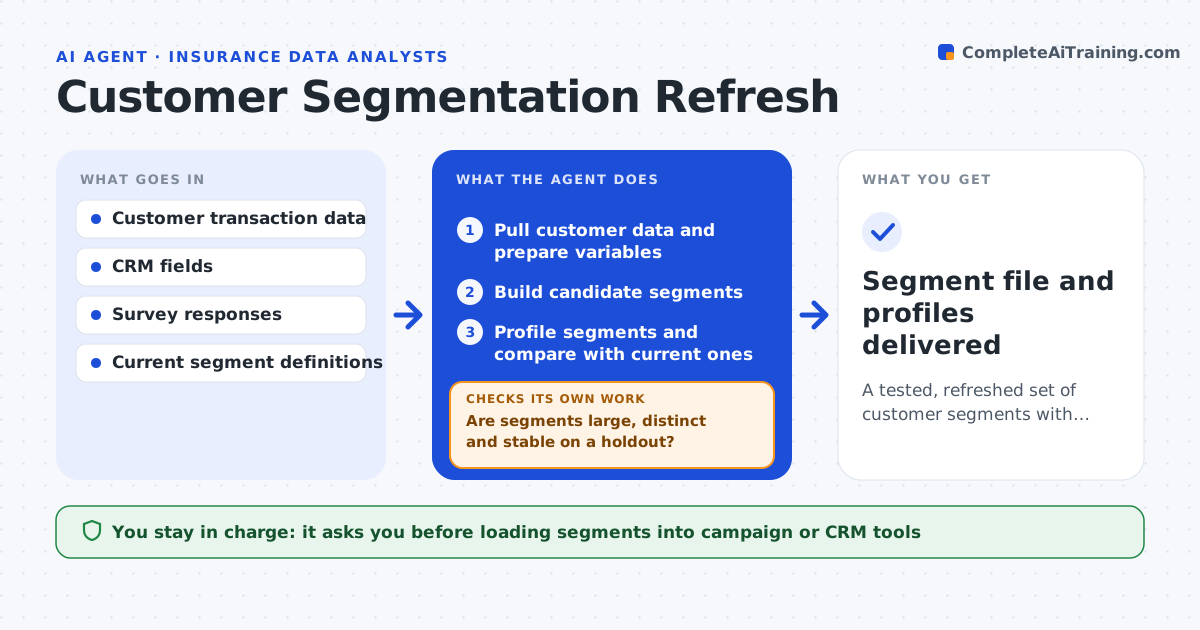
A tested, refreshed set of customer segments with clear profiles
What it does
Customer segments are useful only if they still describe real groups, but they are often built once and left to drift. This agent pulls customer data such as purchases, channel and survey answers, builds candidate segments and tests whether they are stable and different enough to act on. A segment driven by one large customer has that customer's weight capped. If segments are too small or too similar, it changes the variables or the number of segments and reruns. It compares new segments with current ones and shows which customers moved. Each segment gets a plain language profile. The marketing or research lead approves before segments go into campaign tools.
How it works
Follow the arrows from top to bottom. The orange dashed arrow is the loop: when a check fails, the agent goes back and tries again.
Read the steps as a list
- Segmentation refresh scheduled
- Pull customer data and prepare variables
- Build candidate segments
- Are segments large, distinct and stable on a holdout?If not: change variables or segment count and rebuild. Back to step 3.
- Profile segments and compare with current ones
- Draft segment profiles and migration summary
- Lead approves segments for use in campaignsThe agent waits here for your OK.
- Segment file and profiles delivered
How it decides
It keeps a segmentation only when each segment is above the minimum size, clearly different from others, and stable on a holdout sample.
- Minimum segment size is 5% of customers
- Holdout agreement under 80% means unstable
- Single customers capped at 2% of segment weight
Make it yours
Every agent is a starting point. You choose these settings for your own situation.
- Variables used
- Minimum segment size
- Number of segments to test
- Refresh frequency
What keeps you in control
It always asks you first
- Loading segments into campaign or CRM tools
Hard limits
- Does not use protected characteristics
- Works on de-identified data
It stops when
- Done: segments approved
- Stop: data has under the minimum number of customers
Set it up
We guide you through the set-up, step by step
Members get the full set-up guide for this agent. No technical skills needed: you copy, paste and upload.
- One set of instructions to paste into your AI, with the clicks for ChatGPT, Claude, Microsoft 365 Copilot, Gemini and Grok
- The agent then walks you through connecting your own data, one source at a time
- A downloadable copy with the flow chart, the rules and the full guide