AI agent for erp consultants
Go-Live Support Hypercare Agent
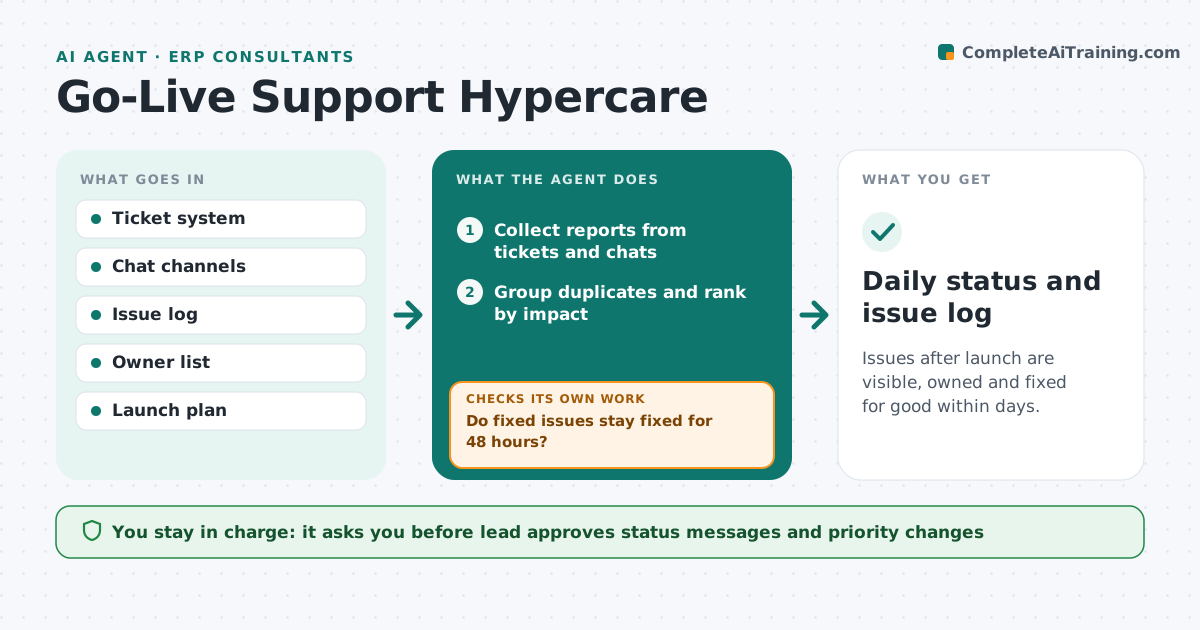
Issues after launch are visible, owned and fixed for good within days.
What it does
After a go-live, issues arrive through tickets, chat and hallway reports. Fixes are late because nobody sees the full picture. For the first weeks, this agent collects reports from tickets and chats, groups them, ranks them by impact, assigns owners and checks that fixes hold. It reopens issues that return. It drafts a daily status. It decides by the number of users affected and whether a workaround exists. The lead approves what is communicated. It counts an issue as stable only after two days without a repeat, so quick fixes that fail overnight come back to the list. It never tells users anything until the lead approves the wording. Edge case: an issue marked fixed returns after the nightly job, so the agent reopens it and notes the pattern.
How it works
Follow the arrows from top to bottom. The orange dashed arrow is the loop: when a check fails, the agent goes back and tries again.
Read the steps as a list
- Daily hypercare check
- Collect reports from tickets and chats
- Group duplicates and rank by impact
- Assign owners and target times
- Check whether earlier fixes still hold
- Do fixed issues stay fixed for 48 hours?If not: reopen the issue and note the pattern. Back to step 2.
- Draft the daily status
- Lead approves what is communicatedThe agent waits here for your OK.
- Daily status and issue log
How it decides
It ranks issues by users affected and the absence of a workaround. It treats an issue as fixed only after 48 hours without a repeat.
- Rank by users affected and no workaround
- Treat fixed as stable after 48 hours
- Merge duplicate reports
- Escalate any issue open over 3 days
Make it yours
Every agent is a starting point. You choose these settings for your own situation.
- Hypercare length in weeks
- Stability window (default 48 hours)
- Impact ranking
- Status audience
- Escalation days
What keeps you in control
It always asks you first
- Lead approves status messages and priority changes
Hard limits
- Never close an issue without evidence
- Never send status to users without approval
It stops when
- Done: all issues closed and stable
- Stop: hypercare ends and open items are handed to support
Set it up
We guide you through the set-up, step by step
Members get the full set-up guide for this agent. No technical skills needed: you copy, paste and upload.
- One set of instructions to paste into your AI, with the clicks for ChatGPT, Claude, Microsoft 365 Copilot, Gemini and Grok
- The agent then walks you through connecting your own data, one source at a time
- A downloadable copy with the flow chart, the rules and the full guide