AI agent for chief digital officers
Data Product Adoption Review Agent
A leaner data product catalog where unused items are retired and good ones get support
What it does
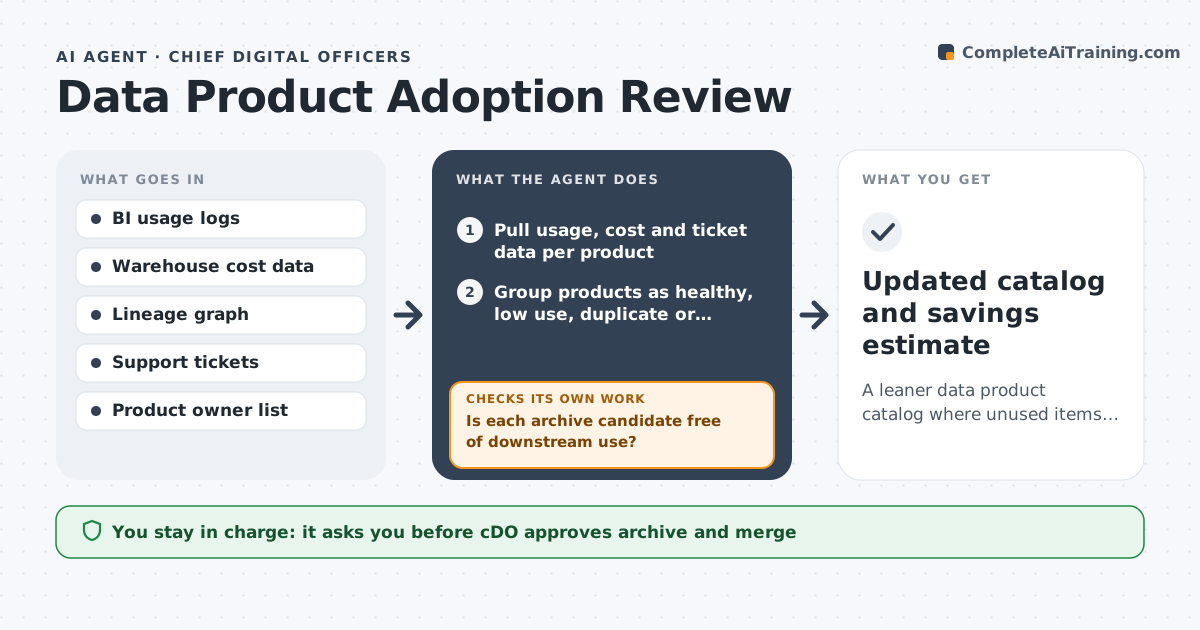
Data teams build reports that nobody opens after launch, and each one still needs upkeep. Every quarter this agent pulls usage logs, storage and compute costs, and support tickets for every dashboard, data set and model. It groups each one as healthy, low use, duplicate or unused. Before calling something unused, it checks whether it feeds another product, so nothing upstream is retired by mistake. If a dependency exists, it moves the item back to review. It drafts notices to owners proposing archive, merge or promotion, and tracks replies. It decides between archive and merge by checking overlap with other products. The CDO approves any archive, and owners can object. Edge case: a report used only at year end is kept if it was opened in the last annual cycle.
How it works
Follow the arrows from top to bottom. The orange dashed arrow is the loop: when a check fails, the agent goes back and tries again.
Read the steps as a list
- Quarter ends
- Pull usage, cost and ticket data per product
- Group products as healthy, low use, duplicate or unused
- Check lineage for downstream dependencies
- Is each archive candidate free of downstream use?If not: move it back to low use and note the dependency. Back to step 3.
- Draft owner notices with archive, merge or keep proposals
- Did each owner reply within 14 days?If not: send one reminder, then list it for the CDO. Back to step 6.
- CDO approves archives and mergesThe agent waits here for your OK.
- Updated catalog and savings estimate
How it decides
Items with no opens in 90 days and no downstream use are archive candidates; items with over 70 percent field overlap are merge candidates.
- No opens in 90 days and no downstream use means archive candidate
- Over 70 percent field overlap means merge candidate
- Year-end reports are kept if used in the last annual cycle
- Owner objection with a reason keeps the item for one more quarter
Make it yours
Every agent is a starting point. You choose these settings for your own situation.
- Unused window (default 90 days)
- Overlap threshold for merges (default 70 percent)
- Owner reply window (default 14 days)
- Products in scope (default dashboards and data sets)
What keeps you in control
It always asks you first
- CDO approves archive and merge
- Owner can object before archive
Hard limits
- Never deletes data; archive is reversible
- Never archives without CDO approval
It stops when
- Done: catalog updated
- Stop: lineage data is incomplete for a domain
Set it up
We guide you through the set-up, step by step
Members get the full set-up guide for this agent. No technical skills needed: you copy, paste and upload.
- One set of instructions to paste into your AI, with the clicks for ChatGPT, Claude, Microsoft 365 Copilot, Gemini and Grok
- The agent then walks you through connecting your own data, one source at a time
- A downloadable copy with the flow chart, the rules and the full guide