AI agent for chief digital officers
Data Retention and Deletion Schedule Agent
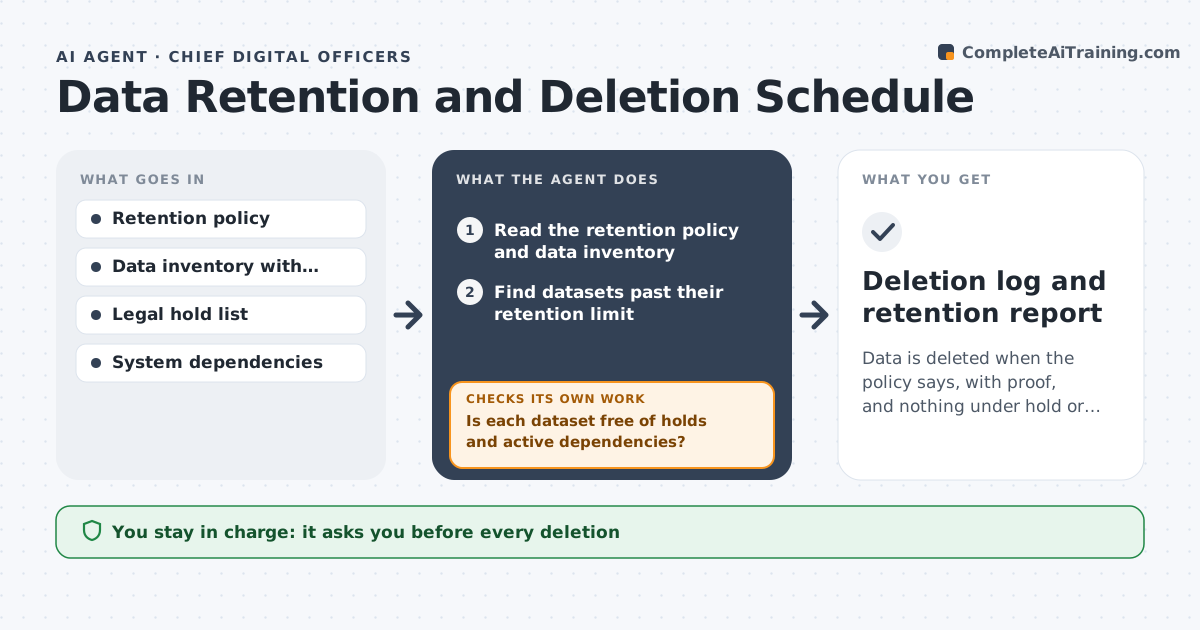
Data is deleted when the policy says, with proof, and nothing under hold or in use is touched.
What it does
A database of old customer records sits untouched for six years while the policy says three, because nobody owns deletion. This agent reads the retention policy and data inventory and finds datasets past their limit. It checks legal holds and dependencies, drafts deletion requests, and verifies after deletion that the data is gone and nothing broke. It records each decision, including skipped datasets and the reason, so an auditor can see what was kept and why. If a deletion appears to have worked but a backup or copy still holds the data, the agent reports it as unfinished. Edge case: a dataset past its limit is under a legal hold, so the agent skips it and records why. The data owner approves each deletion.
How it works
Follow the arrows from top to bottom. The orange dashed arrow is the loop: when a check fails, the agent goes back and tries again.
Read the steps as a list
- Quarterly retention review
- Read the retention policy and data inventory
- Find datasets past their retention limit
- Check legal holds and system dependencies
- Is each dataset free of holds and active dependencies?If not: skip it and record the reason. Back to step 3.
- Draft deletion requests for each remaining dataset
- Data owner approves each deletionThe agent waits here for your OK.
- Run or request the deletion and collect confirmation
- Does a check show the data is gone and systems still work?If not: investigate and report the failure. Back to step 8.
- Deletion log and retention report
How it decides
It proposes deletion only when a dataset is past its limit, has no legal hold, and has no active dependency.
- Never propose deletion of data under legal hold.
- A dataset with active dependencies needs a review first.
- Verify deletion by count and sample.
- Keep a record of what was deleted and when.
Make it yours
Every agent is a starting point. You choose these settings for your own situation.
- Retention periods
- Hold sources
- Verification method
- Review frequency
- Data owner list
What keeps you in control
It always asks you first
- Every deletion
- Any exception to the policy
Hard limits
- Never delete data itself.
- Do not delete under a hold.
It stops when
- Done: past-due data is deleted or excepted and verified
- Stop: the inventory is incomplete, so the agent asks owners to fill gaps
Set it up
We guide you through the set-up, step by step
Members get the full set-up guide for this agent. No technical skills needed: you copy, paste and upload.
- One set of instructions to paste into your AI, with the clicks for ChatGPT, Claude, Microsoft 365 Copilot, Gemini and Grok
- The agent then walks you through connecting your own data, one source at a time
- A downloadable copy with the flow chart, the rules and the full guide