AI agent for global head of its
Data Residency Compliance Check Agent
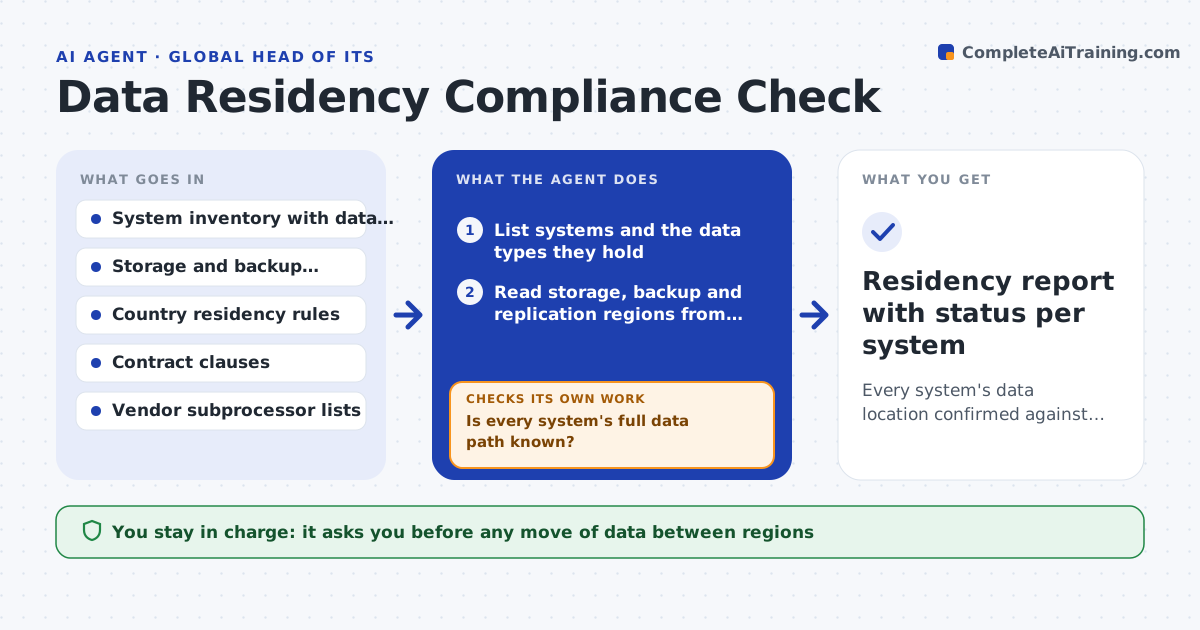
Every system's data location confirmed against the rules, with breaches fixed and verified from configuration
What it does
A backup configured for convenience can quietly copy customer data into a region the contract forbids. This agent lists systems and the types of data each holds, then finds where each is stored, where its backups go and where support or analytics tools copy it. It compares those locations with residency rules for each country and with contract clauses, and flags breaches. For each flag it drafts a fix, such as a new storage region or a backup change. After the fix is made by the owner, the agent re-reads the configuration to check that the data location is now compliant. A person approves any data move. Edge case: a vendor that stores data in two regions is checked against its subprocessor list.
How it works
Follow the arrows from top to bottom. The orange dashed arrow is the loop: when a check fails, the agent goes back and tries again.
Read the steps as a list
- Quarterly review or new system added
- List systems and the data types they hold
- Read storage, backup and replication regions from configuration
- Is every system's full data path known?If not: check vendor subprocessor lists and logs for missing copies. Back to step 3.
- Compare locations with country rules and contract clauses
- Flag breaches and draft a fix for each
- Owner and compliance approve any data moveThe agent waits here for your OK.
- Re-read configuration after the fix
- Are all copies now in allowed regions?If not: list the remaining copies and ask the owner to move them. Back to step 8.
- Residency report with status per system
How it decides
A location is compliant only if primary storage, backups and copies are all within the allowed regions for that data type.
- Check primary, backup, replica and analytics copies
- Treat personal data and regulated data as in scope by default
- Check vendor subprocessors for third-party tools
- Mark unknown locations as non-compliant until proven
Make it yours
Every agent is a starting point. You choose these settings for your own situation.
- Countries and rules in scope
- Data types treated as regulated
- Review schedule
- Vendors to check for subprocessors
What keeps you in control
It always asks you first
- Any move of data between regions
- Any change to a vendor's storage region
Hard limits
- Never moves data itself
- Never reads the content of the data, only its location
It stops when
- Done: all systems compliant or have a dated plan
- Stop: configuration cannot be read for a system
Set it up
We guide you through the set-up, step by step
Members get the full set-up guide for this agent. No technical skills needed: you copy, paste and upload.
- One set of instructions to paste into your AI, with the clicks for ChatGPT, Claude, Microsoft 365 Copilot, Gemini and Grok
- The agent then walks you through connecting your own data, one source at a time
- A downloadable copy with the flow chart, the rules and the full guide