AI agent for data protection officers
Data Subject Request Fulfillment Agent
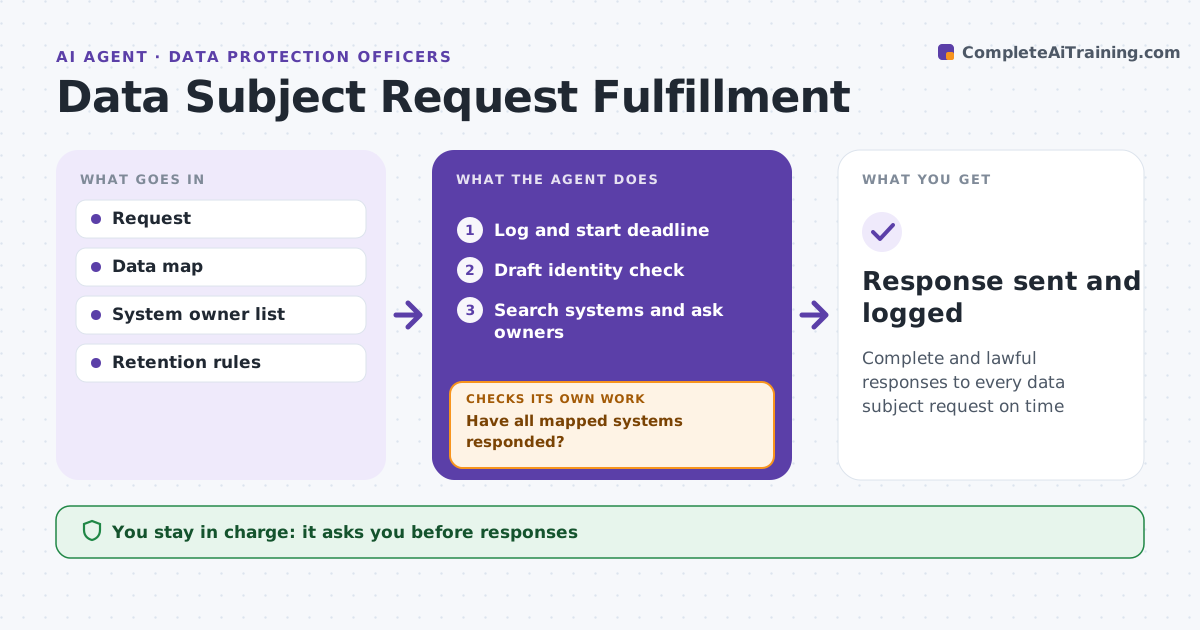
Complete and lawful responses to every data subject request on time
What it does
Requests from people to see, correct or delete their data come with legal deadlines, and records hide in systems nobody remembers. When a request arrives, this agent logs it, starts the deadline clock and drafts an identity check. Once the person is verified, it searches each system on the data map for their records and asks system owners to confirm. It checks that every mapped system has responded and chases those that have not. If it finds records in a system missing from the map, it adds that system. It compiles the results. For access requests it drafts the response package with third-party data redacted. For deletion it lists legal holds and retention exceptions with reasons. The DPO approves every response. Edge case: the person has an open complaint, so some records must be kept, which the agent notes in the reply.
How it works
Follow the arrows from top to bottom. The orange dashed arrow is the loop: when a check fails, the agent goes back and tries again.
Read the steps as a list
- Request received
- Log and start deadline
- Draft identity check
- Search systems and ask owners
- Have all mapped systems responded?If not: chase remaining owners. Back to step 4.
- Compile response with redactions or deletion plan
- DPO approves responseThe agent waits here for your OK.
- Response sent and logged
How it decides
It searches every mapped system and applies retention and legal hold rules.
- Deadline 30 days from verification
- Legal hold: keep and explain
- Third-party data: redact
Make it yours
Every agent is a starting point. You choose these settings for your own situation.
- Deadlines by law
- Systems in scope
- Identity rules
- Response template
What keeps you in control
It always asks you first
- Responses
- Deletions
Hard limits
- Never deletes data itself
- Never sends without approval
It stops when
- Done: response sent
- Stop: identity not verified
Set it up
We guide you through the set-up, step by step
Members get the full set-up guide for this agent. No technical skills needed: you copy, paste and upload.
- One set of instructions to paste into your AI, with the clicks for ChatGPT, Claude, Microsoft 365 Copilot, Gemini and Grok
- The agent then walks you through connecting your own data, one source at a time
- A downloadable copy with the flow chart, the rules and the full guide