AI agent for business development managers
Deal Pricing Margin Check Agent
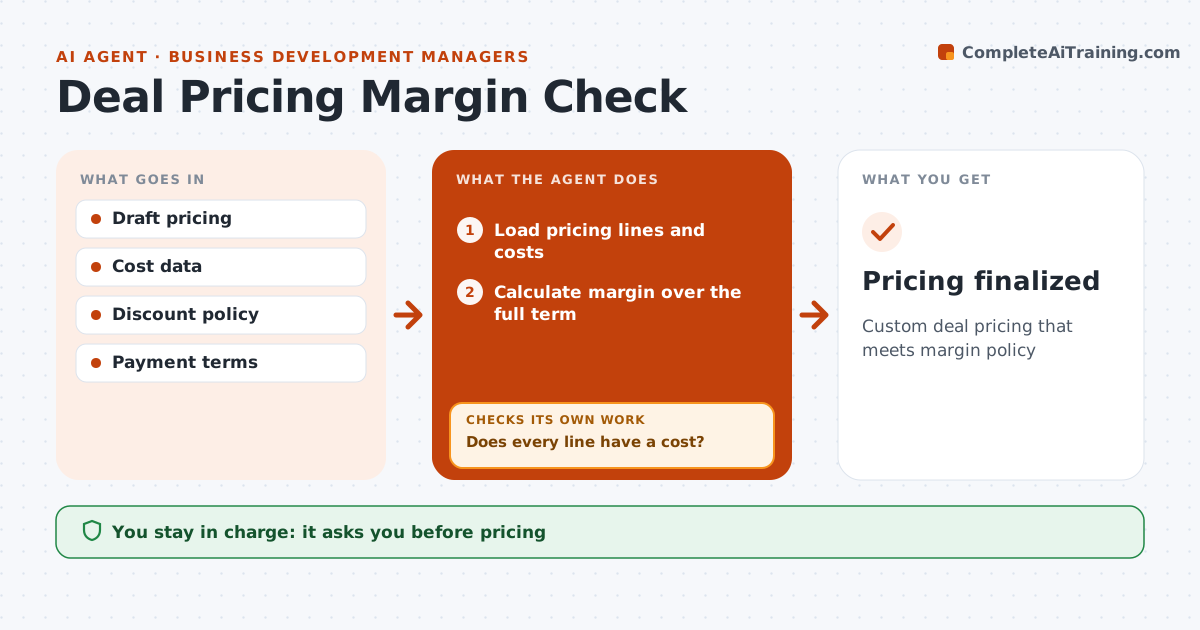
Custom deal pricing that meets margin policy
What it does
Custom proposals often include discounts, extra services and special terms that quietly erode margin. This agent loads the draft pricing and the costs behind each line. It first checks every line has a cost; free services count as cost, and where a cost is missing, it asks delivery for an estimate. It then calculates margin over the full deal term, including discounts, payment terms and later-year price increases, and compares it with the minimum margin policy. If margin is below policy, it suggests changes such as removing free services or shortening payment terms, and recalculates to confirm the change works. The manager approves pricing, and any exception below policy goes to finance. Edge case: a multi-year deal has price increases in later years, so the agent calculates margin over the full term.
How it works
Follow the arrows from top to bottom. The orange dashed arrow is the loop: when a check fails, the agent goes back and tries again.
Read the steps as a list
- Draft pricing ready
- Load pricing lines and costs
- Does every line have a cost?If not: ask delivery for estimates. Back to step 2.
- Calculate margin over the full term
- Compare with the minimum margin policy
- Suggest changes and recalculate
- Does the revised margin meet policy?If not: try further changes or prepare a finance exception. Back to step 6.
- Manager approves pricing; finance approves exceptionsThe agent waits here for your OK.
- Pricing finalized
How it decides
It calculates margin over the deal term and compares with the policy minimum.
- Minimum margin per policy
- Multi-year deals measured over full term
- Free services counted as cost
Make it yours
Every agent is a starting point. You choose these settings for your own situation.
- Margin policy
- Cost sources
- Term length
- Approval levels
What keeps you in control
It always asks you first
- Pricing
- Margin exceptions
Hard limits
- Never sends proposals
- Policy set by finance
It stops when
- Done: pricing approved
- Stop: deal lost
Set it up
We guide you through the set-up, step by step
Members get the full set-up guide for this agent. No technical skills needed: you copy, paste and upload.
- One set of instructions to paste into your AI, with the clicks for ChatGPT, Claude, Microsoft 365 Copilot, Gemini and Grok
- The agent then walks you through connecting your own data, one source at a time
- A downloadable copy with the flow chart, the rules and the full guide