AI agent for machine learning engineers
Decision Threshold Tuning Agent
Set decision thresholds that minimize real-world cost and stay stable as data shifts
What it does
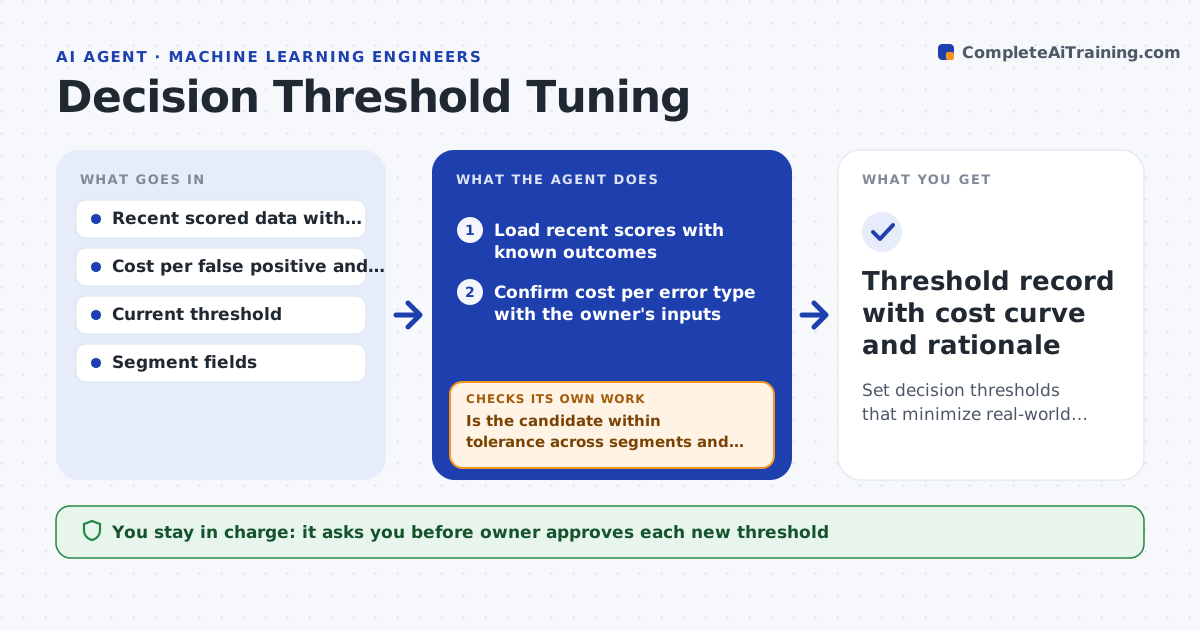
Many teams pick 0.5 as the cutoff and never revisit it, even though a missed fraud case and a false alarm cost very different amounts. This agent starts with the business cost of each error type, written in money or hours. It replays recent scored data at many thresholds, computes total cost at each, and recommends the cheapest one. It then checks stability: does the best threshold hold across customer segments, weeks and volume levels? If not, it proposes separate thresholds or a safer middle value. It also reruns when the score distribution shifts. The owner approves the threshold before it changes. Edge case: the lowest-cost point sits on a steep cliff, so the agent recommends a slightly higher one that is far more stable.
How it works
Follow the arrows from top to bottom. The orange dashed arrow is the loop: when a check fails, the agent goes back and tries again.
Read the steps as a list
- Monthly review or drift alert
- Load recent scores with known outcomes
- Confirm cost per error type with the owner's inputs
- Simulate cost at each threshold
- Pick the lowest-cost candidate and a stable alternative
- Is the candidate within tolerance across segments and weeks?If not: test segment-specific thresholds and a smoother middle value, then resimulate. Back to step 4.
- Owner approves the new thresholdThe agent waits here for your OK.
- Apply the threshold to the decision service
- Does live cost after one week match the simulation within 10%?If not: refresh the data window, look for score drift, and resimulate. Back to step 4.
- Threshold record with cost curve and rationale
How it decides
It picks the threshold with the lowest expected cost, then prefers a nearby value when the cost curve is steep or varies a lot between segments.
- Choose the threshold with the lowest total cost over the last 90 days
- Prefer a different value when cost rises more than 10% for a 0.02 shift
- Use a segment threshold when a segment's best value differs by more than 0.1
- Rerun when the score distribution shifts by more than 0.1 population stability index
Make it yours
Every agent is a starting point. You choose these settings for your own situation.
- Cost of each error type
- Data window (default 90 days)
- Segments to check (default region and customer age)
- Stability tolerance (default 10%)
- Review schedule (default monthly)
What keeps you in control
It always asks you first
- Owner approves each new threshold
- Risk or compliance approves segment-specific thresholds
Hard limits
- Never change a live threshold without approval
- Never use data without known outcomes to judge cost
It stops when
- Done: live cost matches the simulation and the record is saved
- Stop: outcome data is too thin to simulate, so the agent asks for more history
Set it up
We guide you through the set-up, step by step
Members get the full set-up guide for this agent. No technical skills needed: you copy, paste and upload.
- One set of instructions to paste into your AI, with the clicks for ChatGPT, Claude, Microsoft 365 Copilot, Gemini and Grok
- The agent then walks you through connecting your own data, one source at a time
- A downloadable copy with the flow chart, the rules and the full guide