AI agent for full-stack developers
Release Checklist and Rollback Agent
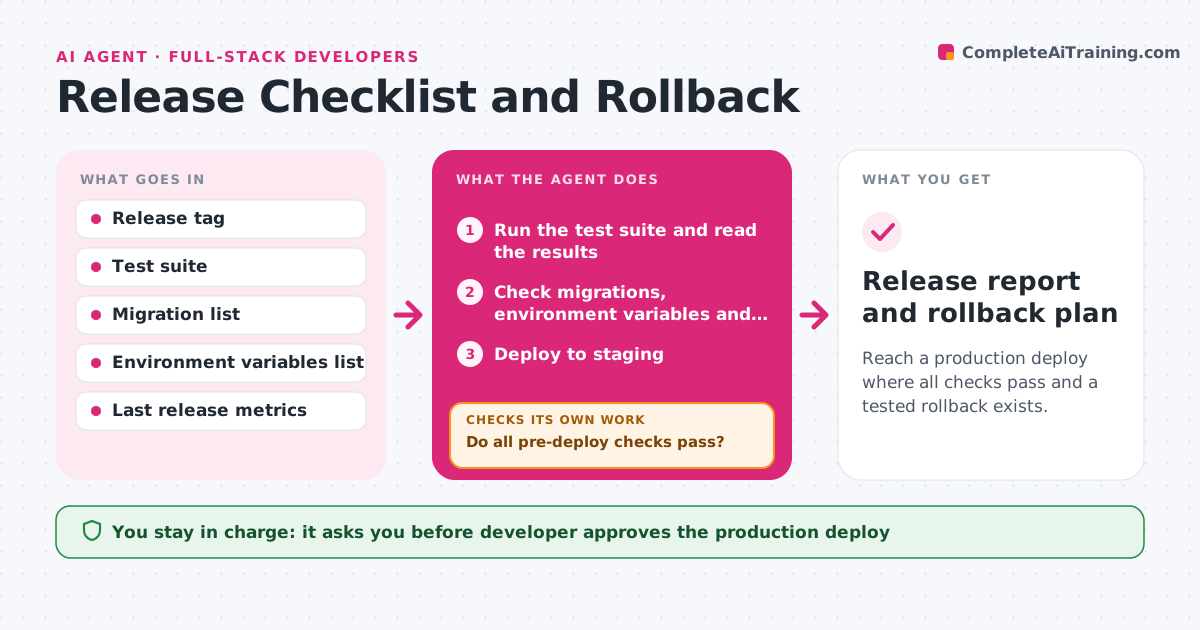
Reach a production deploy where all checks pass and a tested rollback exists.
What it does
A release goes out on Friday with a missing environment variable, and the team spends the evening undoing it. This agent runs your release checklist before every deploy. It confirms that tests pass, that database migrations are listed and safe, that environment variables exist in the target and that a fresh backup exists. It deploys to staging, runs smoke tests on the key paths and compares behavior and performance with the last release. If a test fails, it stops, reports the exact failure and does not move on. After the fix it starts the checklist again from the failed step. It prepares a rollback plan and tests that rollback steps work on staging. The developer approves the production deploy. Edge case: a migration drops a column, so the agent marks it as not reversible.
How it works
Follow the arrows from top to bottom. The orange dashed arrow is the loop: when a check fails, the agent goes back and tries again.
Read the steps as a list
- Release candidate tagged
- Run the test suite and read the results
- Check migrations, environment variables and backups
- Do all pre-deploy checks pass?If not: stop, report the exact failure and rerun from the failed check after a fix. Back to step 2.
- Deploy to staging
- Run smoke tests and compare with the last release
- Do the smoke tests and metrics match or beat the last release?If not: report the differences, wait for a fix, and redeploy to staging. Back to step 5.
- Write the rollback plan and test it on staging
- Developer approves the production deployThe agent waits here for your OK.
- Release report and rollback plan
How it decides
Any failed check blocks the release. A migration that cannot be reversed needs a separate backup and written approval.
- Block the release if any test fails or coverage drops below the current level
- Mark a migration as irreversible if it drops data and require a backup
- Block if the error rate on staging is higher than the last release by more than 10%
- Require the rollback to be tested, not just written
Make it yours
Every agent is a starting point. You choose these settings for your own situation.
- Checklist items for your project
- Test and smoke test commands
- Performance difference allowed (default 10%)
- Environments to deploy to first
- Who may approve a production deploy
What keeps you in control
It always asks you first
- Developer approves the production deploy
Hard limits
- Never deploy to production
- Never skip a failed check or lower a threshold
It stops when
- Done: all checks pass and the rollback is tested
- Stop: a failed check cannot be fixed in the release window
Set it up
We guide you through the set-up, step by step
Members get the full set-up guide for this agent. No technical skills needed: you copy, paste and upload.
- One set of instructions to paste into your AI, with the clicks for ChatGPT, Claude, Microsoft 365 Copilot, Gemini and Grok
- The agent then walks you through connecting your own data, one source at a time
- A downloadable copy with the flow chart, the rules and the full guide