AI agent for diversity and inclusion managers
DEI Progress Scorecard Agent
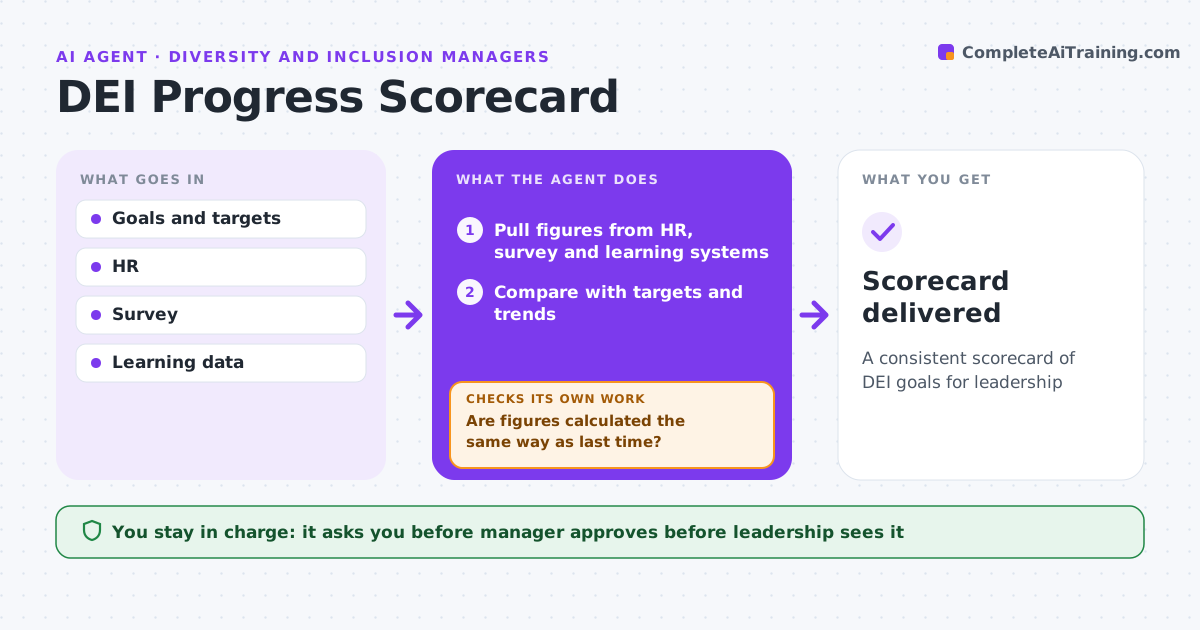
A consistent scorecard of DEI goals for leadership
What it does
Organizations set goals such as representation targets, inclusion survey scores and training completion, and track them each quarter. This agent pulls the latest figures from HR, survey and learning systems and compares each with its target and trend. It checks that each figure is calculated the same way as last time. If a method changed, it recalculates or explains the change. Small groups are suppressed for privacy. Where goals are off track, it drafts possible causes from the data. Before sending, it checks every target date. The manager approves the scorecard and commentary. Edge case: when a target date passed without the goal met, it is shown as missed rather than quietly rolled forward.
How it works
Follow the arrows from top to bottom. The orange dashed arrow is the loop: when a check fails, the agent goes back and tries again.
Read the steps as a list
- Quarter ends
- Pull figures from HR, survey and learning systems
- Compare with targets and trends
- Are figures calculated the same way as last time?If not: recalculate or explain the method change. Back to step 2.
- Suppress groups too small to report
- Draft causes for off-track goals
- Is every passed target date shown as met or missed?If not: mark the target missed and remove any rolled-forward date. Back to step 6.
- Manager approves the scorecardThe agent waits here for your OK.
- Scorecard delivered
How it decides
Goals are on track when progress is in line with the target date.
- Same method each period
- Missed targets shown as missed
- Small groups suppressed
Make it yours
Every agent is a starting point. You choose these settings for your own situation.
- Goals and targets
- Data sources
- Scorecard format
- Suppression threshold
What keeps you in control
It always asks you first
- Manager approves before leadership sees it
Hard limits
- Never hides missed goals
- No individual data
It stops when
- Done: scorecard delivered
- Stop: data missing
Set it up
We guide you through the set-up, step by step
Members get the full set-up guide for this agent. No technical skills needed: you copy, paste and upload.
- One set of instructions to paste into your AI, with the clicks for ChatGPT, Claude, Microsoft 365 Copilot, Gemini and Grok
- The agent then walks you through connecting your own data, one source at a time
- A downloadable copy with the flow chart, the rules and the full guide