AI agent for diversity and inclusion managers
Mentoring Match Agent
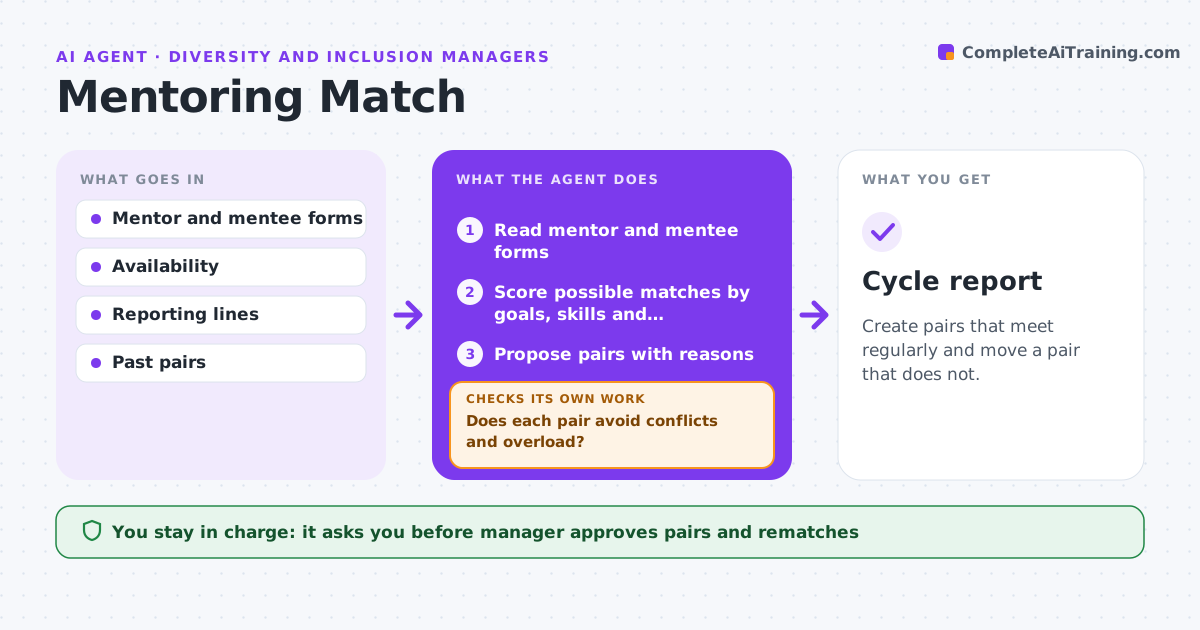
Create pairs that meet regularly and move a pair that does not.
What it does
Poor mentor matches lead to a few meetings and then silence. For each program cycle, this agent reads the mentor and mentee forms and matches by goals, skills, availability and preferences. It checks conflicts such as reporting lines or same team, and proposes pairs with reasons. The manager approves. It then tracks whether pairs meet and collects short progress notes. If a pair does not meet within the window, it flags the pair and proposes a new match. Edge case: a mentor has too many requests, so the agent spreads matches rather than overloading them.
How it works
Follow the arrows from top to bottom. The orange dashed arrow is the loop: when a check fails, the agent goes back and tries again.
Read the steps as a list
- Program cycle opens
- Read mentor and mentee forms
- Score possible matches by goals, skills and availability
- Does each pair avoid conflicts and overload?If not: rescore with the conflict removed and spread mentors. Back to step 3.
- Propose pairs with reasons
- Manager approves the pairsThe agent waits here for your OK.
- Notify the pairs and track meetings
- Did the pair meet within 30 days?If not: send a reminder, then flag the pair and propose a new match. Back to step 7.
- Collect progress notes
- Cycle report
How it decides
It scores matches by goals and skills, removes conflicts and balances mentor load.
- Avoid same reporting line
- Limit a mentor to 2 mentees
- Weigh stated goals above job title
- Flag a pair with no meeting in 30 days
Make it yours
Every agent is a starting point. You choose these settings for your own situation.
- Load limit (default 2)
- Meeting window (default 30 days)
- Match factors
- Cycle length
What keeps you in control
It always asks you first
- Manager approves pairs and rematches
Hard limits
- Never share forms outside the program
- Never force a match
It stops when
- Done: pairs meeting regularly
- Stop: cycle ends
Set it up
We guide you through the set-up, step by step
Members get the full set-up guide for this agent. No technical skills needed: you copy, paste and upload.
- One set of instructions to paste into your AI, with the clicks for ChatGPT, Claude, Microsoft 365 Copilot, Gemini and Grok
- The agent then walks you through connecting your own data, one source at a time
- A downloadable copy with the flow chart, the rules and the full guide