AI agent for sales development representatives
Demo Booking and Handoff Agent
Make booked demos happen with an AE who has full context
What it does
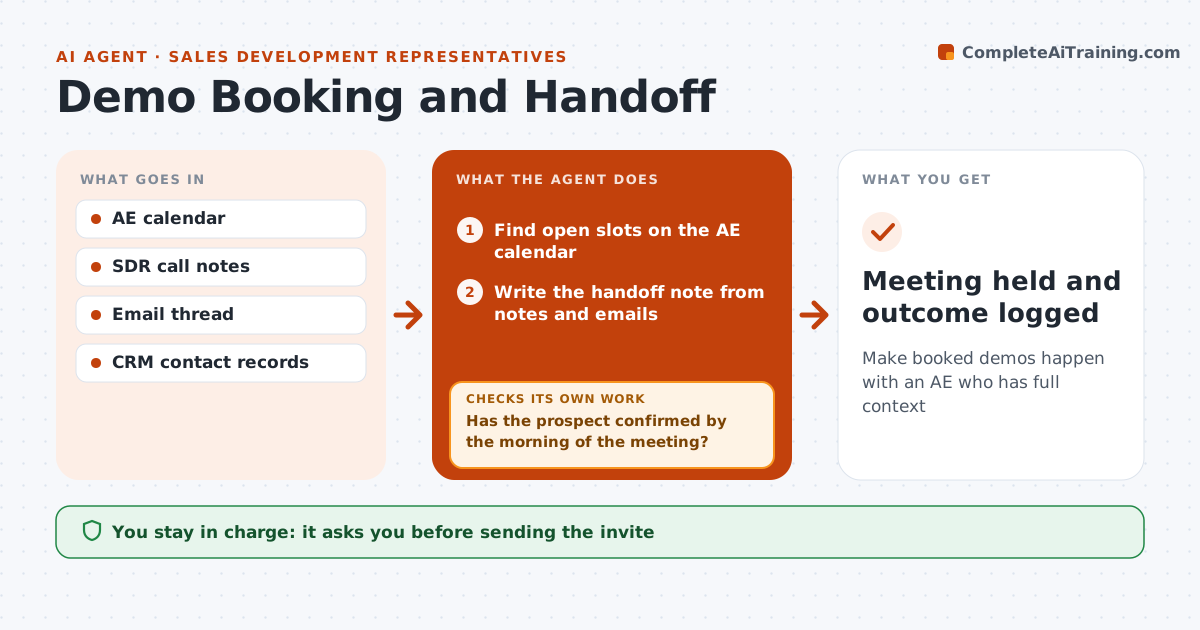
An SDR's work counts only when the meeting happens and the account executive is prepared. When a prospect agrees to meet, this agent finds open slots on the AE's calendar and drafts the invite for SDR approval. It writes a handoff note from call notes and emails: pain, current tools, people involved and why now. It sends a reminder the day before. If the prospect has not confirmed by 9 a.m. on the meeting day, it drafts a check-in; if still silent two hours before, it offers a new time. When new attendees appear, it looks them up and adds them to the note. After the meeting, it checks the AE logged an outcome within a day and reminds them if not. The SDR approves invites and messages. Edge case: added attendees are looked up and added to the handoff note.
How it works
Follow the arrows from top to bottom. The orange dashed arrow is the loop: when a check fails, the agent goes back and tries again.
Read the steps as a list
- Prospect agrees to meet
- Find open slots on the AE calendar
- SDR approves the inviteThe agent waits here for your OK.
- Write the handoff note from notes and emails
- Send a reminder the day before
- Has the prospect confirmed by the morning of the meeting?If not: draft a check-in and a reschedule option, then update the note with any changes. Back to step 4.
- Look up any new attendees and add them to the note
- Did the AE log an outcome within one day?If not: remind the AE and keep the item open. Back to step 7.
- Meeting held and outcome logged
How it decides
No confirmation by 9 a.m. on the meeting day triggers a check-in. No reply two hours before triggers a reschedule offer.
- Check-in when unconfirmed by 9 a.m.
- Offer a reschedule two hours before if still silent
- Look up any new attendees
Make it yours
Every agent is a starting point. You choose these settings for your own situation.
- Confirmation deadline time
- Reminder timing
- Handoff note fields
- AE assignment rules
What keeps you in control
It always asks you first
- Sending the invite
- Sending check-in or reschedule messages
Hard limits
- Never books on an AE calendar without approval
- Never shares internal notes with the prospect
It stops when
- Done: outcome logged
- Stop: prospect declines
Set it up
We guide you through the set-up, step by step
Members get the full set-up guide for this agent. No technical skills needed: you copy, paste and upload.
- One set of instructions to paste into your AI, with the clicks for ChatGPT, Claude, Microsoft 365 Copilot, Gemini and Grok
- The agent then walks you through connecting your own data, one source at a time
- A downloadable copy with the flow chart, the rules and the full guide