AI agent for sales development representatives
Sales Cadence Performance Tuning Agent
Cadences improve step by step because changes are tested against the current version
What it does
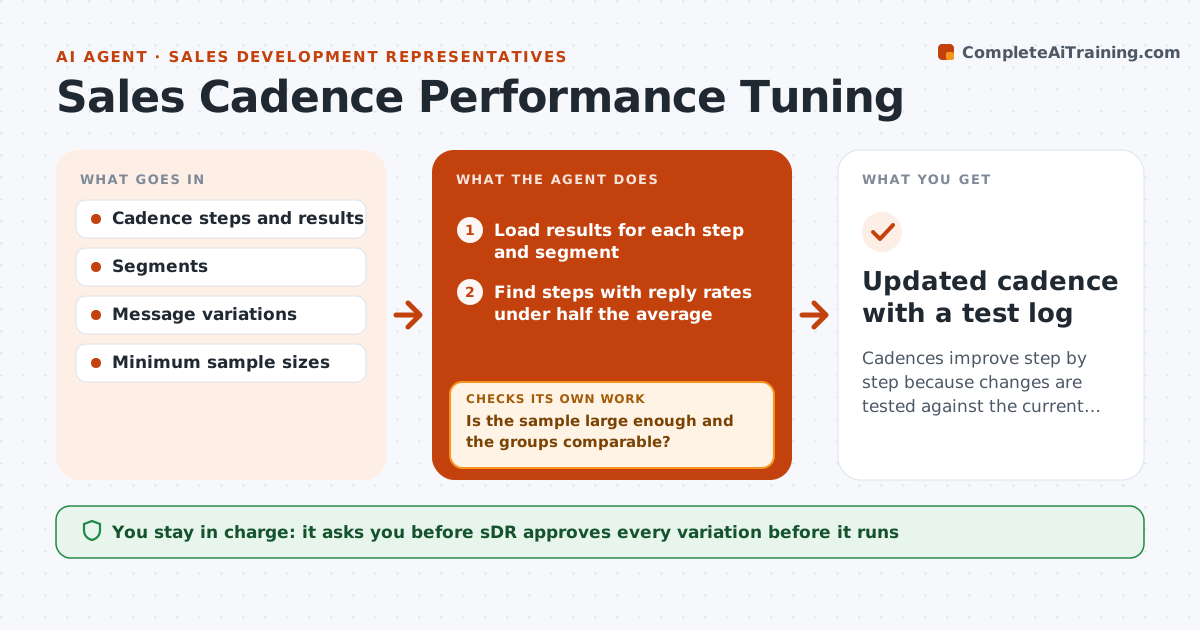
Cadences are often set once and then run for months, even when one step brings no replies. This agent reads step-by-step results for each cadence: sends, opens, replies and meetings by step and by segment. It finds weak steps and proposes variations in timing, subject line, message or channel. Once the SDR approves a change, it runs the variation against the original for a set number of sends, then checks whether the sample is big enough and whether the result is better. It keeps the winner and starts the next test. Edge case: a variation looks better but only because it went to a stronger segment, so the agent checks the groups are equal.
How it works
Follow the arrows from top to bottom. The orange dashed arrow is the loop: when a check fails, the agent goes back and tries again.
Read the steps as a list
- Weekly cadence review
- Load results for each step and segment
- Find steps with reply rates under half the average
- Propose a variation for each weak step
- SDR approves the variationThe agent waits here for your OK.
- Split new sends between the original and the variation
- Is the sample large enough and the groups comparable?If not: keep running the test until the sample size is reached. Back to step 6.
- Compare results and pick the better version
- Is the improvement clear and not caused by the segment mix?If not: rerun with matched groups. Back to step 6.
- Updated cadence with a test log
How it decides
A step is weak when its reply rate is under half the cadence average. A variation wins only with a large enough sample and a clear improvement.
- Call a step weak at under half the average reply rate
- Require at least 100 sends per version
- Check that both groups have similar segments
- Change one thing at a time
Make it yours
Every agent is a starting point. You choose these settings for your own situation.
- Sample size (default 100 per version)
- Weak step threshold
- What to vary
- Review day
What keeps you in control
It always asks you first
- SDR approves every variation before it runs
Hard limits
- Never run a change without approval
- Do not send to opted-out contacts
- Log each test
It stops when
- Done: a winner is kept and recorded
- Stop: results stay unclear after the maximum sends
Set it up
We guide you through the set-up, step by step
Members get the full set-up guide for this agent. No technical skills needed: you copy, paste and upload.
- One set of instructions to paste into your AI, with the clicks for ChatGPT, Claude, Microsoft 365 Copilot, Gemini and Grok
- The agent then walks you through connecting your own data, one source at a time
- A downloadable copy with the flow chart, the rules and the full guide