AI agent for dentists
Dental Lab Case Tracking Agent
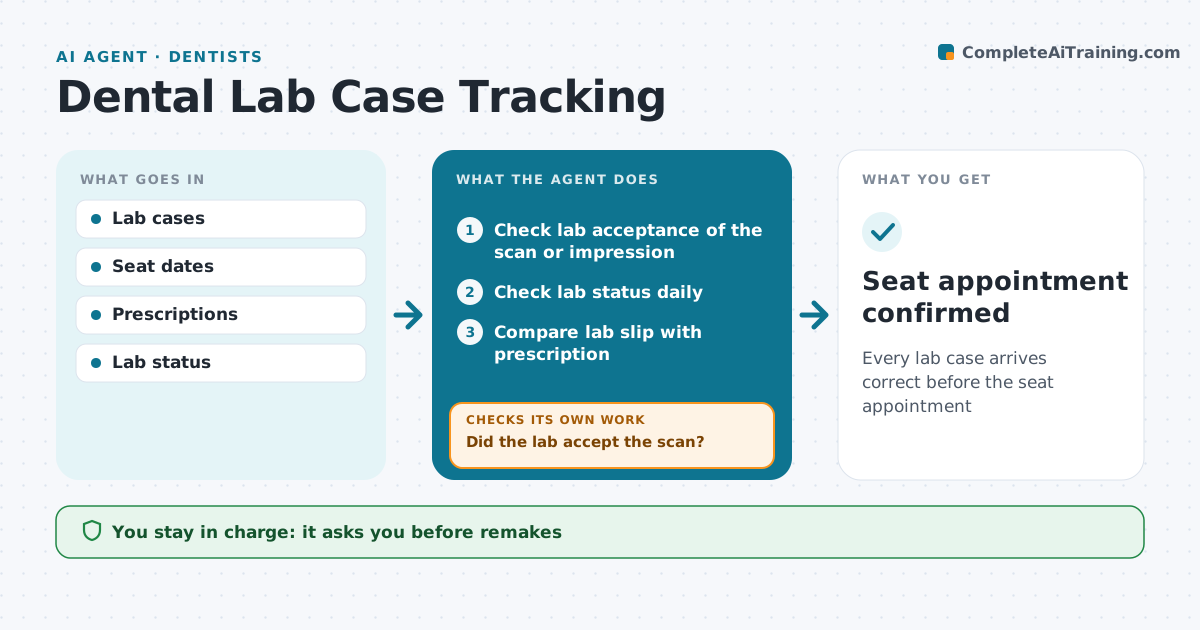
Every lab case arrives correct before the seat appointment
What it does
Crowns, bridges and dentures go to a lab and must return before the seat appointment, or the patient's visit is wasted. This agent tracks each case from impression or scan to delivery. It checks for a scan rejection first; if the lab rejected the scan for margins, the patient is rebooked for a new scan. It checks lab status daily against the seat date, and flags any case that will not arrive at least 2 days before seating, so staff can reschedule early. When the case arrives, it compares the lab slip with the prescription for shade, material and tooth number. Mismatches are held and a remake request is drafted. The dentist confirms the case is ready before the patient is called. Edge case: a scan rejected for unclear margins rebooks the patient instead of waiting on the lab.
How it works
Follow the arrows from top to bottom. The orange dashed arrow is the loop: when a check fails, the agent goes back and tries again.
Read the steps as a list
- Case sent to lab
- Check lab acceptance of the scan or impression
- Did the lab accept the scan?If not: rebook the patient for a new scan. Back to step 2.
- Check lab status daily
- Will it arrive 2 days before the seat date?If not: alert staff to reschedule the patient. Back to step 4.
- Compare lab slip with prescription
- Does it match?If not: hold case and draft remake. Back to step 6.
- Dentist confirms case is readyThe agent waits here for your OK.
- Seat appointment confirmed
How it decides
Expected return is compared with the seat date. Arrived cases must match the prescription.
- Cases must arrive 2 days before seating
- Shade or material mismatch is a remake
- Scan rejections rebook the patient
Make it yours
Every agent is a starting point. You choose these settings for your own situation.
- Buffer days
- Labs
- Check frequency
- Message templates
What keeps you in control
It always asks you first
- Remakes
- Rescheduling patients
Hard limits
- No patient contact without staff
- No clinical changes
It stops when
- Done: seated
- Stop: case cancelled
Set it up
We guide you through the set-up, step by step
Members get the full set-up guide for this agent. No technical skills needed: you copy, paste and upload.
- One set of instructions to paste into your AI, with the clicks for ChatGPT, Claude, Microsoft 365 Copilot, Gemini and Grok
- The agent then walks you through connecting your own data, one source at a time
- A downloadable copy with the flow chart, the rules and the full guide