AI agent for game designers
Design Document Change Sync Agent
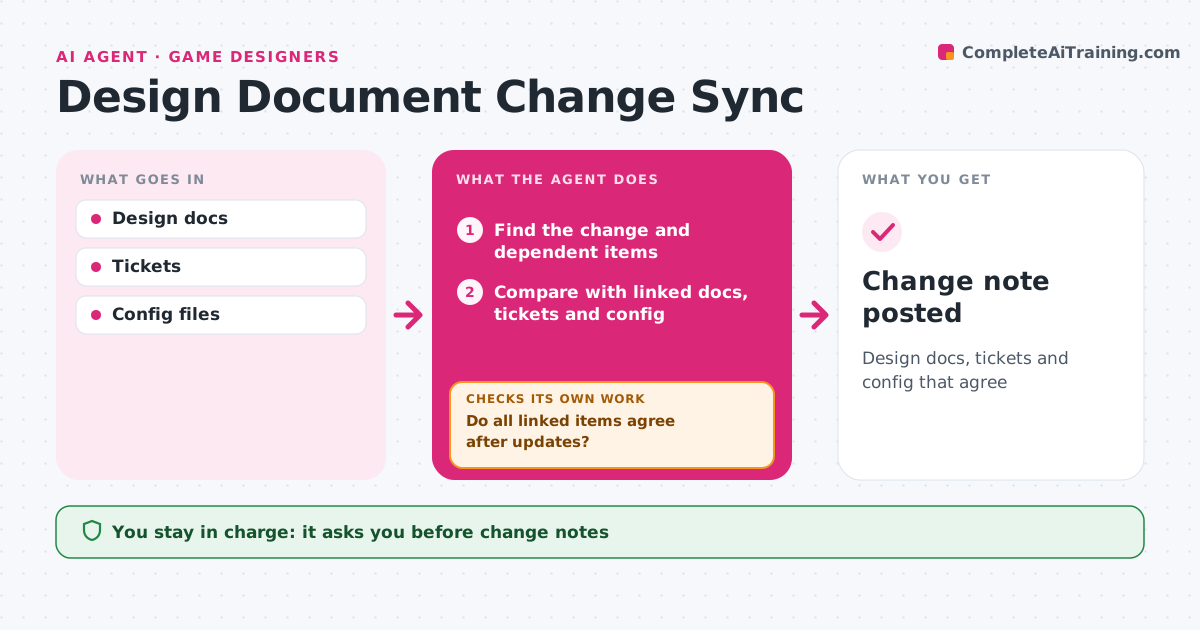
Design docs, tickets and config that agree
What it does
Game design docs change daily, and docs, balance sheets and tickets drift apart unnoticed. When a design doc is edited, this agent finds exactly what changed and which other docs, tickets and config values depend on it. It compares them and lists conflicts, such as a weapon's damage in the combat doc not matching the balance sheet, or a feature described in a doc but cut in tickets. It drafts updates for linked docs and comments for tickets. After the designer applies changes, it rechecks every linked item and lists anything that still disagrees. It also checks whether the change touches work already in production. Once everything agrees, it drafts a change note for art and code leads. The designer approves the note before it is posted. Edge case: a change to a feature already in production is flagged as needing a formal change request.
How it works
Follow the arrows from top to bottom. The orange dashed arrow is the loop: when a check fails, the agent goes back and tries again.
Read the steps as a list
- Design doc edited
- Find the change and dependent items
- Compare with linked docs, tickets and config
- Draft updates and ticket comments for conflicts
- Do all linked items agree after updates?If not: list remaining conflicts for the designer. Back to step 3.
- Does the change touch work already in production?If not: flag it as needing a change request. Back to step 4.
- Draft the change note for art and code leads
- Designer approves the change noteThe agent waits here for your OK.
- Change note posted
How it decides
It traces dependencies and flags any linked item that no longer matches the change.
- Items in production need a change request
- Config is the source of truth for numbers unless the designer says otherwise
- Cut features are marked in docs
Make it yours
Every agent is a starting point. You choose these settings for your own situation.
- Linked sources
- Who gets change notes
- Conflict rules
- Doc tool
What keeps you in control
It always asks you first
- Change notes
- Ticket updates
Hard limits
- Never edits config
- Never closes tickets
It stops when
- Done: all items agree
- Stop: doc locked for milestone review
Set it up
We guide you through the set-up, step by step
Members get the full set-up guide for this agent. No technical skills needed: you copy, paste and upload.
- One set of instructions to paste into your AI, with the clicks for ChatGPT, Claude, Microsoft 365 Copilot, Gemini and Grok
- The agent then walks you through connecting your own data, one source at a time
- A downloadable copy with the flow chart, the rules and the full guide